Handwerk & Bau6 Min Lesezeit

Flat Roof Maintenance Log – Template for Roofers & Facility Managers

Flat roofs are permanently exposed to harsh weather conditions. With our digital template for flat roof maintenance logs, roofers, facility managers, and building operators can document the condition of sealings, drainage systems, and connections quickly and structured on-site.

Vorschau der Vorlage „Flat Roof Maintenance Log – Template for Roofers & Facility Managers"
Create free account
Inhalt der Vorlage

What is included in the template?

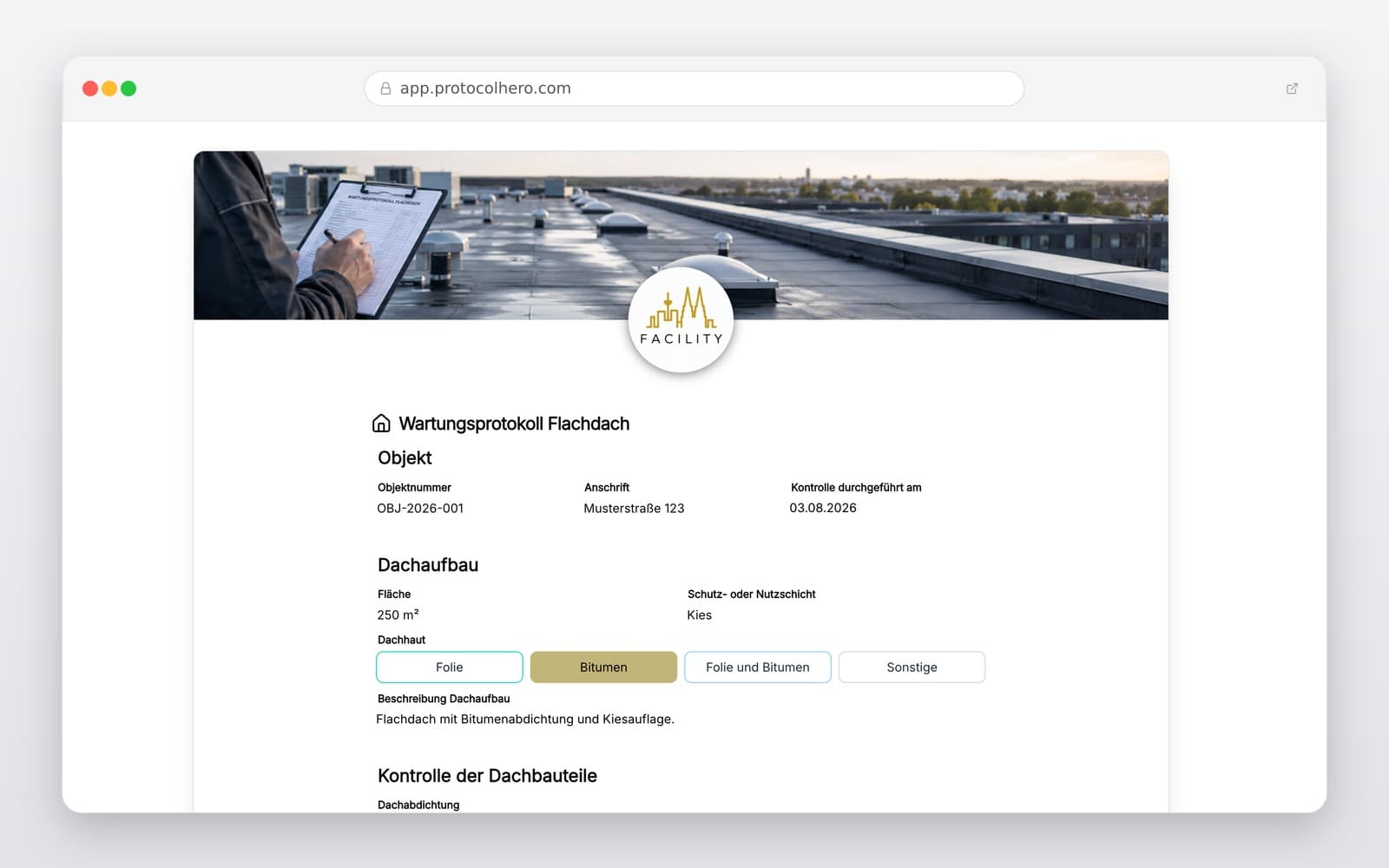
Customer, object, roof area, and date of maintenance

Roof type and general condition details

Inspection of the roof sealing for visible damage or abnormalities

Check of connections, terminations, and penetrations (e.g., attics, vents)

Control of roof drains, gutters, and drainage systems

Documentation of dirt, vegetation, and standing water

Recording of identified defects including precise photo documentation

Performed immediate measures, recommendations, and sign-off

Live form

Fill out this template directly in the browser

No install needed — complete the form below, attach photos, and submit. Create a free account anytime to save and reuse your own templates.

Document Flat Roof Maintenance Digitally

Try ProtocolHero for free and generate professional maintenance protocols directly on your mobile device.

What belongs in a professional flat roof maintenance log?

Maintaining a flat roof involves much more than just looking at the open roof surface. Complete documentation must cover all critical areas. This includes the roof membrane, the parapet/attic areas, and all connections and penetrations for technical equipment or vents. Drainage facilities such as roof outlets and gutters must also be inspected.

Additionally, dirt, plant growth, debris, mechanical damage, or noticeable accumulations of water (ponding) should be documented in detail. German standards like DIN 18531-4:2025-08 regulate the maintenance of waterproofing on used and unused roofs, emphasizing the necessity of regular checks.

A good maintenance log clearly shows which roof was inspected and when, what anomalies were found, and which measures were taken immediately or recommended for the future. The template supports roofing companies and building managers in documenting these checks in a structured and traceable manner.
Critical Areas and Typical Mistakes in Roof Maintenance

Damage to flat roofs rarely starts in the middle of an open surface. Usually, details, transitions, and connections are the first to fail. Industry guides (such as BauNetz Wissen) point out that a failure of the roof waterproofing can cause severe damage to the roof structure, supporting construction, and the entire building. Clogged roof drains deserve special attention, as standing water increases mechanical loads.

A typical mistake in practice is failing to inspect connections and penetrations individually or ignoring dirt and vegetation. Unclear photo documentation is another issue: a photo of a crack is of little use if its exact location on the roof is not noted. Furthermore, maintenance intervals should not be generalized. The age of the sealing, roof slope, construction, and exposure determine how often inspections are necessary.

Practical Workflow: Digital Flat Roof Maintenance

Imagine a roofing company maintaining a commercial building. The technician opens the ProtocolHero app on their tablet, enters the building data, and inspects the roof. While checking the drains, they find accumulated leaves and remove them immediately. At a pipe penetration, they notice a porous spot in the sealing. They take a photo, mark the location, and add a recommendation for a prompt repair.

This example highlights the difference between inspection, maintenance, and repair: an inspection assesses the actual state. Maintenance includes small, value-preserving measures (like cleaning a drain). If a major defect is detected, a separate repair is required, going beyond standard maintenance. Current standards like DIN 18531-4 provide professional guidance here.

Documenting flat roof maintenance directly on-site

With ProtocolHero, there is no need to manually compile handwritten notes, sketches, and smartphone photos back in the office. Roofers and facility managers record all data directly on the roof. Photos are immediately linked to the corresponding checklist item and supplemented with descriptions.

Especially for large commercial properties with multiple roof areas, you always maintain a clear overview. Once the inspection is complete, the log is signed digitally and is instantly available as a professional PDF for clients or building owners. This saves time, reduces errors, and ensures a highly professional appearance.

Häufige Fragen

Fragen zur Vorlage „Flat Roof Maintenance Log"

Mehr als eine Vorlage

Was ProtocolHero zusätzlich für dich übernimmt

Eine Vorlage allein ist erst der Anfang – ProtocolHero macht aus jedem Protokoll einen durchgängigen digitalen Workflow mit KI-Unterstützung, Workflow-Freigaben und revisionssicherem Archiv.

HERO Assistant – KI-Chat für Dokumentenerstellung

Der HERO Assistant ist der eingebaute KI-Chat von ProtocolHero. Du kannst per Spracheingabe ein komplettes Dokument anlegen lassen oder ein bestehendes PDF, Foto oder Word-Dokument hochladen – die KI liest die Struktur aus und baut eine wiederverwendbare Vorlage daraus.

Auto-Fill aus Sprache, Foto und Datei

Beim Ausfüllen kannst du das Dokument per Sprachsteuerung diktieren – die KI ordnet die Inhalte automatisch den richtigen Feldern zu. Oder du lädst Fotos, Scans, Verträge, Datenblätter oder Ausweise hoch: Der HERO Assistant extrahiert die Daten und befüllt das Formular vor – du prüfst und unterschreibst.

Foto- und Video-Upload direkt im Dokument

Zu jedem Bauteil, Messpunkt oder Schadensbild kannst du Fotos und Videos direkt aus der App anhängen. Videos sind besonders nützlich, wenn ein Schadensbild dynamisch ist – ein einzelnes Standbild würde den Befund nicht ausreichend dokumentieren.

Kommentare als Aufgaben – intern und mit dem Kunden

Jede Position im Dokument kann kommentiert und als Aufgabe an einen Kollegen, an dich selbst oder direkt an den Kunden zugewiesen werden. Kommentare können wahlweise rein intern bleiben oder im freigegebenen Kundenlink mitgeteilt werden.

Workflow: Bearbeiter zuweisen, Prüfer freigeben

Dokumente lassen sich an Kollegen weiterleiten und können einen festen Prüfer haben, der die letzte fachliche Freigabe erteilt, bevor das Dokument unterschrieben oder an den Kunden geht.

Activity-Log für lückenlose Nachvollziehbarkeit

Jedes Dokument hat einen vollständigen Aktivitäts-Verlauf: Wer hat wann was geändert, kommentiert, hochgeladen, freigegeben, unterschrieben. Das Log ist auf Wunsch auch im Kunden-Freigabelink sichtbar – ideal für Auditoren, Versicherer und Kunden.

Eindeutige Protocol-ID je Dokument

Jedes Dokument bekommt automatisch eine eindeutige Protocol-ID, mit der es sich zweifelsfrei referenzieren, verlinken und im Audit-Trail wiederfinden lässt.

Automatische Berichts-Nummerierung

Neu

Fortlaufende, lückenlose Berichts-Nummern (z. B. Protokoll-2026-001, 002, 003 …) je Dokumenttyp und Kunde – ohne manuelles Vergeben, ohne Dubletten.

Web-Formular & Inbox

Neu

Vorlagen lassen sich als öffentliches Web-Formular auf der eigenen Website einbinden – ein ausgefülltes Dokument landet automatisch in deiner ProtocolHero-Inbox zur Weiterbearbeitung.

QR-Code-Etiketten für Anlagen und Bauteile

Neu

QR-Code-Etiketten pro Anlage, Bauteil oder Abschottung, die beim Scannen direkt das hinterlegte Protokoll, die Historie und alle Wartungs- bzw. Prüfdokumente öffnen.

0 × genutzt

Diese Vorlage in 2 Minuten selbst nutzen

Vorlage übernehmen, an deinen Betrieb anpassen und direkt vor Ort ausfüllen – kostenlos testen, keine Kreditkarte nötig.