Hygienemanagement & HACCP6 Min Lesezeit

HACCP Incoming Goods Checklist – Template for Food Receipt Control

With the digital HACCP checklist for incoming goods, you can document food deliveries quickly and seamlessly directly on your smartphone or tablet. Protect your business from quality defects and simplify daily food receipt controls for your team. Save valuable time and eliminate cluttered paper logs.

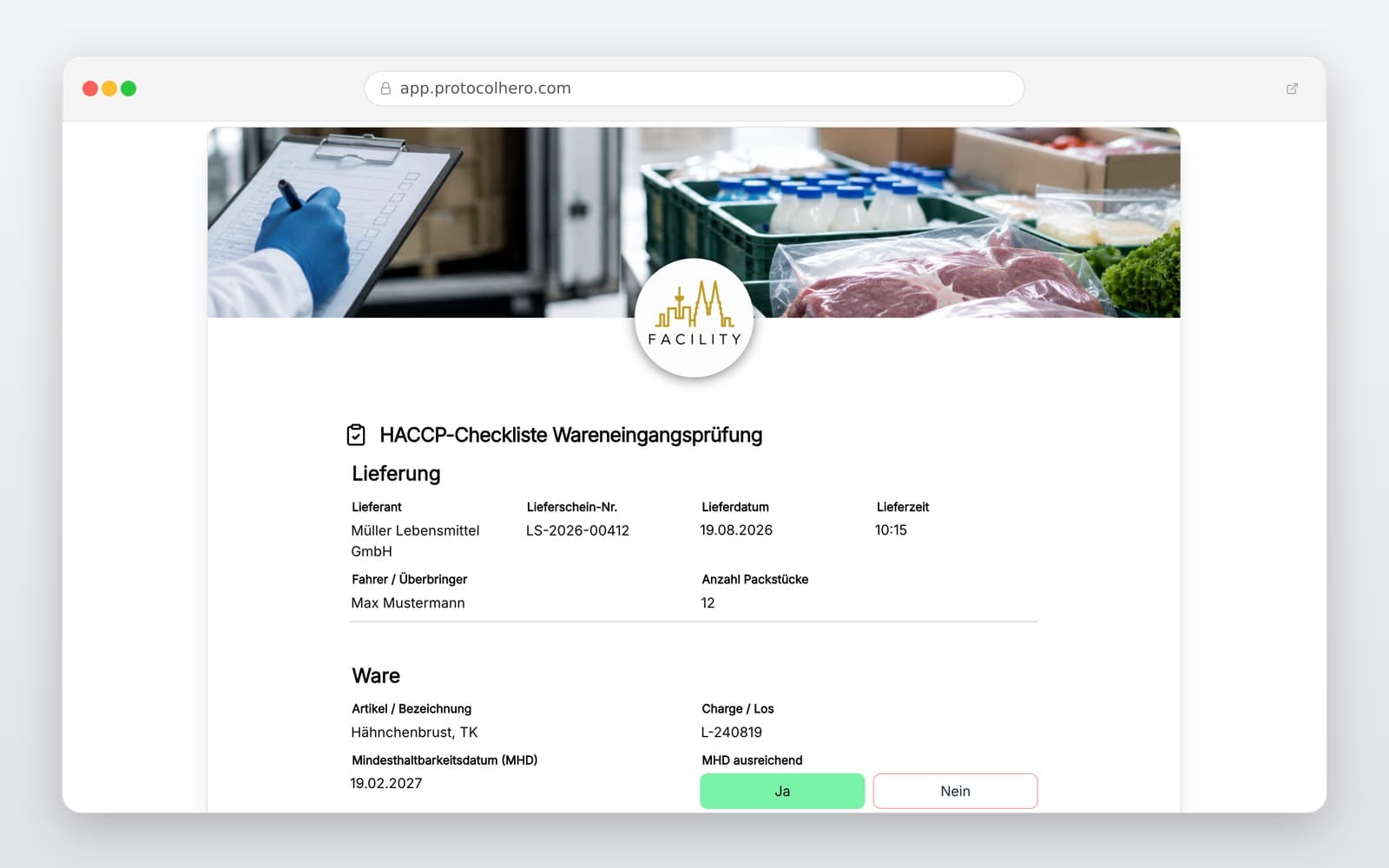
app.protocolhero.com/share/haccp-checkliste-wareneingangsprufung/01a019b1-eb22-73cc-b705-78a746d93db3
Vorschau der Vorlage „HACCP Incoming Goods Checklist – Template for Food Receipt Control"
Create free account
Inhalt der Vorlage

What is included in the template?

Supplier, delivery date, and exact time of incoming goods

Recording of the delivered food products or product groups

Control and documentation of relevant temperatures (chilled/frozen goods)

Inspection of packaging, cleanliness, and visible damage

Checking of labeling, best before, or expiration dates

Evaluation of the overall condition and integrity of the goods

Documentation of deviations, complaints, and corrective actions taken

Photo documentation of defects and digital sign-off by the responsible person

Live form

Fill out this template directly in the browser

No install needed — complete the form below, attach photos, and submit. Create a free account anytime to save and reuse your own templates.

Try the Digital HACCP Checklist Now

Use our template for incoming goods inspections and test ProtocolHero for free today.

What belongs in a HACCP incoming goods control?

Seamless quality assurance starts the moment raw materials and food products are delivered. Within your operational HACCP concept, the incoming goods inspection serves as the first critical barrier to detect and reject faulty or unhygienic products early on. Standard information includes recording the supplier, the delivery time, and the exact product description.

Checking the cold chain is particularly sensitive. Depending on the type of food—whether unrefrigerated, chilled, or deep-frozen—the required temperature limits must be maintained and documented. Since exact temperature requirements depend heavily on the respective product group and regulatory guidelines, a flexible checklist provides the ideal basis for mapping your operation's specific requirements.

  • Clear assignment of supplier and delivery date
  • Recording of specific product groups
  • Temperature measurement for chilled and frozen goods
  • Visual inspection of the cleanliness and integrity of the delivery vehicle
What should be inspected during food receipt?

Receiving goods is about much more than just matching the delivered quantity with the delivery note. Staff should be trained to visually and sensorially inspect the goods for anomalies. This includes checking for damaged, bloated, or dirty packaging, as well as signs of pest infestation or freezer burn.

Checking the best-before date or expiration date is equally critical. If defects or deviations from quality standards are detected during this process, the corrective measures taken—such as rejecting the goods, consulting with the supplier, or separate labeling for quick return—must be documented immediately and traceably.

  • Condition of the packaging (e.g., loss of vacuum, physical damage)
  • Plausibility check of best-before and expiration dates
  • Random sensory evaluation of smell, color, and appearance
  • Documentation of initiated corrective measures in case of limit violations

Typical mistakes in HACCP incoming goods inspections

In the hectic daily routine of kitchens and food businesses, mistakes can easily happen. Temperatures are often documented irregularly or inaccurately. Overlooking damaged packaging or accepting deliveries without recording the expiration date also occurs. Another common issue is that complaints are often only communicated verbally to the supplier without any written or photographic documentation.

Furthermore, paper lists filled out retrospectively carry the risk of important data being forgotten, illegibly written, or simply estimated. In the event of an audit, this makes it significantly harder to prove seamless self-monitoring to food safety inspectors.

  • Incomplete or retrospective documentation of measured values
  • Accepting defects without supporting photos or written notes
  • Lack of assignment of deliveries to specific batches or suppliers
  • Purely verbal agreements on complaints without written proof

Advantages of a digital HACCP checklist over paper

A digital checklist optimizes the entire receiving process directly in your daily operations: as soon as the delivery arrives, the employee opens the template on a smartphone or tablet. Step by step, they are guided through the inspection. The temperature is measured and entered directly. If the employee detects damaged packaging, they can immediately take a photo with the device's camera and attach it directly to the protocol.

Once the inspection is complete, the report is saved digitally and archived immediately in the system. No more collecting, filing, or tediously transferring paper slips. During official food safety inspections, you have all proofs ready at hand with just a few clicks. Additionally, related tasks such as general cleaning documentation or cold room controls can be managed seamlessly in one central system.

Häufige Fragen

Fragen zur Vorlage „HACCP Incoming Goods Checklist"

Mehr als eine Vorlage

Was ProtocolHero zusätzlich für dich übernimmt

Eine Vorlage allein ist erst der Anfang – ProtocolHero macht aus jedem Protokoll einen durchgängigen digitalen Workflow mit KI-Unterstützung, Workflow-Freigaben und revisionssicherem Archiv.

HERO Assistant – KI-Chat für Dokumentenerstellung

Der HERO Assistant ist der eingebaute KI-Chat von ProtocolHero. Du kannst per Spracheingabe ein komplettes Dokument anlegen lassen oder ein bestehendes PDF, Foto oder Word-Dokument hochladen – die KI liest die Struktur aus und baut eine wiederverwendbare Vorlage daraus.

Auto-Fill aus Sprache, Foto und Datei

Beim Ausfüllen kannst du das Dokument per Sprachsteuerung diktieren – die KI ordnet die Inhalte automatisch den richtigen Feldern zu. Oder du lädst Fotos, Scans, Verträge, Datenblätter oder Ausweise hoch: Der HERO Assistant extrahiert die Daten und befüllt das Formular vor – du prüfst und unterschreibst.

Foto- und Video-Upload direkt im Dokument

Zu jedem Bauteil, Messpunkt oder Schadensbild kannst du Fotos und Videos direkt aus der App anhängen. Videos sind besonders nützlich, wenn ein Schadensbild dynamisch ist – ein einzelnes Standbild würde den Befund nicht ausreichend dokumentieren.

Kommentare als Aufgaben – intern und mit dem Kunden

Jede Position im Dokument kann kommentiert und als Aufgabe an einen Kollegen, an dich selbst oder direkt an den Kunden zugewiesen werden. Kommentare können wahlweise rein intern bleiben oder im freigegebenen Kundenlink mitgeteilt werden.

Workflow: Bearbeiter zuweisen, Prüfer freigeben

Dokumente lassen sich an Kollegen weiterleiten und können einen festen Prüfer haben, der die letzte fachliche Freigabe erteilt, bevor das Dokument unterschrieben oder an den Kunden geht.

Activity-Log für lückenlose Nachvollziehbarkeit

Jedes Dokument hat einen vollständigen Aktivitäts-Verlauf: Wer hat wann was geändert, kommentiert, hochgeladen, freigegeben, unterschrieben. Das Log ist auf Wunsch auch im Kunden-Freigabelink sichtbar – ideal für Auditoren, Versicherer und Kunden.

Eindeutige Protocol-ID je Dokument

Jedes Dokument bekommt automatisch eine eindeutige Protocol-ID, mit der es sich zweifelsfrei referenzieren, verlinken und im Audit-Trail wiederfinden lässt.

Automatische Berichts-Nummerierung

Neu

Fortlaufende, lückenlose Berichts-Nummern (z. B. Protokoll-2026-001, 002, 003 …) je Dokumenttyp und Kunde – ohne manuelles Vergeben, ohne Dubletten.

Web-Formular & Inbox

Neu

Vorlagen lassen sich als öffentliches Web-Formular auf der eigenen Website einbinden – ein ausgefülltes Dokument landet automatisch in deiner ProtocolHero-Inbox zur Weiterbearbeitung.

QR-Code-Etiketten für Anlagen und Bauteile

Neu

QR-Code-Etiketten pro Anlage, Bauteil oder Abschottung, die beim Scannen direkt das hinterlegte Protokoll, die Historie und alle Wartungs- bzw. Prüfdokumente öffnen.

551 × genutzt

Diese Vorlage in 2 Minuten selbst nutzen

Vorlage übernehmen, an deinen Betrieb anpassen und direkt vor Ort ausfüllen – kostenlos testen, keine Kreditkarte nötig.