Gebäudereinigung & Facility Management6 Min Lesezeit

Commercial Cleaning Quality Check Template – Digital Inspection Report

Ensure consistent and transparent cleaning quality across all client properties. With our digital commercial cleaning quality check template, facility managers and supervisors can document defects, ratings, and photos directly on-site using their smartphones. Eliminate paperwork and optimize your quality control instantly.

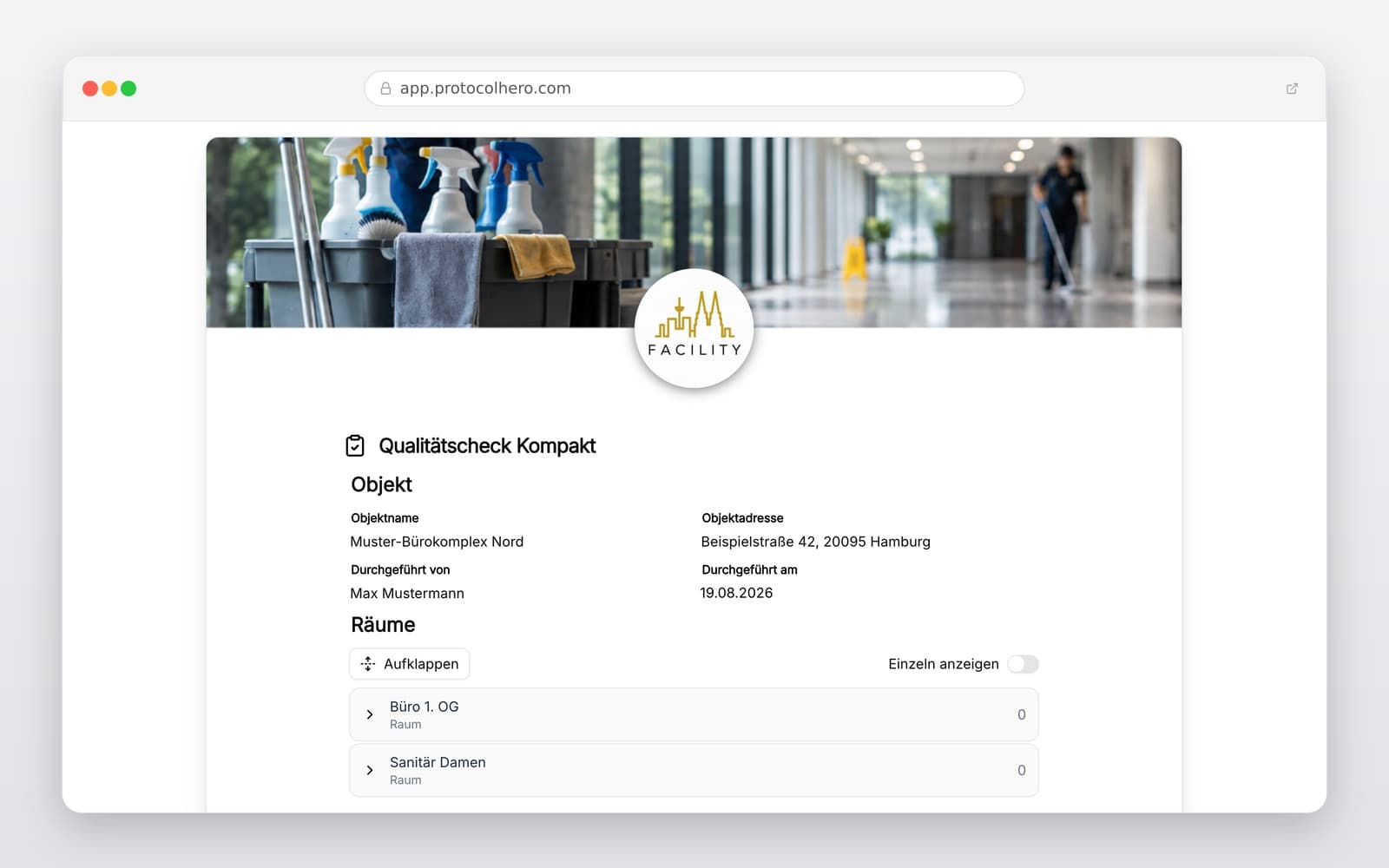
app.protocolhero.com/share/qualitatscheck-kompakt/01a019d3-0416-729e-926f-b0181cab5104
Vorschau der Vorlage „Commercial Cleaning Quality Check Template – Digital Inspection Report"
Create free account
Inhalt der Vorlage

What is included in the quality check template?

Capture of property, client, and inspection metadata

Structured evaluation of individual rooms and areas

Checkpoints for floors, surfaces, and sanitary installations

Standardized rating system on a scale from 0 to 5

Direct photo documentation of defects and anomalies

Tracking of required recleanings and follow-up checks

Completion with digital signature of the inspector

Live form

Fill out this template directly in the browser

No install needed — complete the form below, attach photos, and submit. Create a free account anytime to save and reuse your own templates.

Test the Digital Cleaning Quality Check for Free

Create your first inspection report directly on your smartphone and impress your clients with seamless documentation.

What Belongs in a Professional Cleaning Quality Control?

A reliable quality check in commercial cleaning goes far beyond a generic overall rating. To obtain a clear picture, different rooms and functional areas must be inspected individually. This is the only way to identify and resolve weak spots effectively.

A comprehensive cleaning log should include metadata such as property name, inspector, and date, alongside specific checkpoints for floors, surfaces, and sanitary areas. Every rating must be based on clear criteria to prevent misunderstandings between supervisors, cleaning staff, and clients. Related tasks like property walkthroughs and general defect documentation can be standardized in the same way.
Evaluating Cleaning Quality with a Structured System

A standardized rating system is key to comparable results. In our compact template, you use a scale from 0 to 5. A medium rating represents a solid, generally clean result with slight room for improvement, while high ratings indicate flawless execution.

It is crucial that all supervisors apply this scale consistently. If deviations are found, they should be backed up not just by a number, but also by concrete comments and photos. Note: This documentation serves as a structured record of the current state. It is not automatic proof of contract compliance, as the required services depend heavily on the specific property and service level agreements.

Avoiding Typical Mistakes in Cleaning Quality Checks

In practice, quality controls often fail due to imprecise documentation. Common mistakes include vague overall ratings like 'everything okay' without room-specific details, missing photo evidence for complaints, or purely verbal instructions to the cleaning staff.

Without written proof of work and structured follow-ups, it remains unclear whether a defect was actually resolved. Our digital inspection report helps you close these gaps systematically, ensuring professional accountability to your clients.

The Benefits of Digital Logs Over Paper

Switching from clipboards and Excel sheets to a digital solution saves valuable time every day. The supervisor simply opens the template on their smartphone, selects the property, and completes the checklist room by room. Defects are photographed instantly and saved directly inside the report.

Once completed, the protocol is automatically generated as a PDF. No more tedious manual transcription, scanning, or filing in the office. All data is instantly archived and ready for the next follow-up check or as proof of service for the client.

Häufige Fragen

Fragen zur Vorlage „Commercial Cleaning Quality Check Template"

Mehr als eine Vorlage

Was ProtocolHero zusätzlich für dich übernimmt

Eine Vorlage allein ist erst der Anfang – ProtocolHero macht aus jedem Protokoll einen durchgängigen digitalen Workflow mit KI-Unterstützung, Workflow-Freigaben und revisionssicherem Archiv.

HERO Assistant – KI-Chat für Dokumentenerstellung

Der HERO Assistant ist der eingebaute KI-Chat von ProtocolHero. Du kannst per Spracheingabe ein komplettes Dokument anlegen lassen oder ein bestehendes PDF, Foto oder Word-Dokument hochladen – die KI liest die Struktur aus und baut eine wiederverwendbare Vorlage daraus.

Auto-Fill aus Sprache, Foto und Datei

Beim Ausfüllen kannst du das Dokument per Sprachsteuerung diktieren – die KI ordnet die Inhalte automatisch den richtigen Feldern zu. Oder du lädst Fotos, Scans, Verträge, Datenblätter oder Ausweise hoch: Der HERO Assistant extrahiert die Daten und befüllt das Formular vor – du prüfst und unterschreibst.

Foto- und Video-Upload direkt im Dokument

Zu jedem Bauteil, Messpunkt oder Schadensbild kannst du Fotos und Videos direkt aus der App anhängen. Videos sind besonders nützlich, wenn ein Schadensbild dynamisch ist – ein einzelnes Standbild würde den Befund nicht ausreichend dokumentieren.

Kommentare als Aufgaben – intern und mit dem Kunden

Jede Position im Dokument kann kommentiert und als Aufgabe an einen Kollegen, an dich selbst oder direkt an den Kunden zugewiesen werden. Kommentare können wahlweise rein intern bleiben oder im freigegebenen Kundenlink mitgeteilt werden.

Workflow: Bearbeiter zuweisen, Prüfer freigeben

Dokumente lassen sich an Kollegen weiterleiten und können einen festen Prüfer haben, der die letzte fachliche Freigabe erteilt, bevor das Dokument unterschrieben oder an den Kunden geht.

Activity-Log für lückenlose Nachvollziehbarkeit

Jedes Dokument hat einen vollständigen Aktivitäts-Verlauf: Wer hat wann was geändert, kommentiert, hochgeladen, freigegeben, unterschrieben. Das Log ist auf Wunsch auch im Kunden-Freigabelink sichtbar – ideal für Auditoren, Versicherer und Kunden.

Eindeutige Protocol-ID je Dokument

Jedes Dokument bekommt automatisch eine eindeutige Protocol-ID, mit der es sich zweifelsfrei referenzieren, verlinken und im Audit-Trail wiederfinden lässt.

Automatische Berichts-Nummerierung

Neu

Fortlaufende, lückenlose Berichts-Nummern (z. B. Protokoll-2026-001, 002, 003 …) je Dokumenttyp und Kunde – ohne manuelles Vergeben, ohne Dubletten.

Web-Formular & Inbox

Neu

Vorlagen lassen sich als öffentliches Web-Formular auf der eigenen Website einbinden – ein ausgefülltes Dokument landet automatisch in deiner ProtocolHero-Inbox zur Weiterbearbeitung.

QR-Code-Etiketten für Anlagen und Bauteile

Neu

QR-Code-Etiketten pro Anlage, Bauteil oder Abschottung, die beim Scannen direkt das hinterlegte Protokoll, die Historie und alle Wartungs- bzw. Prüfdokumente öffnen.

0 × genutzt

Diese Vorlage in 2 Minuten selbst nutzen

Vorlage übernehmen, an deinen Betrieb anpassen und direkt vor Ort ausfüllen – kostenlos testen, keine Kreditkarte nötig.