Fuhrpark & Verwaltung6 Min Lesezeit

Report Transport Damage – Digital Damage Report Template

A damaged package or a crushed pallet at goods receipt requires quick action. With our digital damage report template, you can record transport damage directly on-site via smartphone or tablet. This allows you to secure all evidence seamlessly, speed up processing, and avoid typical documentation errors.

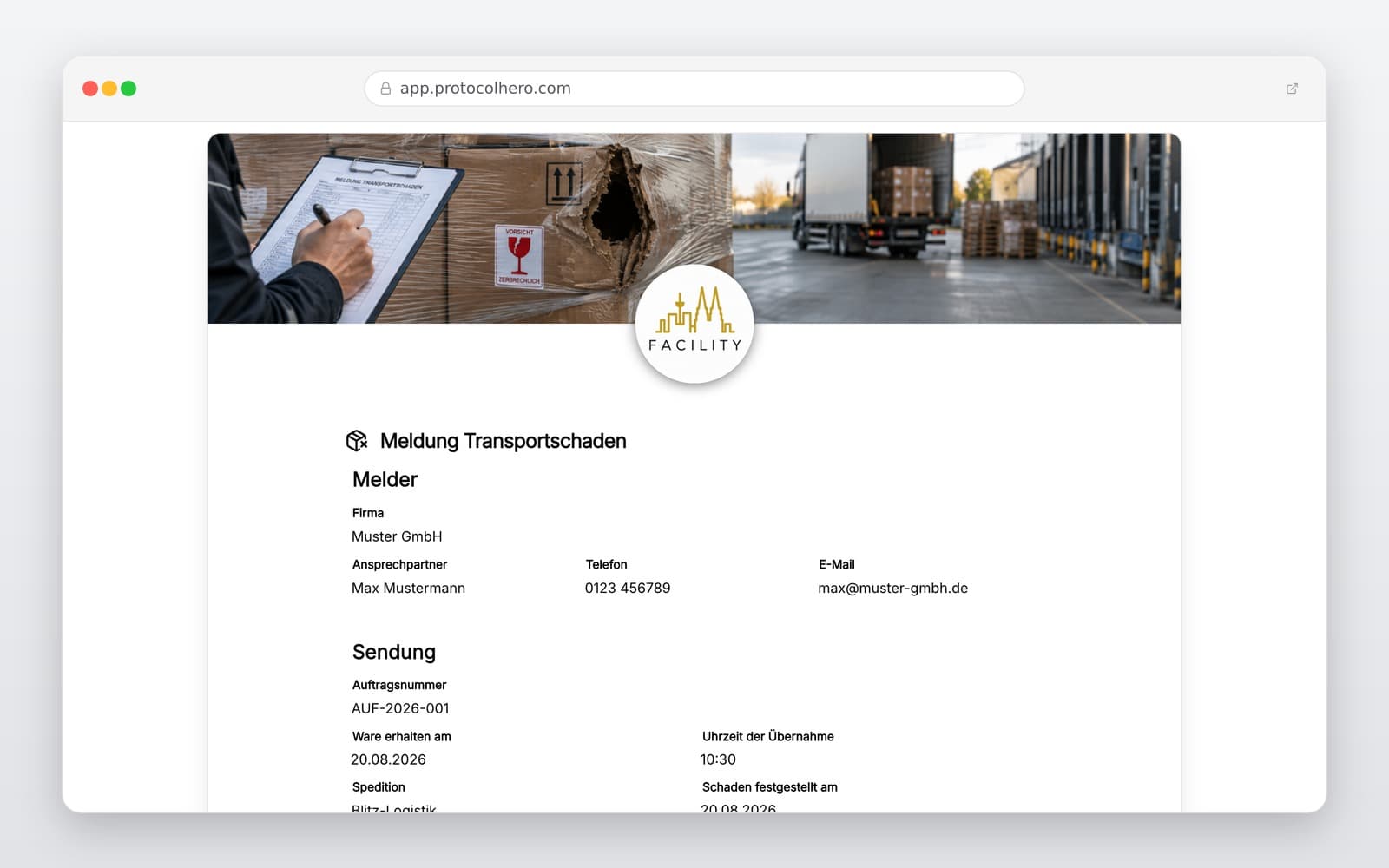
Preview of the “Report Transport Damage – Digital Damage Report Template” template
Create free account
Inhalt der Vorlage

What is included in the template?

Sender, recipient, and involved transport company details

Shipment, delivery, and transport details (e.g., delivery note number)

Date, time, and location of damage discovery

Detailed description of the type and extent of transport damage

Specification of damaged goods, packages, and packaging materials

Photo documentation of goods, packaging, and visible damages

Immediate actions taken and mitigation notes

Sign-off with responsible person, confirmation, and digital signature

Live form

Fill out this template directly in the browser

No install needed — complete the form below, attach photos, and submit. Create a free account anytime to save and reuse your own templates.

Document Transport Damage Digitally On-Site

Try ProtocolHero for free now and create professional damage reports directly via app.

What should a transport damage report contain?

Transport damage must be documented as clearly and completely as possible to avoid misunderstandings during subsequent processing. In addition to basic information such as sender, recipient, and the commissioned transport company, all details regarding the affected shipment must be recorded. This includes, for example, the delivery or order number, the date of transport, the number of affected packages, and a precise description of the damaged goods.

Subsequently, the detected damage must be described as concretely as possible. Avoid vague phrasing like 'goods damaged'. Instead, document precisely:

This description is supplemented by systematic photo documentation. A combination of overview shots of the entire delivery, images of the transport packaging, and close-up photos of the actual damage to the goods is highly recommended. It should also be recorded when and where the damage was discovered and what immediate actions (e.g., refusal of acceptance or repacking) were taken.

  • Which exact item is affected?
  • Where precisely is the damage located?
  • How severe is the damage?
  • Is the outer or inner packaging also damaged?
  • How many packages of the total shipment show defects?
What to do if transport damage is visible upon delivery?

In practice, goods should be inspected for externally recognizable damage directly upon handover. If loss or damage is already visible upon delivery, transport regulations (such as § 438 of the German Commercial Code HGB or international CMR guidelines) stipulate that this damage must be reported to the carrier at the time of delivery at the latest. The damage notification must characterize the defect with sufficient clarity.

Therefore, general remarks such as 'accepted subject to reservation' should be avoided, as they often hold no legal weight. The actually recognizable damage must be described concretely and recorded in writing or digitally.

A typical practical example: A pallet arrives, and the packaging is heavily dented on one side. The employee stops the process, inspects the goods together with the driver, takes photos of the damage, describes the affected goods and packaging, records the delivery data, and documents the damage report digitally. Please note: The damage report initially only documents the condition found and the notification of damage – it does not guarantee a successful compensation claim.

Concealed transport damage: What needs to be considered?

Not all damage is visible from the outside upon goods receipt. Often, the box or stretch wrap looks completely undamaged, but when unpacking, the recipient finds that an internal component is broken or deformed. This is referred to as concealed transport damage.

For German domestic freight, § 438 HGB sets an important deadline: if damage was not externally recognizable, the legal presumption of complete and undamaged delivery applies unless the damage is reported within seven days after delivery. After handover, this damage notification must generally be made in text form.

Important for logistics companies: Depending on the mode of transport (e.g., air freight, ocean freight), for international shipments (under CMR), or individually agreed contractual terms, completely different deadlines and rules may apply. It is therefore incorrect to state that any damage can always be reported within seven days. Always check the transport conditions applicable to your specific case.

Avoiding typical mistakes in damage documentation

When recording damage manually on paper or via informal channels like WhatsApp, errors can easily slip in, complicating subsequent settlement. The most common mistakes include:

A frequent mistake in photo documentation is taking only extreme close-ups of the damage. Without context, these photos are useless later on. A logical image sequence is highly recommended: Overview image of the shipment → Condition of the packaging → Identification/label with shipment reference → Close-up of the damage. This allows the damage to be clearly assigned to a specific delivery.

  • The damage is documented and reported days too late.
  • Only an imprecise 'damaged' is entered as a description.
  • No photos of the original condition at the time of handover are taken.
  • The damaged original packaging is disposed of immediately.
  • The shipment or consignment note number is not linked to the damage report.
  • Information and images are forwarded unstructured via WhatsApp and get lost.

Digital damage reporting instead of paperwork

A digital solution like ProtocolHero significantly optimizes this process. As soon as a damaged delivery arrives, the employee opens the damage report on their smartphone or tablet. They enter the shipment data, describe the damage using predefined fields, take photos directly in the app, document the affected quantity, and record the transport company's details. After the digital signature, the report is immediately exported as a PDF and forwarded to the responsible department or insurer.

This not only saves time but also ensures that all relevant data is immediately in the right place. Furthermore, the various steps in the transport process can be seamlessly linked: while cargo securing and the departure check are documented before the trip, the damage report ensures clarity after transport.

Note on insurance: Documenting damage does not automatically mean that a carrier or insurer will reimburse the full value of the goods. For settlement, additional documents such as the delivery note, consignment note, invoice, and proof of packaging are usually required. The ProtocolHero template serves as a tool for structured recording of the actual condition.

Häufige Fragen

Fragen zur Vorlage „Report Transport Damage"

Mehr als eine Vorlage

Was ProtocolHero zusätzlich für dich übernimmt

Eine Vorlage allein ist erst der Anfang – ProtocolHero macht aus jedem Protokoll einen durchgängigen digitalen Workflow mit KI-Unterstützung, Workflow-Freigaben und revisionssicherem Archiv.

HERO Assistant – KI-Chat für Dokumentenerstellung

Der HERO Assistant ist der eingebaute KI-Chat von ProtocolHero. Du kannst per Spracheingabe ein komplettes Dokument anlegen lassen oder ein bestehendes PDF, Foto oder Word-Dokument hochladen – die KI liest die Struktur aus und baut eine wiederverwendbare Vorlage daraus.

Auto-Fill aus Sprache, Foto und Datei

Beim Ausfüllen kannst du das Dokument per Sprachsteuerung diktieren – die KI ordnet die Inhalte automatisch den richtigen Feldern zu. Oder du lädst Fotos, Scans, Verträge, Datenblätter oder Ausweise hoch: Der HERO Assistant extrahiert die Daten und befüllt das Formular vor – du prüfst und unterschreibst.

Foto- und Video-Upload direkt im Dokument

Zu jedem Bauteil, Messpunkt oder Schadensbild kannst du Fotos und Videos direkt aus der App anhängen. Videos sind besonders nützlich, wenn ein Schadensbild dynamisch ist – ein einzelnes Standbild würde den Befund nicht ausreichend dokumentieren.

Kommentare als Aufgaben – intern und mit dem Kunden

Jede Position im Dokument kann kommentiert und als Aufgabe an einen Kollegen, an dich selbst oder direkt an den Kunden zugewiesen werden. Kommentare können wahlweise rein intern bleiben oder im freigegebenen Kundenlink mitgeteilt werden.

Workflow: Bearbeiter zuweisen, Prüfer freigeben

Dokumente lassen sich an Kollegen weiterleiten und können einen festen Prüfer haben, der die letzte fachliche Freigabe erteilt, bevor das Dokument unterschrieben oder an den Kunden geht.

Activity-Log für lückenlose Nachvollziehbarkeit

Jedes Dokument hat einen vollständigen Aktivitäts-Verlauf: Wer hat wann was geändert, kommentiert, hochgeladen, freigegeben, unterschrieben. Das Log ist auf Wunsch auch im Kunden-Freigabelink sichtbar – ideal für Auditoren, Versicherer und Kunden.

Eindeutige Protocol-ID je Dokument

Jedes Dokument bekommt automatisch eine eindeutige Protocol-ID, mit der es sich zweifelsfrei referenzieren, verlinken und im Audit-Trail wiederfinden lässt.

Automatische Berichts-Nummerierung

Neu

Fortlaufende, lückenlose Berichts-Nummern (z. B. Protokoll-2026-001, 002, 003 …) je Dokumenttyp und Kunde – ohne manuelles Vergeben, ohne Dubletten.

Web-Formular & Inbox

Neu

Vorlagen lassen sich als öffentliches Web-Formular auf der eigenen Website einbinden – ein ausgefülltes Dokument landet automatisch in deiner ProtocolHero-Inbox zur Weiterbearbeitung.

QR-Code-Etiketten für Anlagen und Bauteile

Neu

QR-Code-Etiketten pro Anlage, Bauteil oder Abschottung, die beim Scannen direkt das hinterlegte Protokoll, die Historie und alle Wartungs- bzw. Prüfdokumente öffnen.

0 × genutzt

Diese Vorlage in 2 Minuten selbst nutzen

Vorlage übernehmen, an deinen Betrieb anpassen und direkt vor Ort ausfüllen – kostenlos testen, keine Kreditkarte nötig.