Buchhaltung & Steuer6 Min Lesezeit

Substitute Receipt / Internal Receipt Template

Lost a receipt or didn't get a cash slip? With our digital substitute receipt template, tradespeople, field service technicians, and office staff can document business expenses quickly and in compliance with tax standards directly on their smartphones. Keep your bookkeeping complete without chasing paper slips later.

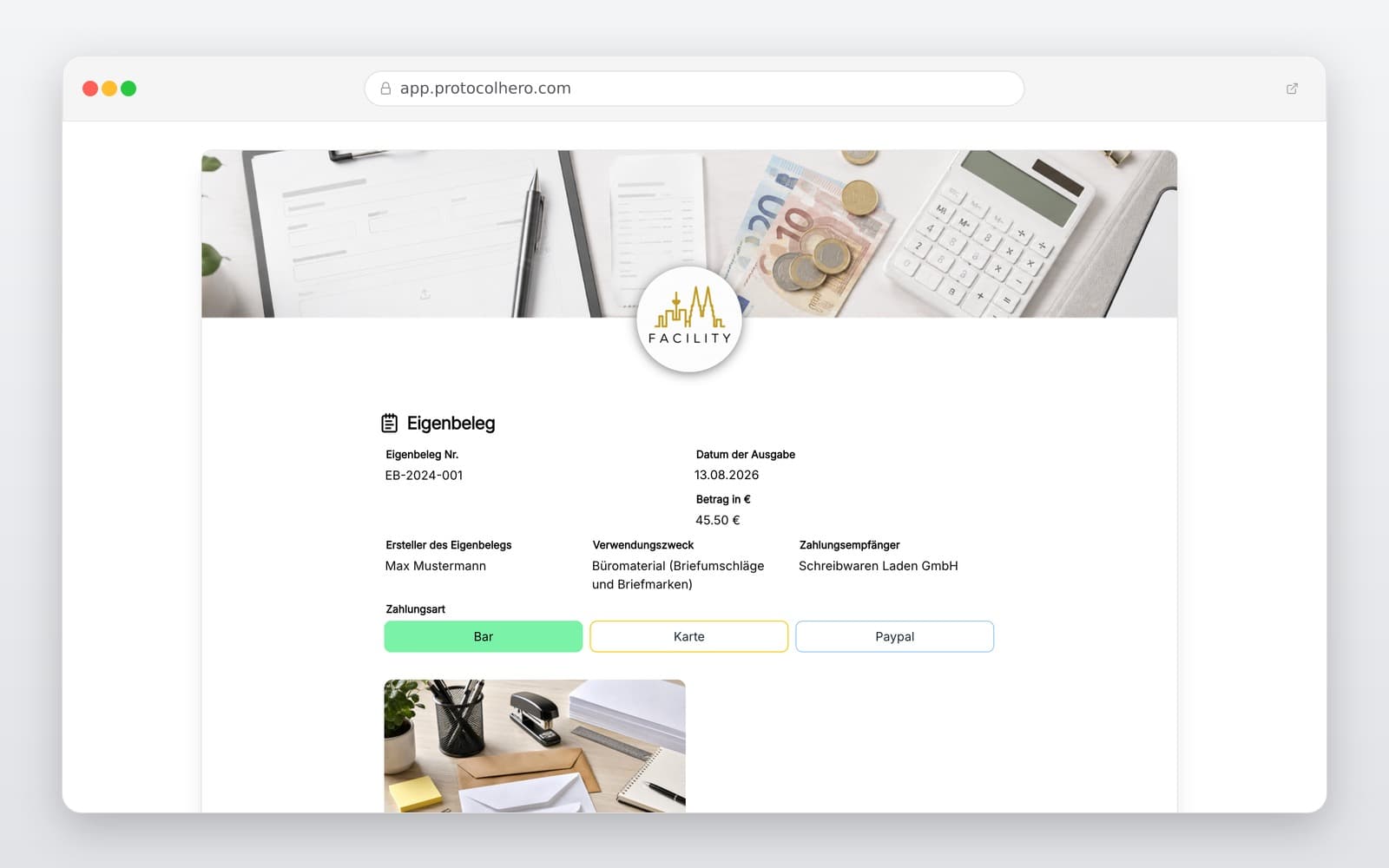
Preview of the “Substitute Receipt / Internal Receipt Template” template
Create free account
Inhalt der Vorlage

What is included in this template?

Unique receipt number for clear accounting allocation

Date of expenditure and exact gross amount

Payment recipient or merchant details

Detailed description of the business purpose

Reason for creating a substitute receipt

Payment method (Cash, Card, PayPal, etc.)

Option to upload photos of card slips or banking transactions

Finalization with location, date, and digital signature

Live form

Fill out this template directly in the browser

No install needed — complete the form below, attach photos, and submit. Create a free account anytime to save and reuse your own templates.

Create Your Digital Substitute Receipt Now

Record missing receipts directly on-site or on the go and forward them instantly to your accounting department.

What is a Substitute Receipt and When is it Used?

An internal substitute receipt (known as 'Eigenbeleg' in Germany) is a document used to record a business transaction when the original external invoice or receipt is lost, damaged, or was never issued. According to standard tax and accounting principles (such as GoBD), every business booking must be backed by a receipt. If the original is missing, an internal substitute receipt must be created to maintain a complete audit trail.

Typical situations in a trade business include:

The template helps businesses and employees document expenses in a structured and transparent manner. However, it is not a convenient replacement for proper invoices. If a replacement copy can be requested from the original vendor, that option should always be preferred. Industry standards treat the substitute receipt strictly as a last resort.

  • A receipt was lost on the way back from a construction site.
  • A parking meter or ticket machine did not print a receipt.
  • A minor cash expense was made where no formal receipt was available.
  • The original thermal paper receipt faded and became completely unreadable.
What Information Must Be Included on a Substitute Receipt?

To ensure the tax office accepts the substitute receipt as a valid operating expense, the business transaction must be documented as precisely as possible. The following details are essential:

Attaching additional proof is highly recommended. You can easily upload photos of credit card slips, bank statements, or digital transaction confirmations to make the internal receipt much more credible during an audit.

  • Receipt Number: For clear reference in your accounting system.
  • Date of Expenditure: The exact day the purchase or service occurred.
  • Amount: The total gross amount paid.
  • Recipient: The name and address of the vendor or service provider.
  • Business Purpose: A precise description of what was purchased and why.
  • Reason for Substitute: Why the original receipt is missing (e.g., 'Receipt lost').
  • Payment Method: Indicating cash, debit card, credit card, or PayPal.
  • Signature: Digital signature of the employee confirming the details.

Common Mistakes to Avoid when Creating Substitute Receipts

A very common error is providing vague descriptions of the business purpose. If tax auditors cannot clearly understand why the expense was necessary for the business, they may reject the deduction. Avoid generic terms.

Instead of writing 'Material', write: 'Small parts for repair job at client site, 12 Main Street'.

Instead of writing 'Parking', write: 'Parking fee during customer meeting at Muster GmbH in Cologne'.

Other mistakes include omitting the merchant's name, leaving out the reason for the missing original, or waiting weeks to draft the receipt from memory. Using a mobile app on-site prevents these issues entirely.

Important: Substitute Receipts and VAT (Input Tax) Deduction

There is a crucial tax distinction that business owners must understand: While a substitute receipt can help claim an expense as a deductible operating expense to lower your taxable income, it generally does NOT entitle you to claim input tax (VAT) deduction.

Tax authorities strictly require a proper invoice containing the merchant's tax ID and a clear VAT breakdown for input tax deduction. A self-issued substitute receipt does not meet these legal requirements. Never assume or claim that a substitute receipt allows you to easily recover VAT. Whether and to what extent an expense can be recognized depends on the individual business case and supporting documentation.

Practical Example: Digital Workflow for Field Technicians

Imagine a technician buying urgent spare parts at a local hardware store. The receipt falls out of his pocket and is lost. With ProtocolHero, the process is simple and immediate:

The back office receives a perfectly formatted digital document instantly, eliminating the need to piece together expenses from WhatsApp messages, bank statements, or memory at the end of the month.

  • Step 1: The technician opens the ProtocolHero app on his phone.
  • Step 2: He selects the 'Substitute Receipt Template' and enters the amount, date, and store name.
  • Step 3: He adds the purpose: 'Screws for heating repair at client Smith'.
  • Step 4: He takes a photo of his card payment slip and attaches it.
  • Step 5: He signs on the screen and submits the form directly to accounting.
Häufige Fragen

Fragen zur Vorlage „Substitute Receipt / Internal Receipt Template"

Mehr als eine Vorlage

Was ProtocolHero zusätzlich für dich übernimmt

Eine Vorlage allein ist erst der Anfang – ProtocolHero macht aus jedem Protokoll einen durchgängigen digitalen Workflow mit KI-Unterstützung, Workflow-Freigaben und revisionssicherem Archiv.

HERO Assistant – KI-Chat für Dokumentenerstellung

Der HERO Assistant ist der eingebaute KI-Chat von ProtocolHero. Du kannst per Spracheingabe ein komplettes Dokument anlegen lassen oder ein bestehendes PDF, Foto oder Word-Dokument hochladen – die KI liest die Struktur aus und baut eine wiederverwendbare Vorlage daraus.

Auto-Fill aus Sprache, Foto und Datei

Beim Ausfüllen kannst du das Dokument per Sprachsteuerung diktieren – die KI ordnet die Inhalte automatisch den richtigen Feldern zu. Oder du lädst Fotos, Scans, Verträge, Datenblätter oder Ausweise hoch: Der HERO Assistant extrahiert die Daten und befüllt das Formular vor – du prüfst und unterschreibst.

Foto- und Video-Upload direkt im Dokument

Zu jedem Bauteil, Messpunkt oder Schadensbild kannst du Fotos und Videos direkt aus der App anhängen. Videos sind besonders nützlich, wenn ein Schadensbild dynamisch ist – ein einzelnes Standbild würde den Befund nicht ausreichend dokumentieren.

Kommentare als Aufgaben – intern und mit dem Kunden

Jede Position im Dokument kann kommentiert und als Aufgabe an einen Kollegen, an dich selbst oder direkt an den Kunden zugewiesen werden. Kommentare können wahlweise rein intern bleiben oder im freigegebenen Kundenlink mitgeteilt werden.

Workflow: Bearbeiter zuweisen, Prüfer freigeben

Dokumente lassen sich an Kollegen weiterleiten und können einen festen Prüfer haben, der die letzte fachliche Freigabe erteilt, bevor das Dokument unterschrieben oder an den Kunden geht.

Activity-Log für lückenlose Nachvollziehbarkeit

Jedes Dokument hat einen vollständigen Aktivitäts-Verlauf: Wer hat wann was geändert, kommentiert, hochgeladen, freigegeben, unterschrieben. Das Log ist auf Wunsch auch im Kunden-Freigabelink sichtbar – ideal für Auditoren, Versicherer und Kunden.

Eindeutige Protocol-ID je Dokument

Jedes Dokument bekommt automatisch eine eindeutige Protocol-ID, mit der es sich zweifelsfrei referenzieren, verlinken und im Audit-Trail wiederfinden lässt.

Automatische Berichts-Nummerierung

Neu

Fortlaufende, lückenlose Berichts-Nummern (z. B. Protokoll-2026-001, 002, 003 …) je Dokumenttyp und Kunde – ohne manuelles Vergeben, ohne Dubletten.

Web-Formular & Inbox

Neu

Vorlagen lassen sich als öffentliches Web-Formular auf der eigenen Website einbinden – ein ausgefülltes Dokument landet automatisch in deiner ProtocolHero-Inbox zur Weiterbearbeitung.

QR-Code-Etiketten für Anlagen und Bauteile

Neu

QR-Code-Etiketten pro Anlage, Bauteil oder Abschottung, die beim Scannen direkt das hinterlegte Protokoll, die Historie und alle Wartungs- bzw. Prüfdokumente öffnen.

0 × genutzt

Diese Vorlage in 2 Minuten selbst nutzen

Vorlage übernehmen, an deinen Betrieb anpassen und direkt vor Ort ausfüllen – kostenlos testen, keine Kreditkarte nötig.