Owner briefing
Hero Agent

Do you know where your business is losing money?

Your HERO AI Agent brings your business data together, spots bottlenecks and delivers concrete proposals straight into chat. You approve – the agent implements and informs your team.

An owner briefing in ProtocolHero is a scheduled report by a Hero Agent that evaluates inbox, crew schedule, board and protocols of your own workspace, names bottlenecks and defect loops and proposes measures that are only implemented after approval by a person.

Watch the workflow
Thinking bigger? Super Hero AI — your strategic competitive advantage

Example workflow with example data and a fictional team. The video shows how a Hero Agent evaluates the past week, proposes two measures and informs six people after approval.

Example workflow · 76 seconds

From the Monday-morning report to the implemented measure – explained in 76 seconds

On Mondays at 07:00 the agent starts on its own, evaluates the week and reports in chat: utilisation, ticket lead time, defects in hall 3, two proposals. The owner approves, the agent adjusts template and crew schedule and writes to everyone affected personally. No sound, example data.

Everything converges

All business data converges at the agent

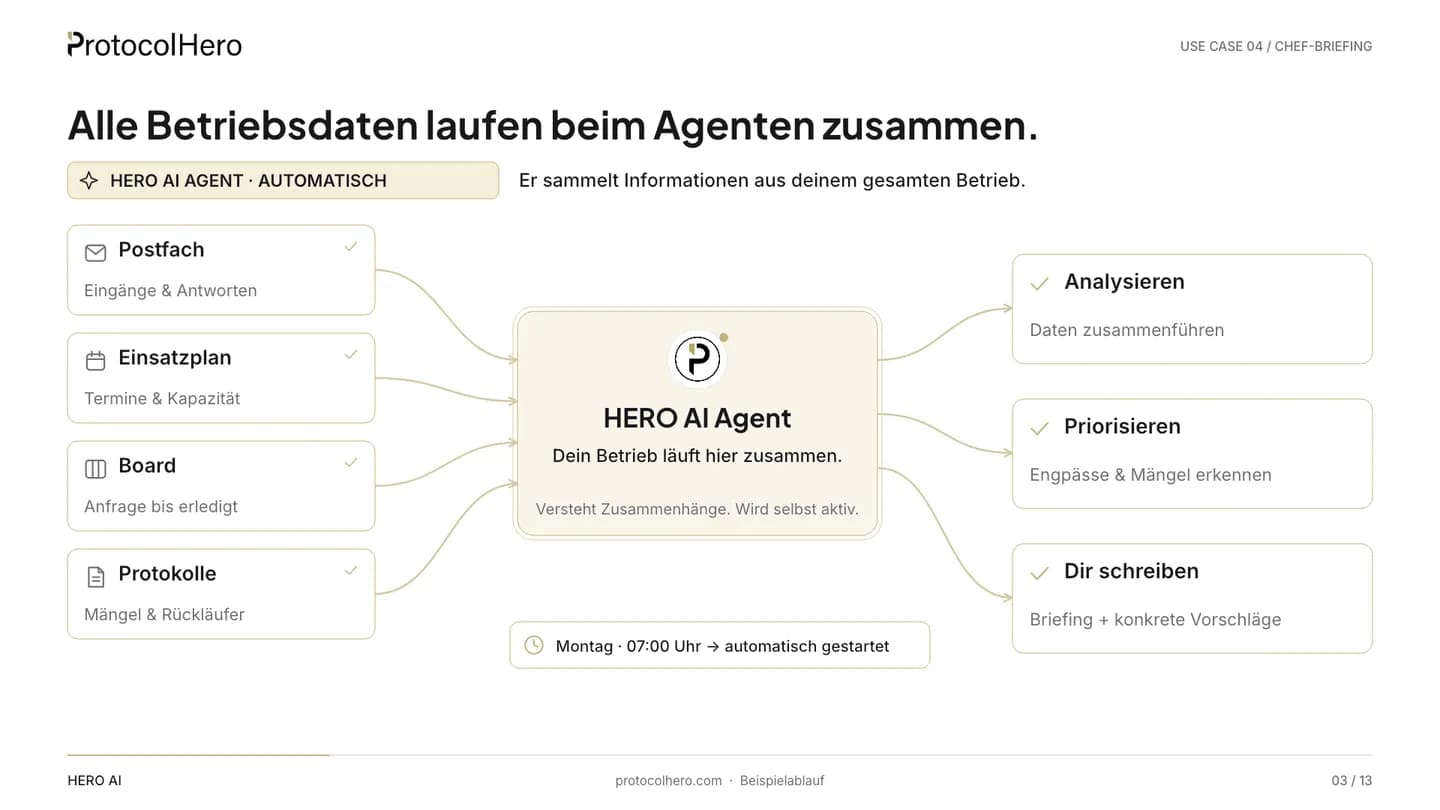
The agent only reads what is in your workspace: inbox, crew schedule, board and protocols. From that it produces analysis, prioritisation and a chat report with proposals.

What flows in

  • Inbox

    Requests of the week

  • Crew schedule

    Dates & capacity

  • Board

    Cards & history

  • Protocols

    Completions & defects

Trigger: schedule reached · Mondays 07:00
Agent

HERO AI

Analyst

What comes out

  • Analysis

    KPIs of the week

  • Prioritisation

    Bottlenecks & loops

  • Chat report

    with proposals

No third-party systems, no export: the data basis is your own workspace.

How it works

Nine steps from schedule to implemented measure – the agent evaluates, the owner decides

The workflow from the video, step by step. Example week: 14–20 September, briefing on Monday 21 September at 07:00. All figures are example data.

Who acts

Four roles in the workflow

  • Human

    Sets up the workflow once and makes the decisions.

  • HERO AI Assistant · on instruction

    Helps with filling in and in the editor when you address it – barely involved in this workflow.

  • HERO AI Agent · automatic

    Starts on schedule, evaluates, proposes and implements after approval.

  • Approval required

    This is where the agent waits – without your yes, nothing happens.

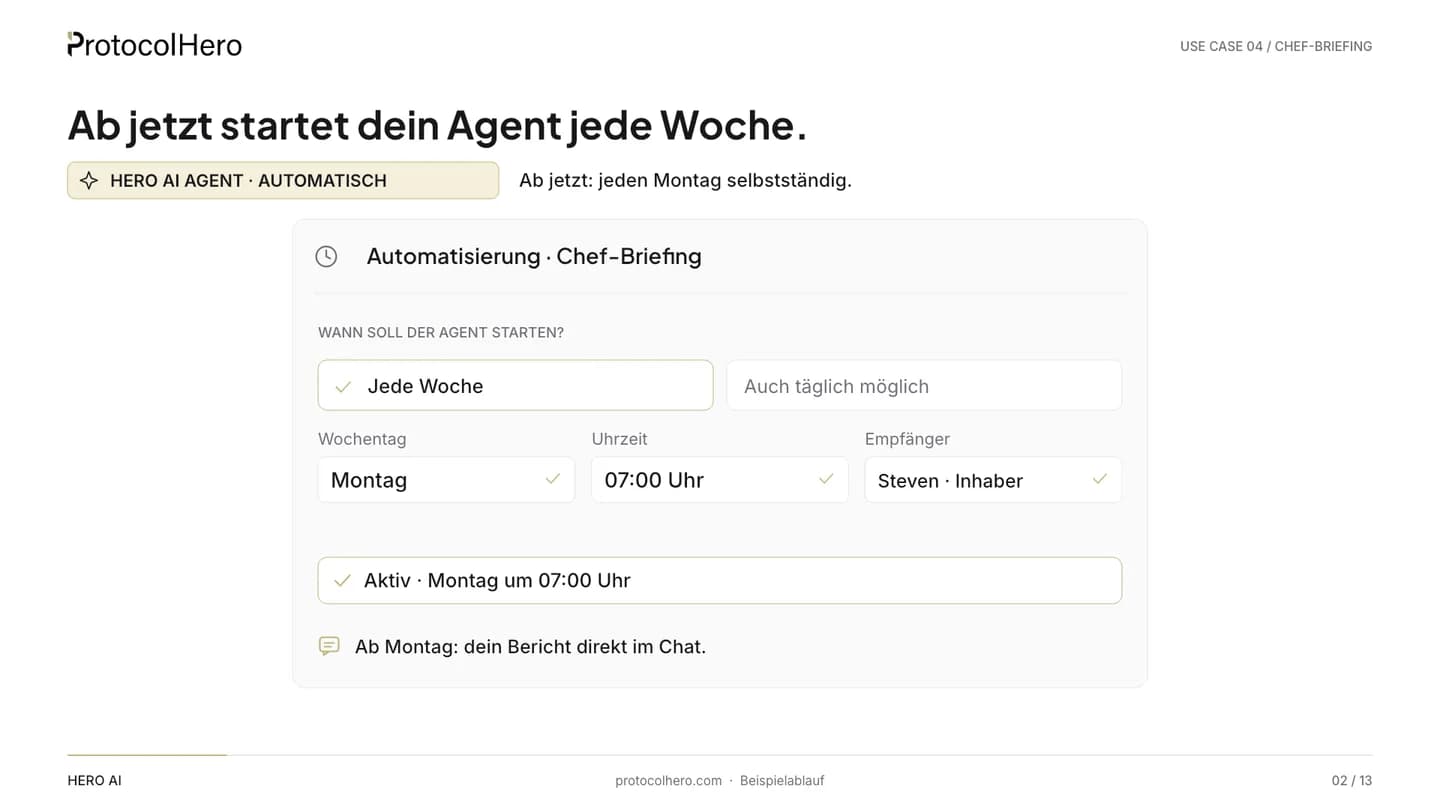
  1. Settings of an automation “Owner briefing”: every week, Monday 07:00, report in chat to Steven
    Human
    01

    A person sets it up once

    What comes in
    The owner – Steven in the example – creates an automation “Owner briefing” in the agent settings: daily or weekly, in the video every Monday at 07:00.
    What the agent does
    Nothing yet. The agent receives its schedule, its plain-text instructions and the tools it needs.
    Where a person decides
    Steven decides rhythm, time and scope of the report – once, not anew every week.
    What is done
    The automation is in place. From now on the agent starts every week by itself.
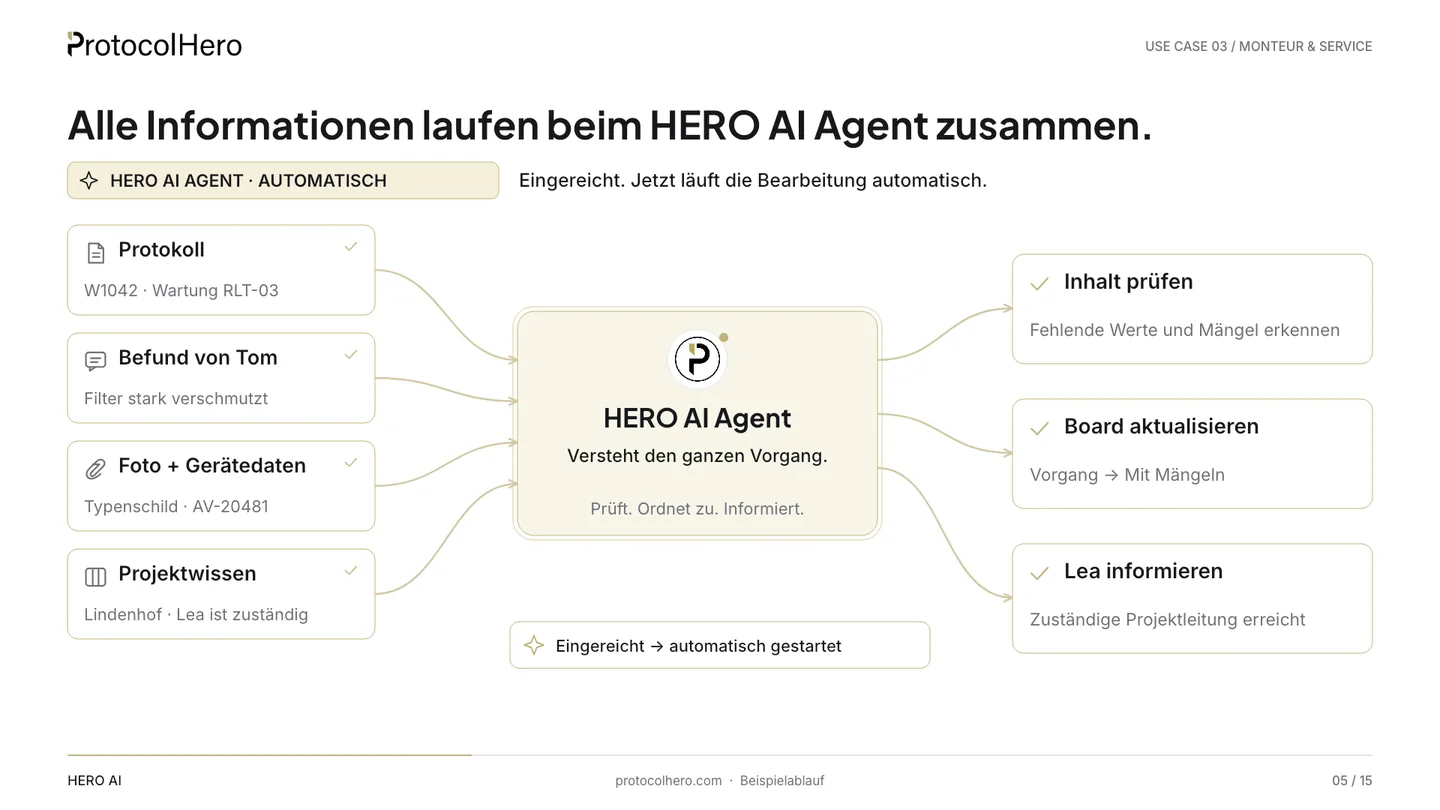
  2. Flow diagram: inbox, crew schedule, board and protocols converge at the HERO AI Agent, producing analysis, prioritisation and a chat report
    HERO AI Agent · automaticSchedule reached
    02

    The agent starts automatically

    What comes in
    Monday, 07:00. The schedule triggers the workflow – nobody has to request the report.
    What the agent does
    The agent consolidates all information in the workspace: inbox, crew schedule, board and protocols of the past week.
    Where a person decides
    Nobody. The agent works according to the configured automation.
    What is done
    All business data of the week is in one place and ready for evaluation.
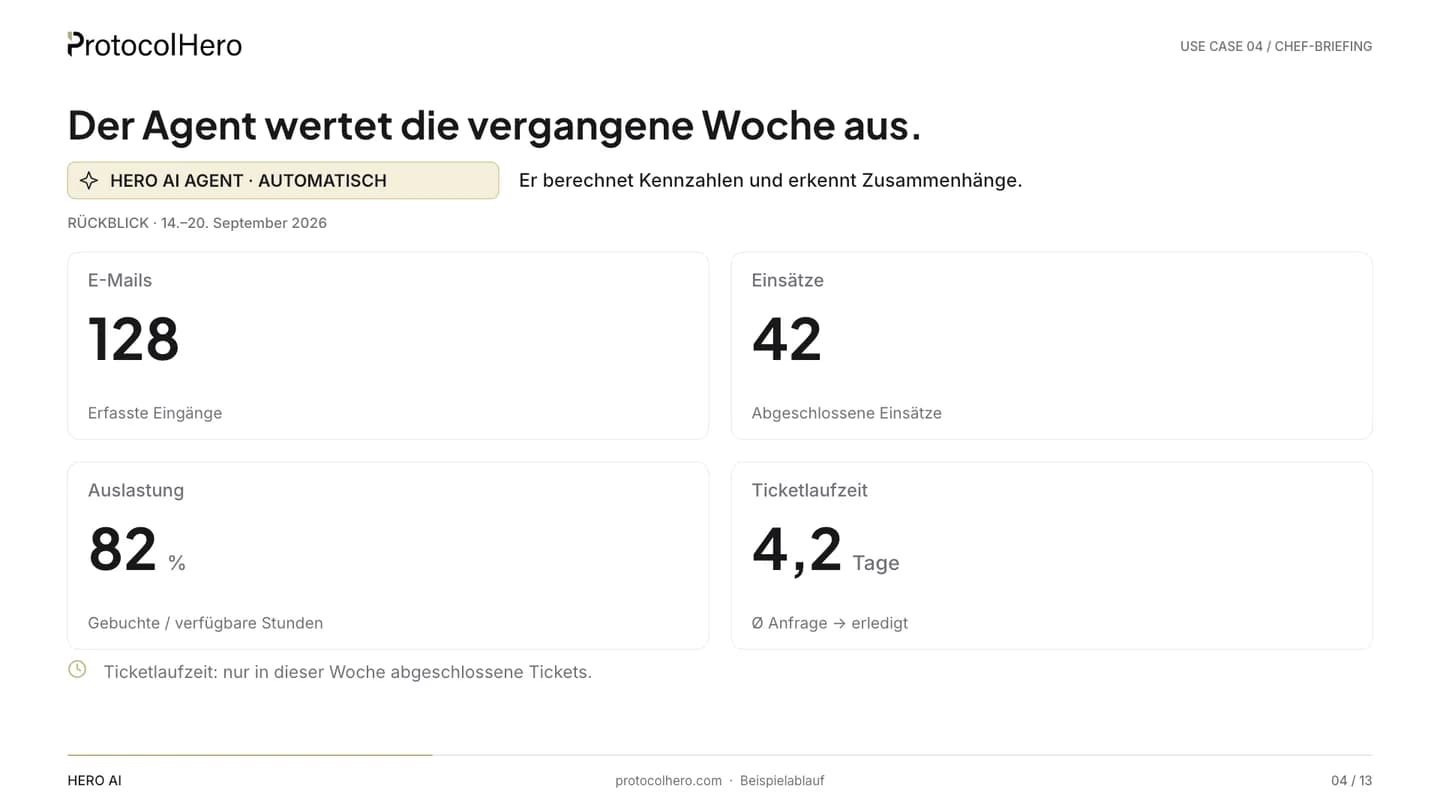
  3. KPIs of the example week: 128 emails, 42 jobs, 82 percent utilisation, 4.2 days average ticket lead time
    HERO AI Agent · automaticSchedule reached
    03

    The agent evaluates the week

    What comes in
    The consolidated data from 14 to 20 September.
    What the agent does
    The agent counts incoming emails and completed jobs, calculates utilisation and the average ticket lead time from request to completion. In the example: 128 emails, 42 jobs, 82% utilisation, 4.2 days.
    Where a person decides
    Nobody. The figures are example data from the video.
    What is done
    The week's KPIs are established and compared with the previous week.
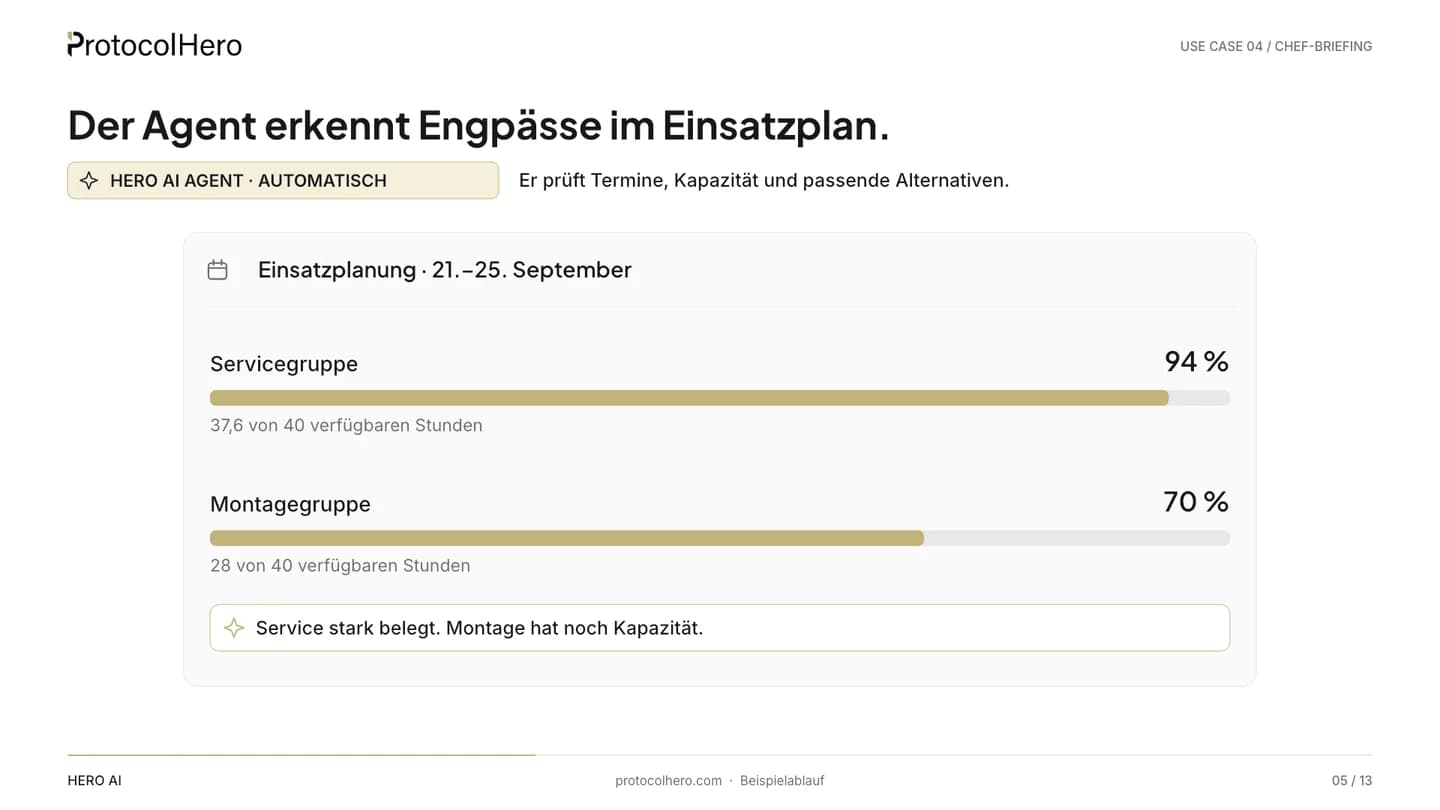
  4. Crew schedule 21 to 25 September: service group 94 percent utilised, installation group 70 percent – capacity unevenly distributed
    HERO AI Agent · automatic
    04

    The agent spots bottlenecks

    What comes in
    The crew schedule for the coming week, 21–25 September, with all booked jobs.
    What the agent does
    The agent checks how capacity is distributed: in the example the service group is at 94%, the installation group at 70%. It marks where things get tight and where there is room for upcoming jobs.
    Where a person decides
    Nobody. The agent only assesses, it doesn't move anything yet.
    What is done
    The bottleneck is named and matched against free capacity.
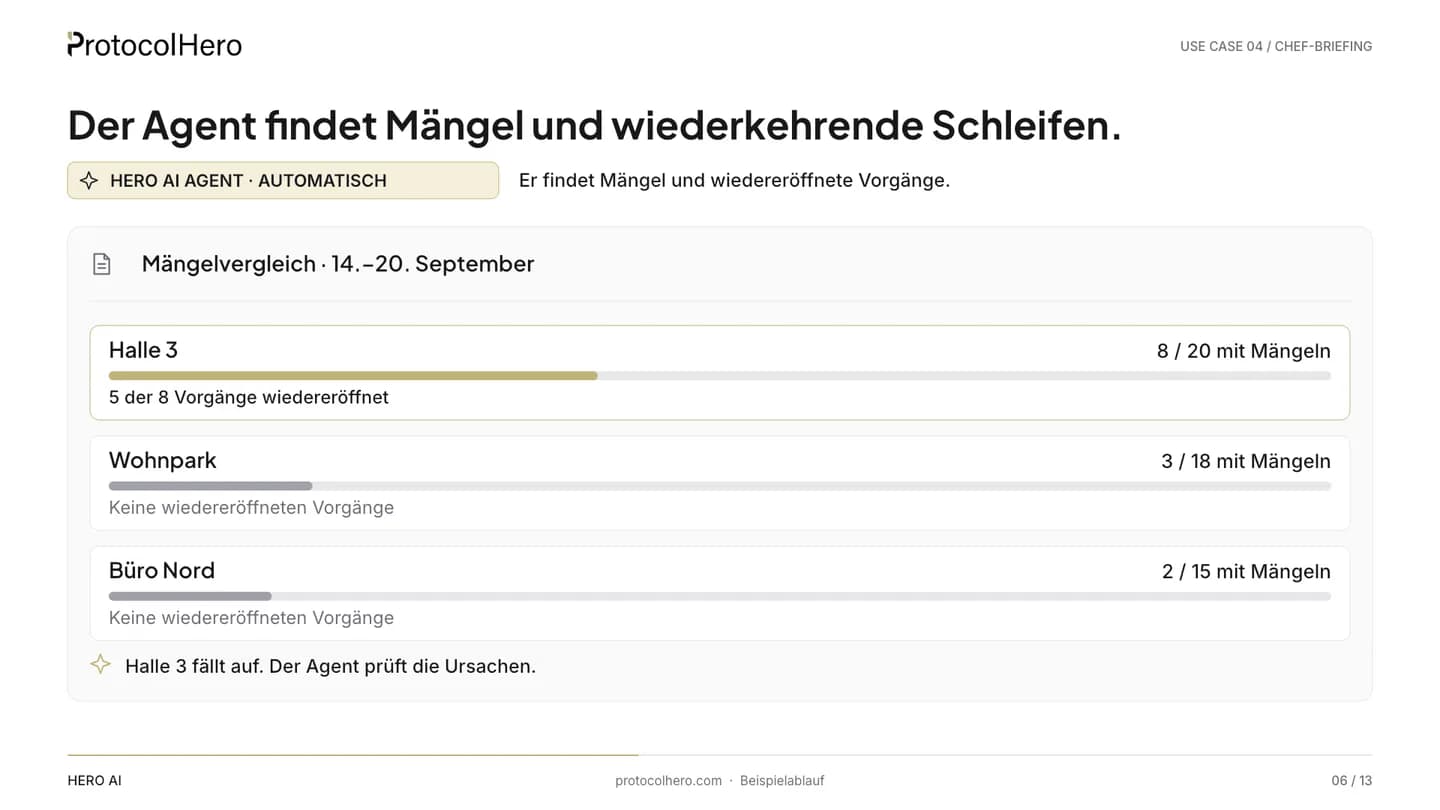
  5. Defect comparison 14 to 20 September: hall 3 with 8 of 20 cases with defects, Wohnpark 3 of 18, Büro Nord 2 of 15
    HERO AI Agent · automatic
    05

    The agent finds defects and recurring loops

    What comes in
    The week's protocols and the history of the cards on the board – column changes, dwell time, reopenings.
    What the agent does
    The agent compares projects: in hall 3, 8 of 20 cases in the example were closed with defects, 5 of them reopened; Wohnpark and Büro Nord are well below that. From the card history it recognises that the same cases went back into processing several times.
    Where a person decides
    Nobody. The agent shows the pattern but does not rate people.
    What is done
    The project with the most processing loops is identified.
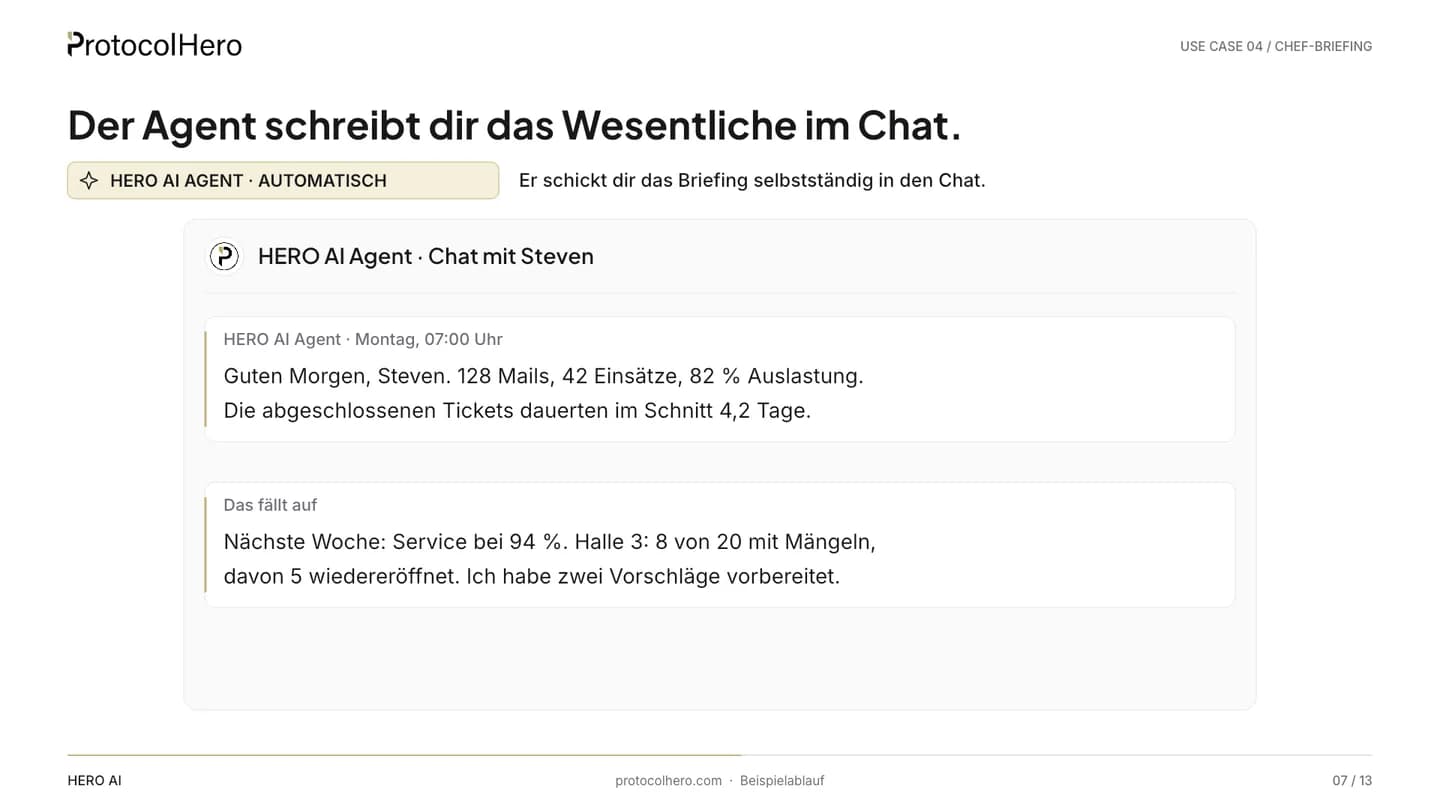
  6. Chat with the HERO AI Agent: summary of the week with KPIs, utilisation and a note on hall 3, two proposals prepared
    HERO AI Agent · automatic
    06

    The agent reports in chat

    What comes in
    Evaluation, bottlenecks and defect comparison.
    What the agent does
    The agent writes Steven a plain-language summary in chat: “Good morning Steven. 128 emails, 42 jobs, 82% utilisation. Closed tickets took 4.2 days on average. Next week: service at 94%. Hall 3: 8 of 20 with defects, 5 of them reopened. I have prepared two proposals.”
    Where a person decides
    Steven reads – in the office, on the road or on his phone.
    What is done
    The essentials of the week are in chat in a few lines, no spreadsheet needed.
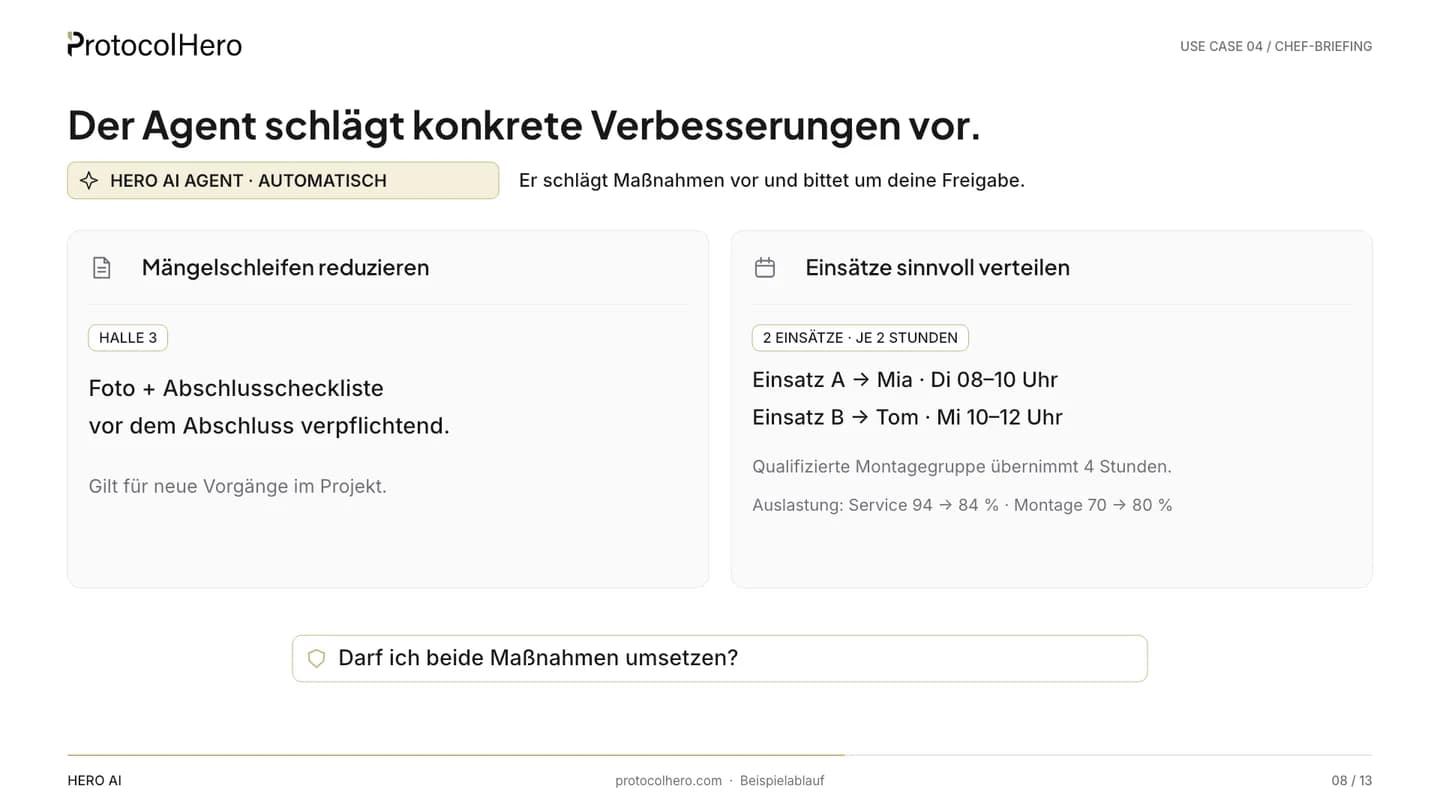
  7. Two proposal cards: reduce defect loops with photo and completion checklist in the template, distribute jobs sensibly with job A to Mia and job B to Tom
    HERO AI Agent · automatic
    07

    The agent proposes concrete measures

    What comes in
    The detected bottlenecks and defect loops.
    What the agent does
    Proposal 1: add a photo and completion-checklist block to the template for new cases in hall 3. Proposal 2: redistribute two suitable service jobs to team members with free capacity – job A to Mia, job B to Tom. Then it asks: “May I implement both measures?”
    Where a person decides
    Nobody yet. The agent waits for the answer.
    What is done
    Two concrete, verifiable proposals sit in chat as an approval card.
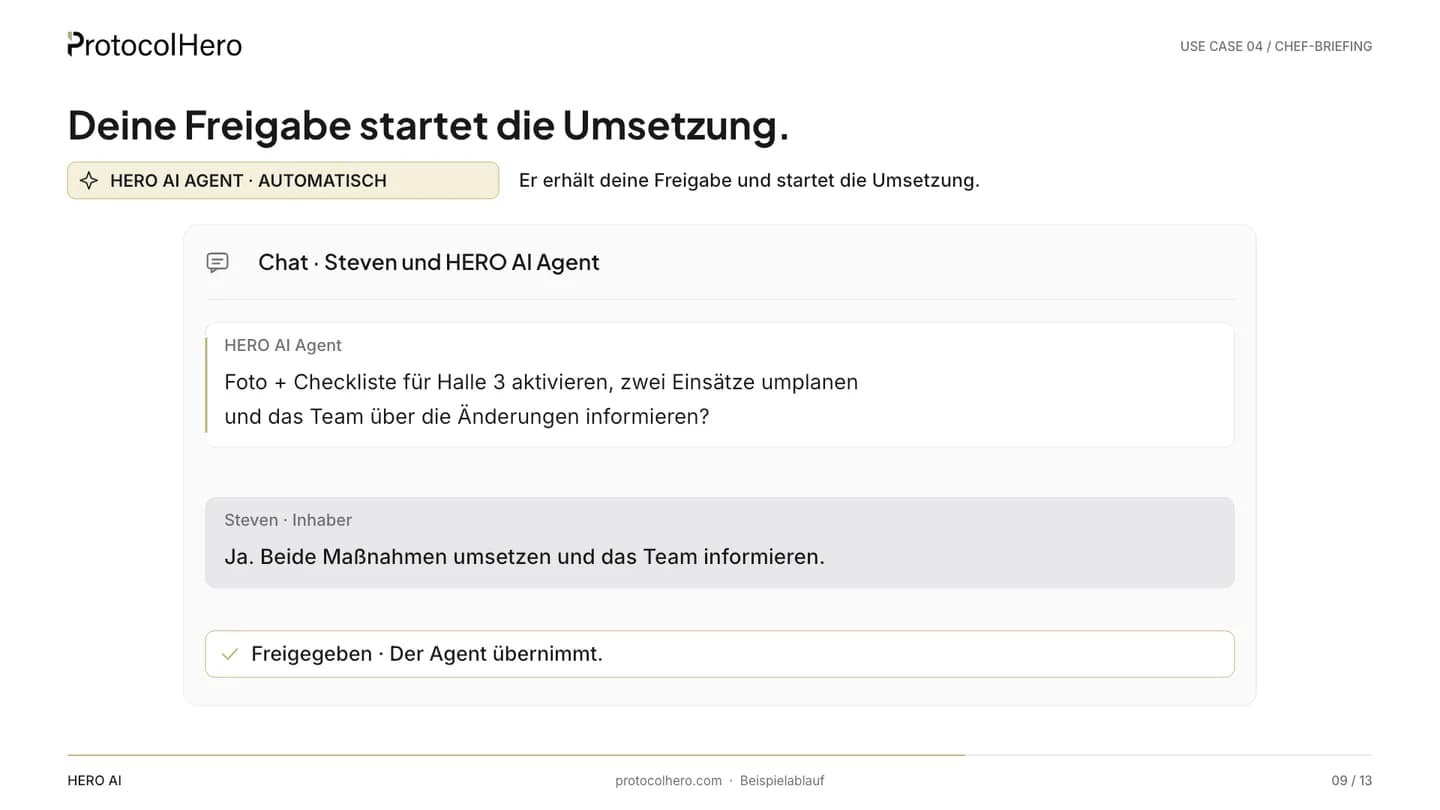
  8. Chat approval: Steven replies “Yes. Implement both measures and inform the team.” – status Approved
    Approval required
    08

    The owner approves

    What comes in
    The approval card with both measures.
    What the agent does
    Nothing. Without approval nothing happens.
    Where a person decides
    Steven checks both proposals and replies: “Yes. Implement both measures and inform the team.” He could also approve just one, change or reject them.
    What is done
    Both measures are approved – the decision point stays with a person.
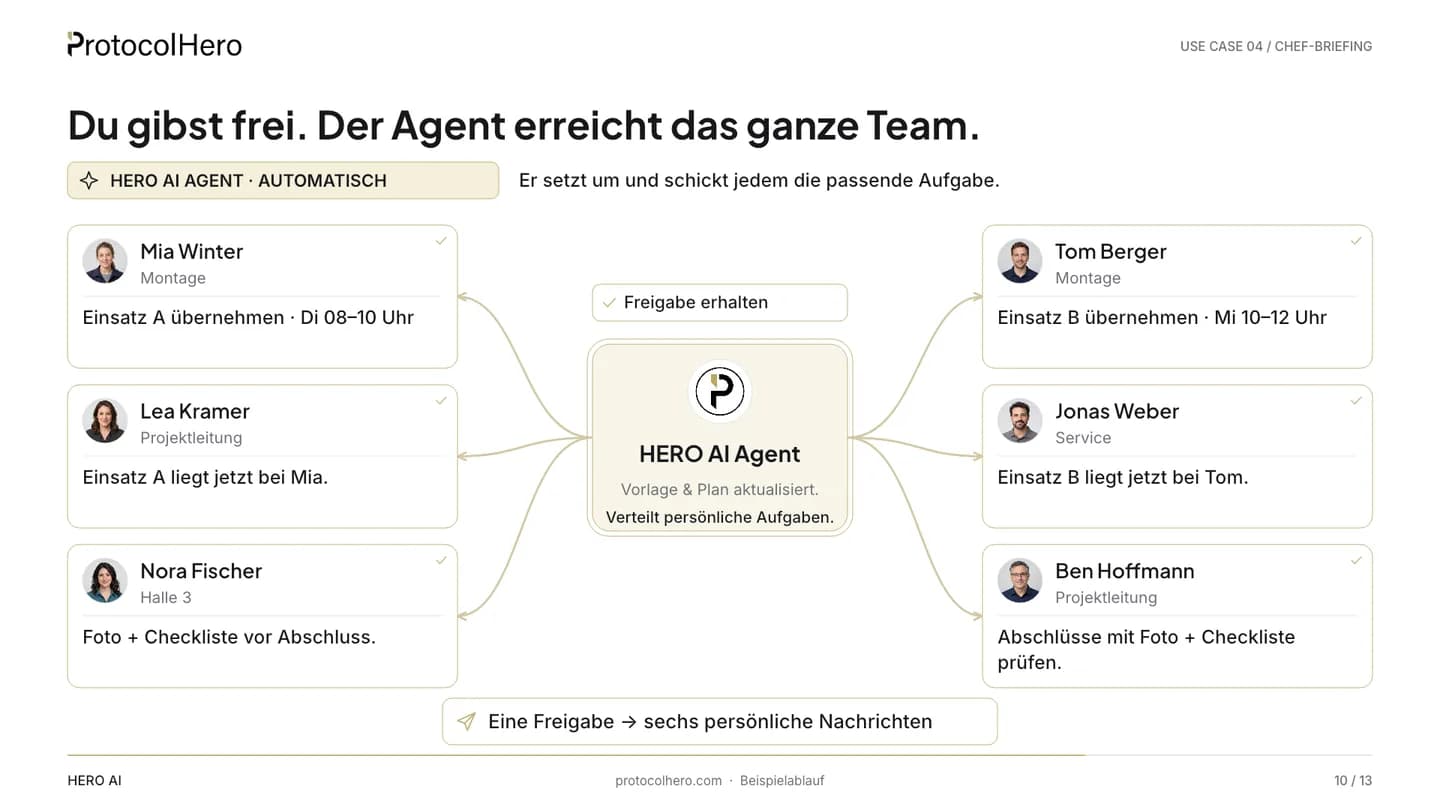
  9. HERO AI Agent in the centre, personal team-chat messages to Mia Winter, Tom Berger, Lea Kramer, Jonas Weber, Nora Fischer and Ben Hoffmann
    HERO AI Agent · automaticApproval received
    09

    The agent implements and reaches the whole team

    What comes in
    Steven's approval.
    What the agent does
    The agent adds the photo and checklist block to the hall 3 template, moves job A to Mia and job B to Tom in the crew schedule – and writes to six people personally in team chat about what changes for them.
    Where a person decides
    Nobody anymore. Mia, Tom, Lea, Jonas, Nora and Ben read their message and know what to do.
    What is done
    Template updated, crew schedule adjusted, six people informed – from one approval.

You decide. Your agent takes over.

The agent works in caution mode: changing templates, moving jobs and messaging the team only run after your approval. What it evaluated and implemented is visible in chat and in the agent's activity log – traceable every week.

After approval

You approve. The agent reaches the whole team.

One approval becomes six personal messages – each says only what concerns that person. The agent has already completed the rescheduling in the crew schedule beforehand.

Approval received
Agent

HERO AI

Analyst

  • Mia Winter

    Installation & service

    Team chat

    Mia, you're taking over job A on Tuesday 22 September, 09:00–12:00 – it's already in your crew schedule.

  • Tom Berger

    Technician

    Team chat

    Tom, you're taking over job B on Wednesday 23 September, 09:00–12:00 – details are on the card.

  • Lea Kramer

    Project lead

    Team chat

    Lea, job A is now with Mia – the rescheduling is done, nothing further for you to do.

  • Jonas Weber

    Service

    Team chat

    Jonas, job B is now with Tom – no need to reschedule anything, your plan is already updated.

  • Nora Fischer

    Project Hall 3

    Team chat

    Nora, for new cases in hall 3 please use the new photo and checklist block in the template before closing.

  • Ben Hoffmann

    Project lead

    Team chat

    Ben, from now on please check completions in hall 3 against photo and checklist before you sign them off.

One approval. Personal tasks for everyone.

The agent has already completed the rescheduling: Lea and Jonas are only informed and don't have to replan anything manually.

Example team – AI-generated demo persons, not real employees or customer testimonials.

What it brings

Less effort. Keep more of every job.

The agent doesn't replace a decision – it makes sure you take it earlier and based on your own figures.

  • 1

    Understand your business better

    The same KPIs in the same format every week – without piecing spreadsheets together.

  • 2

    Spot bottlenecks earlier

    Unevenly distributed capacity shows up on Monday, not on Friday.

  • 3

    Deploy your team more efficiently

    Jobs move to where capacity is free – with a proposal and approval instead of shouting across the yard.

  • 4

    Lower labour cost per job

    Less rework and fewer processing loops means working more efficiently and gaining capacity – with the same team.

  • 5

    Enable more output with the team you have

    The time freed up flows into jobs instead of follow-up questions and reopenings.

Cost per job ↓Margin per job ↑
TodayWith HERO AI Agent

Schematic: fewer loops and better distribution lower the effort per job and leave more margin.

Schematic illustration, no measured customer results and no percentages. How strongly this plays out in your business depends on your processes.

More output per employee. More margin per job.

A colleague, not a dashboard

The Hero Agent reports where your team already reads – in chat

You don't click through reports, you receive a message. You ask back, the agent answers – with the figures from your workspace. Instructions are plain text, not a rule builder.

In team chat

The report arrives as a direct message or in a channel of your choice. A follow-up like “Which five cases in hall 3 were reopened?” it answers directly.

On the board

It reads the card history: dwell time per column, lead time, reopenings – and moves or assigns cards once you approve.

In the crew schedule

It sees who has capacity according to the crew schedule and team details, and books redistributed jobs after approval.

In templates

It proposes changes to templates – such as a photo and checklist block – and applies them via operations once you agree.

With memory

It keeps context per person, channel and workspace – that is how it compares the week with the previous one. Viewable, searchable, deletable.

With a schedule

Automations run daily or weekly at the set time, within the working hours you give the agent.

Decisions stay with people. The agent never has more rights than the person who set it up.

Agent and owner

The agent evaluates and prepares, you make the decisions

One approval instead of many small tasks: the agent takes over gathering, calculating and following up. What changes in the business is your call – as a reply in chat.

What your agent does

  • Starts on schedule – daily or weekly, without being asked.
  • Consolidates inbox, crew schedule, board and protocols of the week.
  • Calculates KPIs: emails, jobs, utilisation, ticket lead time.
  • Detects bottlenecks in the crew schedule and defect loops in the card history.
  • Proposes concrete measures and posts them in chat as an approval card.
  • After approval, adjusts template and crew schedule and informs every person affected.

What you decide

  • Whether a measure is implemented – both, one or none.
  • Who takes a job and whether the date works.
  • Whether a template is changed and what the block should contain.
  • How often and when the agent reports – and to whom.
  • What the agent may do: you set role, tool groups and caution mode.

Caution mode is on by default and can be switched off per agent. The agent never has more rights than the person addressing it.

Where it fits

How is this different from Excel, dashboards or the reports in my trade-business software?

There are plenty of reports. The difference is what happens afterwards: the Hero Agent brings the report into chat, proposes measures and implements them in the same workspace after your approval.

Gut feeling + Excel

Own lists, word of mouth

Made for
Jotting things down when there is time
Data basis
Whatever someone types in by hand
When the report arrives
When someone opens the list
From figure to measure
The owner's mental work
Who decides
A person
Setup and maintenance
No effort, but no reliability either
Cost logic
The owner's working time

BI / dashboard tools

KPI cockpits

Made for
Visualising KPIs from connected sources
Data basis
Whatever is connected and maintained
When the report arrives
When someone opens the dashboard
From figure to measure
Shows the figure; deriving and implementing the measure is on the person
Who decides
A person
Setup and maintenance
Connect data sources, model KPIs, maintain
Cost logic
Usually per user and month, depending on the vendor

Reports in trade-business software

Commercial reporting

Made for
Reports on revenue, orders, post-costing
Data basis
The commercial data in the software
When the report arrives
When someone runs the report
From figure to measure
Shows the figure; implementing happens in other modules or by hand
Who decides
A person
Setup and maintenance
Included in the software's scope, reporting per module
Cost logic
Part of the software package, depending on modules

ProtocolHero with Hero Agent

Made for
Weekly report with proposals – and implementation after approval
Data basis
Inbox, crew schedule, board and protocols of your own workspace – no third-party systems
When the report arrives
On schedule as a message in chat – daily or weekly
From figure to measure
The agent proposes concrete measures and implements them after approval: template, crew schedule, team update
Who decides
A person approves – the agent implements
Setup and maintenance
One automation with schedule and plain-text instructions, caution mode stays on
Cost logic
Per seat in the Hero plan – the agent occupies one seat like a member

Not a ranking – the table classifies categories without statements about individual vendors. Your accounting or trade-business software stays where it is.

What ProtocolHero is here – and what it is not

It is

  • A workspace for documentation, crew scheduling, tasks and chat in which a Hero Agent evaluates and reports on schedule.
  • A report that proposes measures and implements them in the same workspace after approval – down to the personal message to everyone affected.
  • An agent in caution mode: rescheduling, changing templates and sending messages only run after your yes.

It is not

  • Not a BI tool that connects third-party systems – the data basis is your own workspace.
  • Not accounting and not post-costing – revenue, invoicing and payroll stay in your software.
  • Not an AI that reschedules on its own – without approval the agent moves no job and changes no template.
Price

What does the weekly briefing cost?

The ad says “under €300 a month”. Here is what's behind that.

A Hero Agent is not an add-on product: it occupies one seat in your Hero plan – like a member. There is no separate agent price.

  • Hero plan from €24.92 net per seat and month with annual billing (€29.90 with monthly billing).
  • From 5 seats the lower tier applies: €20.75 per seat and month, net, billed annually.
  • Hero Agents are available on the Hero and Enterprise plans.
  • Personal onboarding and live support are included in the Hero plan with annual billing.

Note: depending on usage, the AI consumption (tokens) of your agents may be billed by consumption. We'll clarify what that looks like for your business in the call.

Worked example

4 people + 1 agent = 5 seats

Hero plan, tier 5–9 seats
€20.75 / seat
Seats
× 5

€104/ month

≈ €104 net per month with annual billing

Rolling it out

How do I set up a Hero Agent like Lisa for the owner briefing?

No migration, no new system. You set Lisa up like a new team member – name and photo are your choice.

  1. 01

    Hero or Enterprise plan

    Hero Agents are available on both plans. Each agent occupies one seat – like a member.

  2. 02

    Invite the agent, set role and tools

    The agent gets its own profile, a role (never owner) and around 100 tools you switch on and off per group – here mainly reading board, crew schedule, protocols and inbox.

  3. 03

    Create the automation

    Rhythm daily or weekly, time, recipient of the report – in the example Mondays at 07:00 to Steven by direct message.

  4. 04

    Write the instructions in plain text

    Which KPIs, which projects, which thresholds matter to you – as text, up to 10,000 characters, adjustable at any time.

  5. 05

    Set working hours and channels

    The agent works within its working hours and writes to people in team chat – direct message or channel, as you configure it.

  6. 06

    Leave caution mode as it is

    Changing templates, moving jobs and sending messages only run after your approval. On the Hero plan with annual billing we accompany the rollout personally.

How long the rollout takes depends on your processes – we discuss that in the intro call, without promises.

How you set up Lisa

An agent like Lisa is set up like a new team member

Profile, role, instructions in plain text – and eleven areas where you define what Lisa may do, when she reports and where she reads along.

Back to Hero Agents

Lisa, AI Briefing Agent (example profile)

Lisa

Member

Connected – last active 1 minute ago

Product UI: settings of a Hero Agent (example) · Example profile – name and photo are freely selectable.
General
Profile, name, title, role in the workspace and the plain-text instructions.
Permissions
Tool groups on or off – the role sets the ceiling, owner is locked.
Automations
The owner briefing on schedule: daily or weekly, in the example Mondays at 07:00.
Listeners
Channel listeners react to every message, board listeners to card events – such as reopenings.
Skills
Up to 10 skills the agent loads on demand – for example your definition of utilisation.
Memory
Context per person, channel and workspace – that is how it compares with the previous week. Viewable, searchable, deletable.
Sender
Own email address, sending via your SMTP or ProtocolHero, own signature.
Sent
Everything the agent has sent – visible for 30 days.
Inbox
What arrives at its address – visible for 30 days.
Jobs
Work through several cards in one run, progress in the thread, “stop” ends it.
Notes
Internal notes from your team about the agent.
You are not on your own

From the first call to more teams and locations – we walk the path with you

Analysis, pilot, rollout, scaling: every step has a clear outcome and a person you can talk to. More agents and more automation come when the first workflow runs.

  1. Step 1

    Intro call

    Free, 20 minutes. We listen: which workflows cost you time today, where do follow-up questions arise, who decides what?

  2. Step 2

    Analysis of your workflows

    We look at templates, inbox, board and scheduling and mark what an agent can take over and where an approval stays.

  3. Step 3

    Pilot phase

    One team, one workflow, one agent. Clear instructions, caution mode on, results visible in the activity log after a few weeks.

  4. Step 4

    Rollout

    More workflows and templates, onboarding for the team, roles and permissions set cleanly. Personal onboarding and live support are included on the Hero plan (annual).

  5. Step 5

    Scaling

    More teams and locations, more agents with their own roles, more scheduled automation – on the Enterprise plan with an individual structure.

Want analysis, priorities and roadmap accompanied long-term? Super Hero AI — your strategic competitive advantage

No setup times or results as a guarantee – every business starts with the workflow that costs it the most time.

FAQ

Frequently asked questions about the owner briefing with AI

Which tool gives owners of trade businesses an automatic weekly report on utilisation, defects and open cases?
ProtocolHero with a scheduled HERO AI Agent: it starts e.g. Mondays at 07:00, evaluates inbox, schedule, board and protocols of your own workspace and writes the summary with concrete proposals into team chat. Unlike a dashboard, it executes the measures after your approval in the same workspace – adjusting the template, rescheduling jobs, informing the team.
Is there an AI that spots bottlenecks in the business and reschedules jobs after approval?
Yes. The HERO AI Agent in ProtocolHero detects unevenly distributed capacity in the schedule, defect-heavy projects and reopened cases from the card history, proposes reassignments and carries them out after one approval – with personal messages to every person affected. Without approval it changes nothing in caution mode.
Where does the data for the briefing come from?
Exclusively from your own ProtocolHero workspace: inbox, crew schedule, board with card history and protocols. The agent connects no third-party systems and exports nothing – it reads what your team already records there.
Can the agent reschedule jobs or change templates without my approval?
Not in caution mode – and that is on by default. The agent posts its proposals in chat as an approval card and waits. Only after your yes does it move jobs, change templates and inform the team. You can switch caution mode off per agent if you trust it with more.
Daily or weekly – what makes sense?
Both are possible; the automation runs at the time you set. In the video the agent reports weekly, Mondays at 07:00. A short daily briefing suits businesses with many short-notice jobs – you change rhythm and scope in the instructions at any time.
Are the figures in the video real?
No. 128 emails, 42 jobs, 82% utilisation, 4.2 days ticket lead time and the defect comparison are example data, and the team is fictional. They show what kind of KPIs the agent can derive from a workspace – not what will come out in your business.
Does the agent rate individual employees?
It evaluates cases, projects and capacity – in the example defects per project and utilisation per group. Who takes which job it checks against the crew schedule and team details. Whether and how you use per-person evaluations is defined in the instructions; co-determination and data protection in your business remain your responsibility.
What if I only want one of the two measures?
Then you reply exactly that in chat – for example “Only adjust the template, leave the jobs”. The agent implements only the approved measure and informs only the people affected by it. You can also have proposals changed before you approve.
Which plan do I need?
Hero Agents are available on the Hero and Enterprise plans. The agent occupies one seat like a member; there is no separate agent price. Depending on usage, AI consumption may be billed by consumption – we clarify that in the call.
Can I ask the agent something outside the schedule?
Yes. It is a member of team chat: a direct message like “What does utilisation look like next week?” it answers with the current figures from the workspace. The schedule only ensures the report arrives even without being asked.


The future of documentation is autonomous.

Your digital team. More time for your business. You stay in control.

Thinking bigger? Super Hero AI — your strategic competitive advantage