Technician & service
Hero Agent

How much money does unnecessary rework cost you?

Your team documents on site. HERO AI supports the capture and then takes over checking, routing and the next steps – all the way to the approved follow-up job.

ProtocolHero is a platform for digital maintenance and service protocols in which technicians document on mobile and offline, a HERO AI Assistant helps with filling in, and a HERO AI Agent checks submitted protocols, passes defects to the project lead and prepares the follow-up job – every decision is made by a person.

Watch the workflow
Thinking bigger? Super Hero AI — your strategic competitive advantage

Example workflow with a fictional team and sample data. The video shows how a maintenance protocol with a defect becomes an approved follow-up job.

Example workflow · 88 seconds

From the finding on site to the scheduled follow-up job – explained in 88 seconds

Tom documents a ventilation unit, the agent checks the protocol, Lea decides, Mia gets the job, the customer gets the appointment confirmation. All names and figures are sample data. No sound.

Everything converges

All information converges at the HERO AI Agent

As soon as a protocol is submitted, the agent brings together what used to be scattered across notes, photos and people's heads – and turns it into a check, a board card and a notification.

What comes in

  • Protocol

    Maintenance RLT-03, submitted

  • Finding from the team

    “Filter heavily soiled”

  • Photo + device data

    Type plate: manufacturer, model, serial number

  • Project information

    Site, customer, responsibility

Trigger: protocol submitted
Agent

HERO AI

Back office

What goes out

  • Check

    Missing data, defects

  • Board

    “With defects”, card assigned

  • Responsible project lead

    Lea notified

The workflow – trigger, board column, responsible people – is set up once. After that it runs the same way for every submission.

How it works

Ten steps from finding to follow-up job – your team documents and decides, the agent does the rest

The workflow from the video, step by step. Fictional case: maintenance of ventilation unit RLT-03 for property manager Hausverwaltung Lindenhof, filter heavily soiled.

Who does what

Four roles in one workflow

  • Human

    Your team documents on site, checks the technical content and makes the decisions.

  • HERO AI Assistant · on instruction

    Helps with filling in when you ask it – finding into fields, photo into device data.

  • HERO AI Agent · automatic

    Reacts to triggers such as “protocol submitted” in the configured workflow and works through the next steps.

  • Approval required

    Here the agent waits until a person confirms – quote, job, sending.

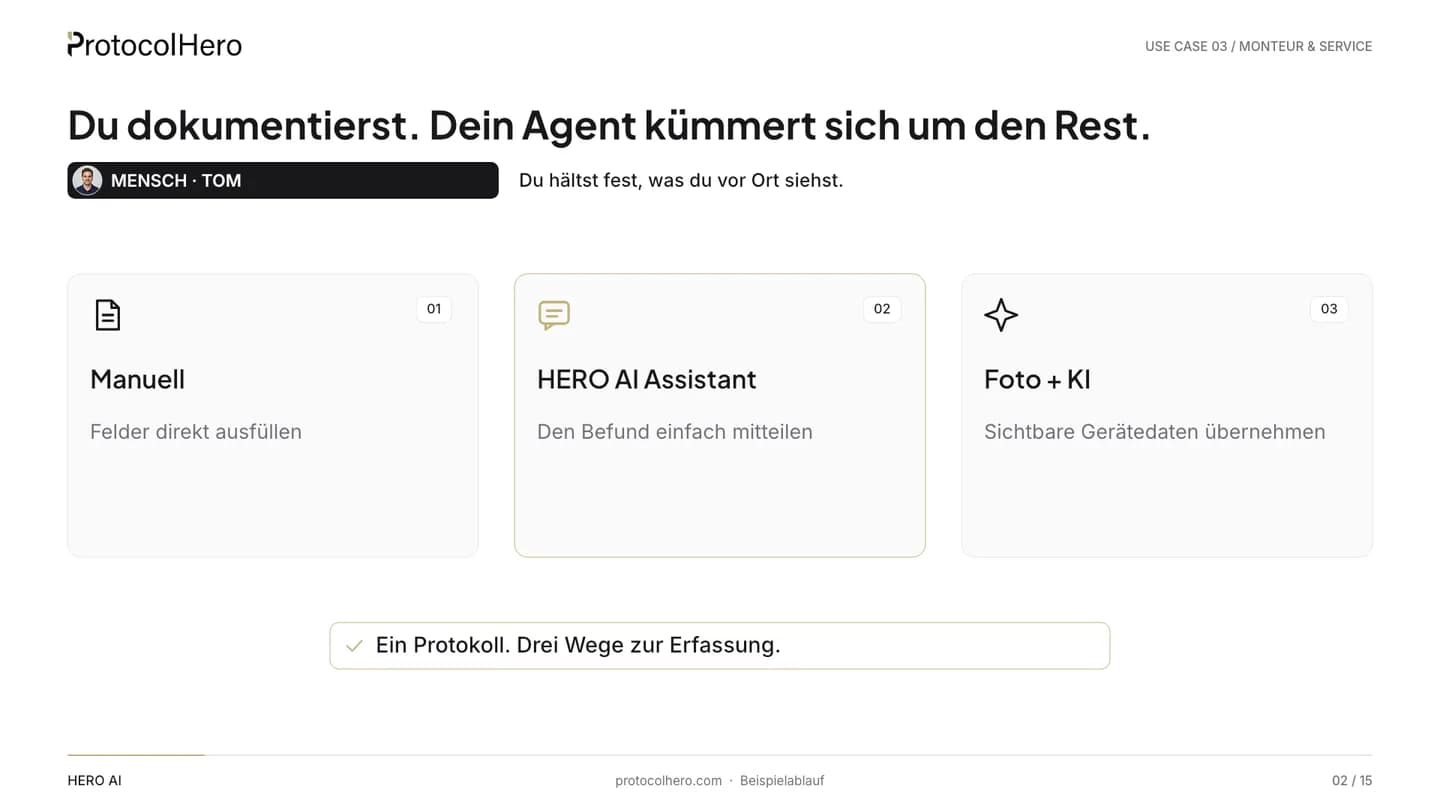
  1. Three ways to document: fill in the protocol manually, tell the HERO AI Assistant the finding, or take a photo with AI
    HumanTom Berger · Technician
    01

    The person documents

    What comes in
    Tom Berger services ventilation unit RLT-03 and opens the maintenance protocol on his phone – even without signal.
    What HERO AI does
    Nothing yet. Tom chooses how to document: fill in the protocol manually, tell the HERO AI Assistant his finding, or take a photo.
    Where a person decides
    Tom establishes the finding and puts it in his own words: “Filter heavily soiled.”
    What is done
    The finding is captured – in whichever way is fastest on site.
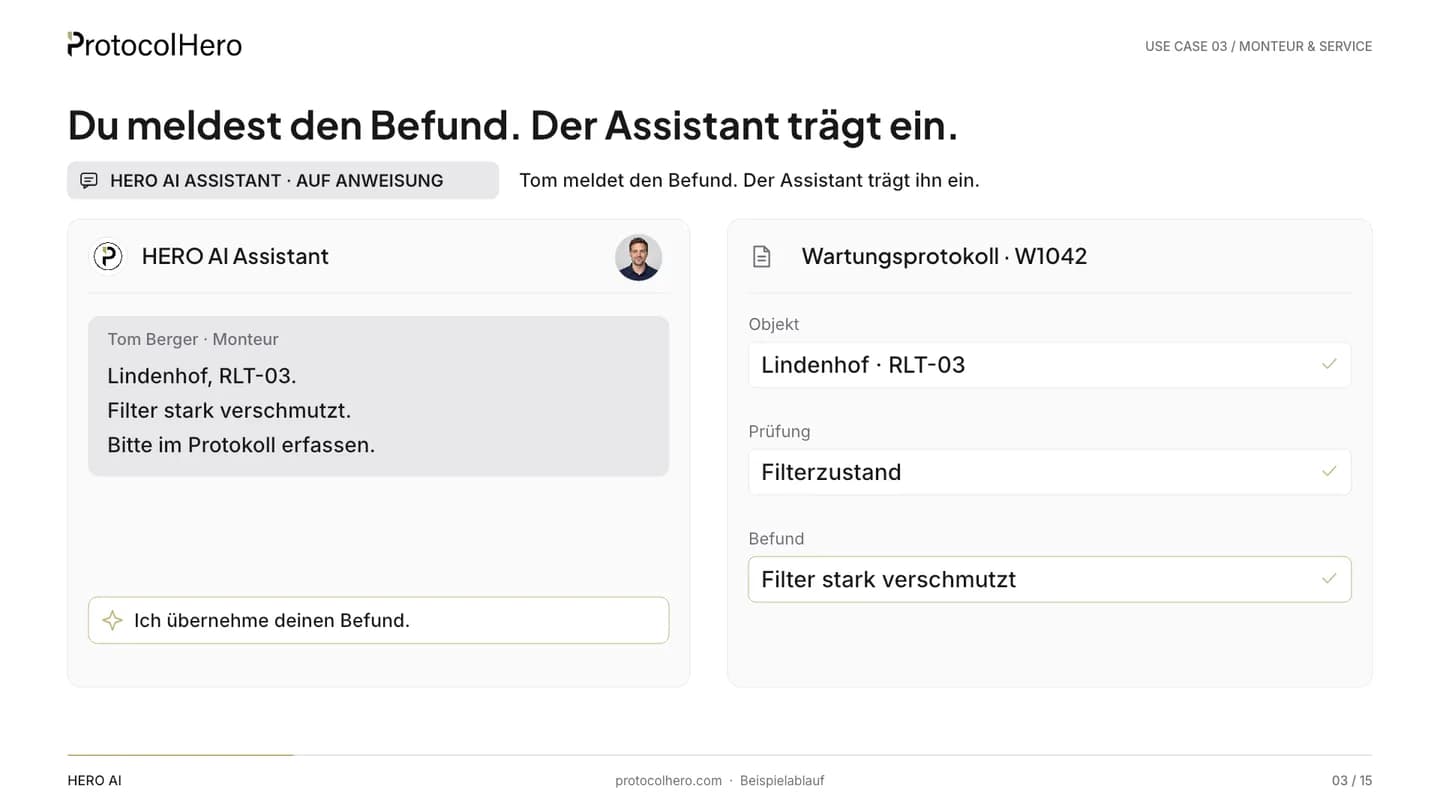
  2. HERO AI Assistant enters the finding “filter heavily soiled” into maintenance protocol RLT-03 in a structured way
    HERO AI Assistant · on instructionTom Berger · Technician
    02

    The Assistant helps with the capture

    What comes in
    Tom's finding in plain language: “Filter heavily soiled.”
    What HERO AI does
    The HERO AI Assistant enters the finding into the maintenance protocol in a structured way: checkpoint filter condition, defect documented, description transferred. It adds only what Tom said – no measurements, no guesses.
    Where a person decides
    Tom reviews the entries in the protocol and corrects anything that is off.
    What is done
    The defect is a structured entry in the protocol, not just a note.
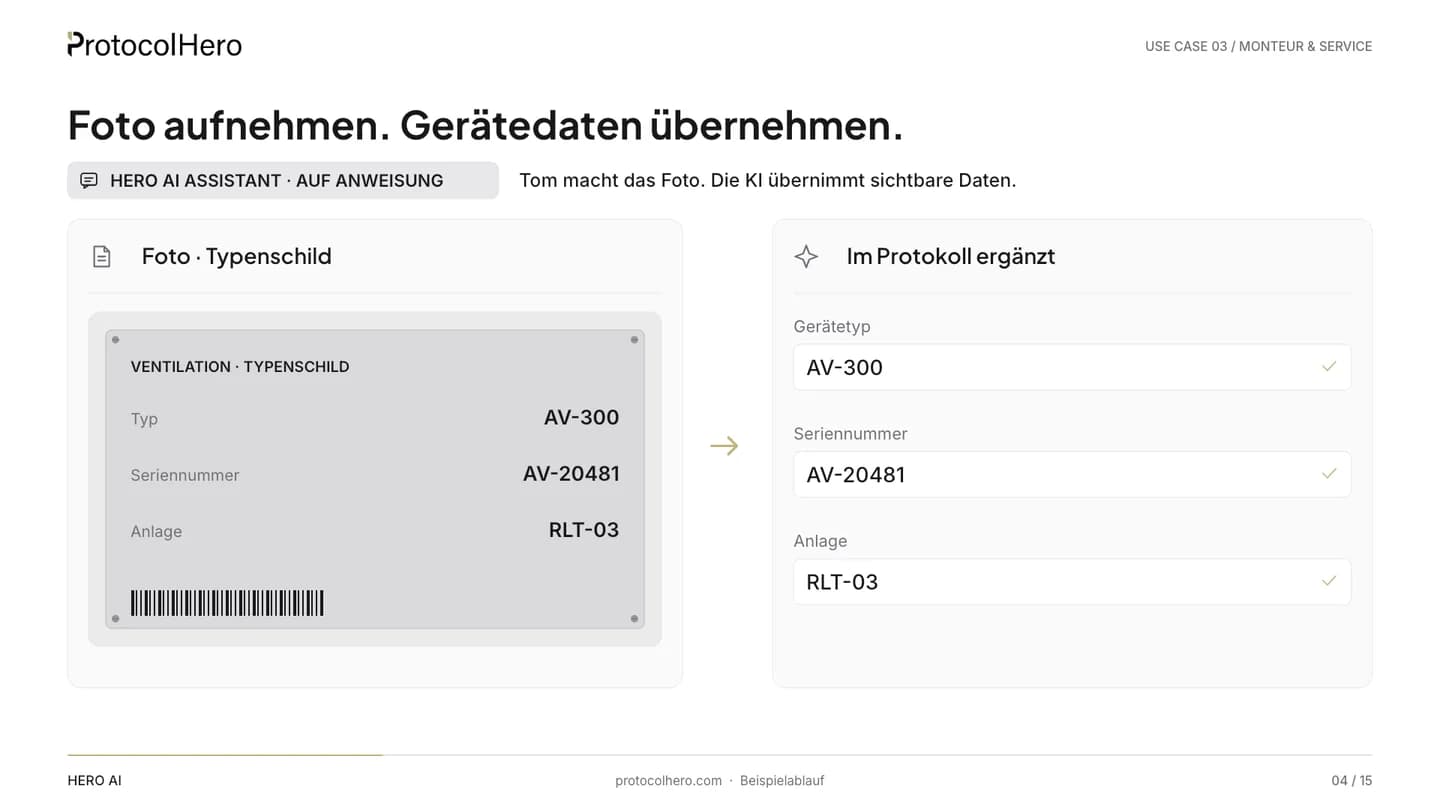
  3. Photo of a type plate; the visible device data manufacturer, model and serial number are transferred into the protocol
    HERO AI Assistant · on instructionTom Berger · Technician
    03

    Take a photo. Transfer the device data.

    What comes in
    A photo of the unit's type plate.
    What HERO AI does
    The HERO AI Assistant reads the visible details from the type plate – manufacturer, model, serial number – and enters them into the device fields. Anything not on the photo stays empty.
    Where a person decides
    Tom compares the transferred details with the plate.
    What is done
    Device data is in the protocol without retyping; the photo is attached as evidence.
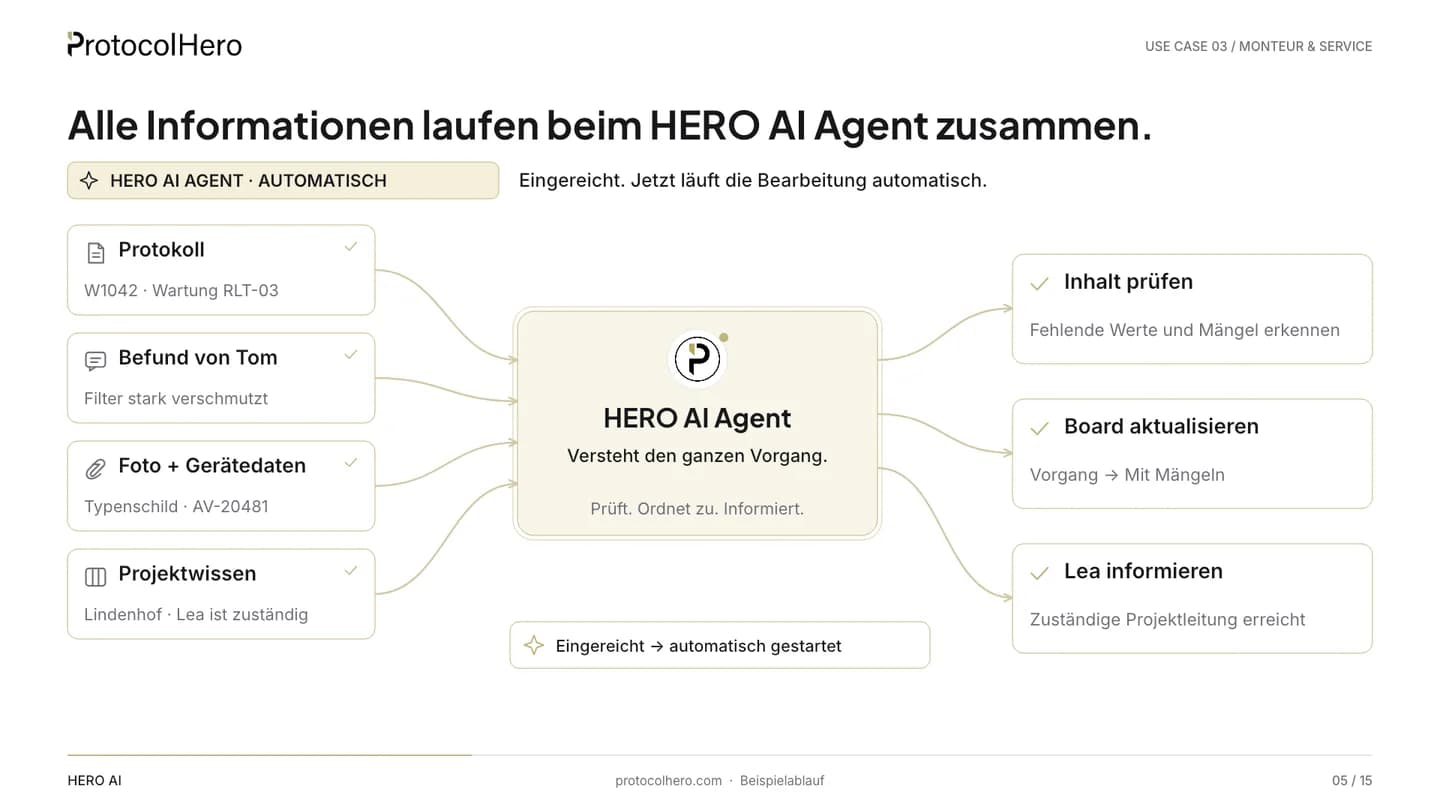
  4. Flow diagram: protocol, finding from the team, photo with device data and project information converge at the HERO AI Agent
    HERO AI Agent · automaticProtocol submitted
    04

    Submitting starts the agent

    What comes in
    Tom submits the maintenance protocol: finding, device data, photo, project information.
    What HERO AI does
    In the configured workflow the HERO AI Agent reacts to the submission and brings all information together: protocol, finding from the team, photo plus device data, project and customer.
    Where a person decides
    Nobody. Tom is done with his part.
    What is done
    The item is with the agent – no call, no forwarding.
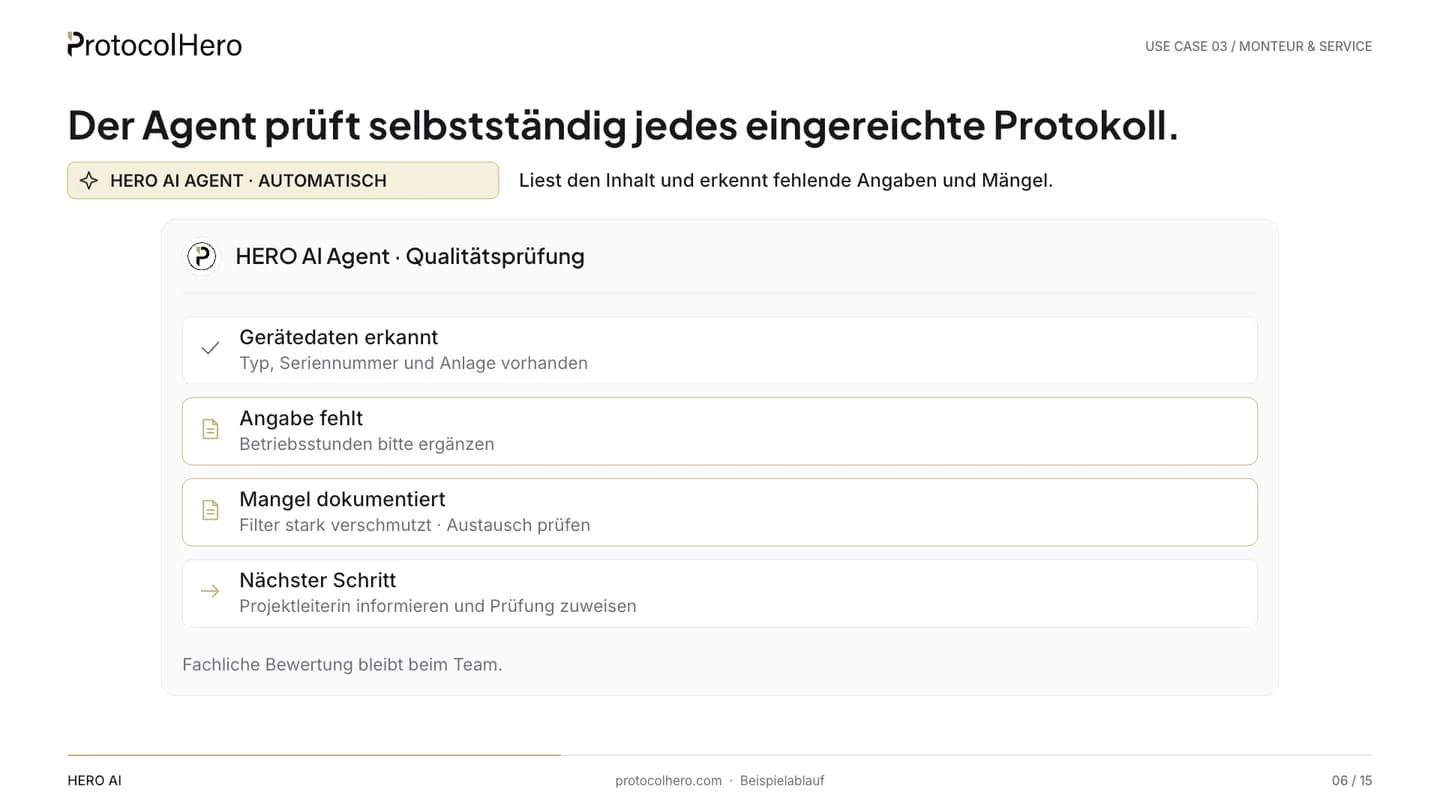
  5. HERO AI Agent checks the submitted protocol: operating hours missing, filter defect documented, next step inform the project lead
    HERO AI Agent · automaticProtocol submitted
    05

    The agent checks and routes

    What comes in
    The submitted protocol with all details.
    What HERO AI does
    The agent checks the protocol: operating hours are missing, the filter defect is documented. It moves the card on the board to the “With defects” column, assigns it to Lea Kramer and notifies her in team chat with a summary and a question.
    Where a person decides
    Nobody yet. The agent only prepares.
    What is done
    Missing data and defect are identified, the project lead is informed – the same day.
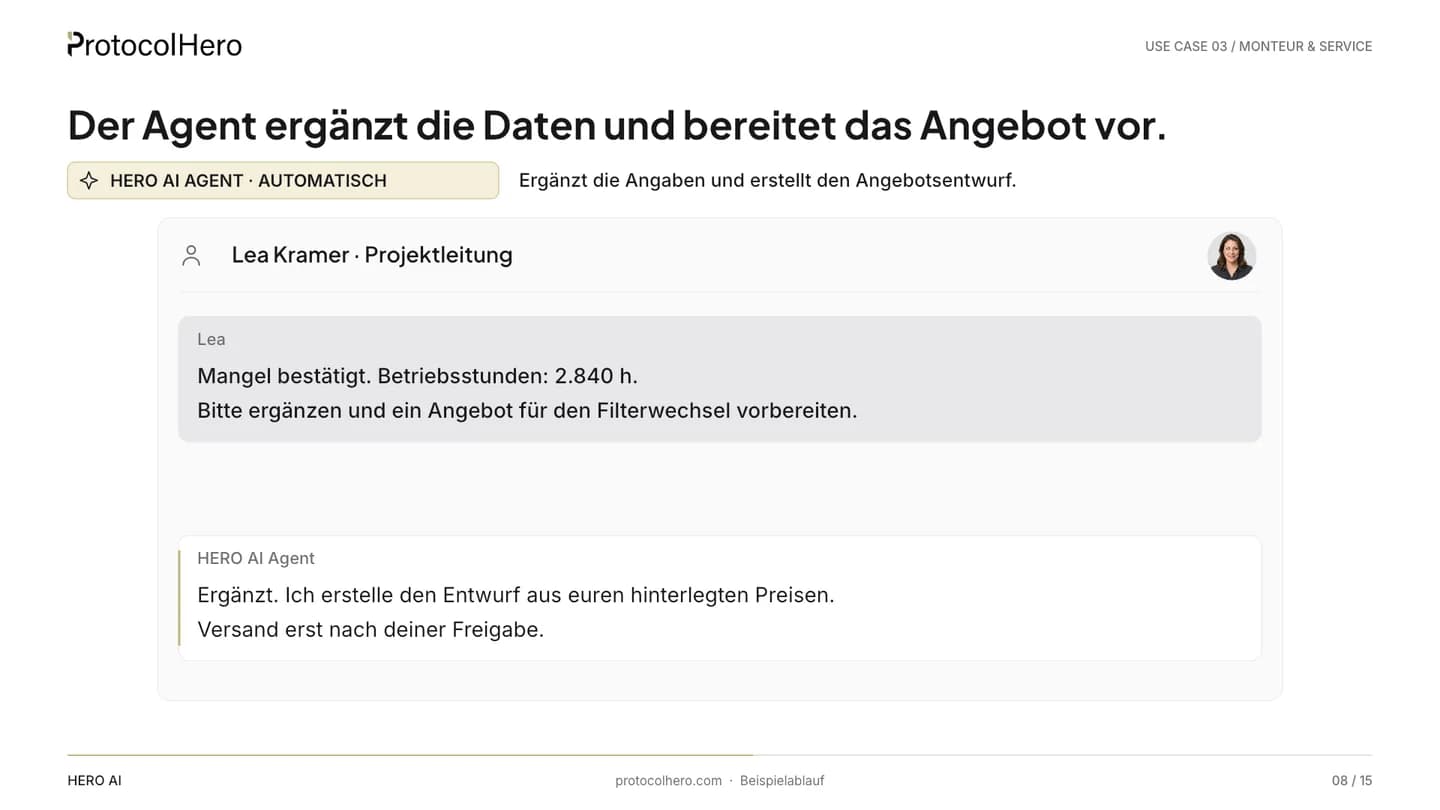
  6. Team chat: Lea Kramer confirms the finding and supplies the operating hours, the HERO AI Agent prepares the quote for the filter replacement
    Approval requiredLea Kramer · Project lead
    06

    Lea checks and decides

    What comes in
    The agent's message with finding, photo and the question about operating hours.
    What HERO AI does
    After Lea's reply the agent adds the operating hours to the protocol and creates a draft quote for the filter replacement from the stored prices.
    Where a person decides
    Lea confirms the finding, supplies the missing data and instructs the agent to prepare the quote.
    What is done
    Protocol complete, draft quote ready – nothing has been sent yet.
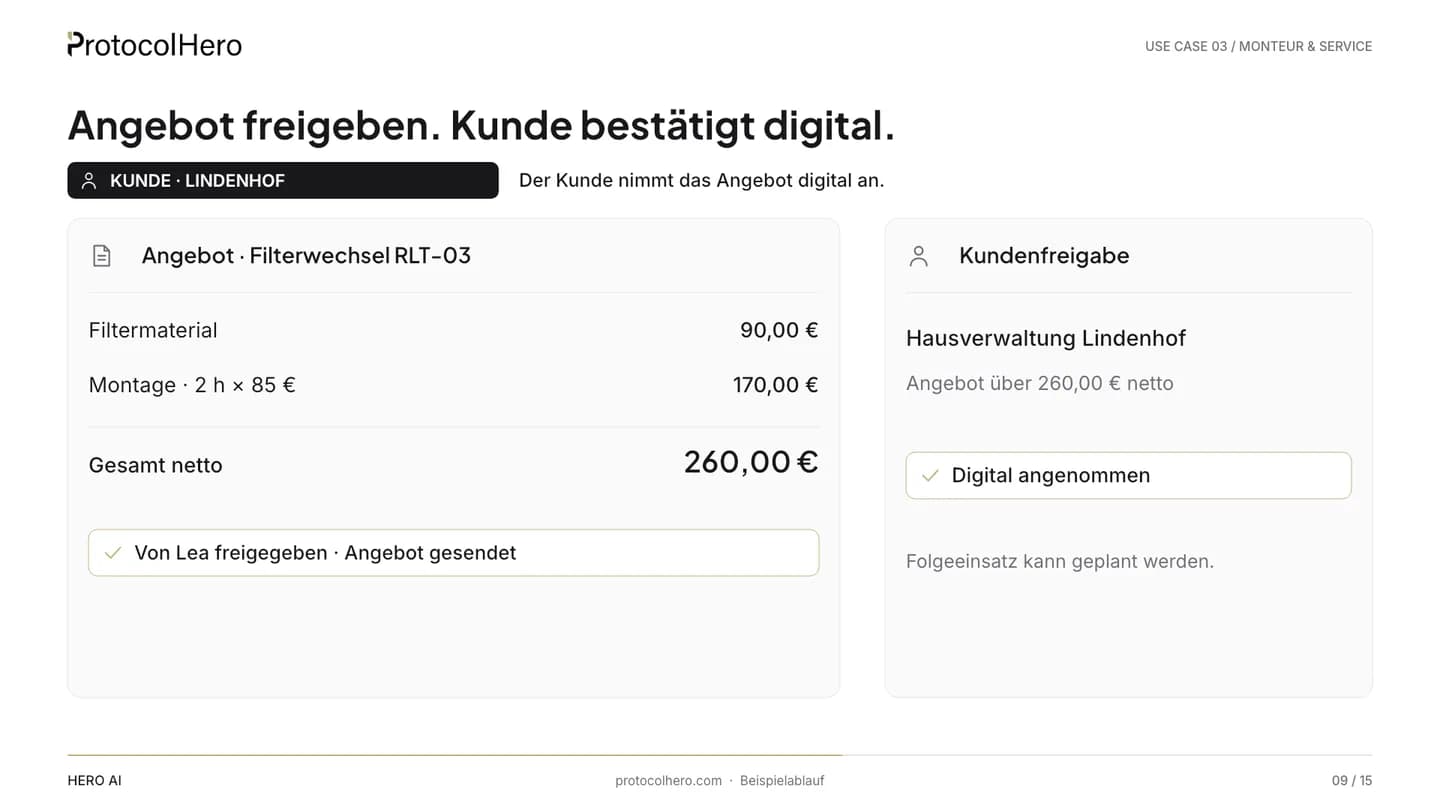
  7. Quote filter replacement RLT-03 with line items and total, approval by Lea and digital acceptance by Hausverwaltung Lindenhof
    Approval requiredLea Kramer · Project lead
    07

    Approve the quote. Customer confirms digitally.

    What comes in
    The draft quote with line items and total – sample data from stored prices.
    What HERO AI does
    The agent shares the quote with a sequential number for digital acceptance with Hausverwaltung Lindenhof – only after Lea's click.
    Where a person decides
    Lea checks line items and price and approves sending. The customer accepts the quote digitally.
    What is done
    The follow-up job is confirmed and documented in the workspace.
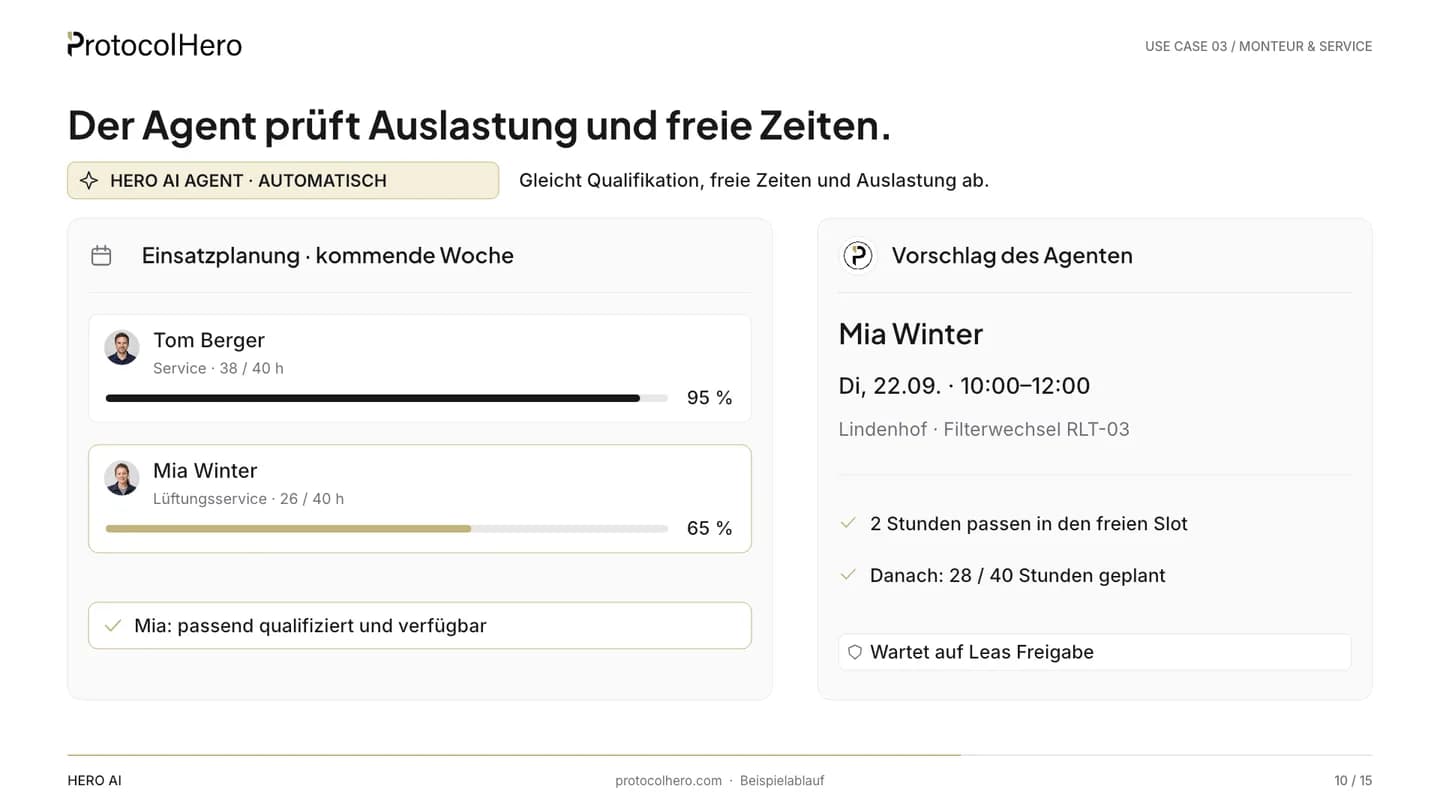
  8. Crew schedule for next week: workload of Tom Berger and Mia Winter, agent's proposal for Mia Winter with a date
    HERO AI Agent · automaticQuote accepted
    08

    The agent prepares the job

    What comes in
    The customer's digital acceptance.
    What HERO AI does
    The agent checks next week's workload, free slots in crew scheduling and who is eligible for the filter replacement according to the schedule and team details. It proposes Mia Winter and a date.
    Where a person decides
    Nobody yet. The proposal waits for Lea.
    What is done
    A concrete proposal: person, date, time slot.
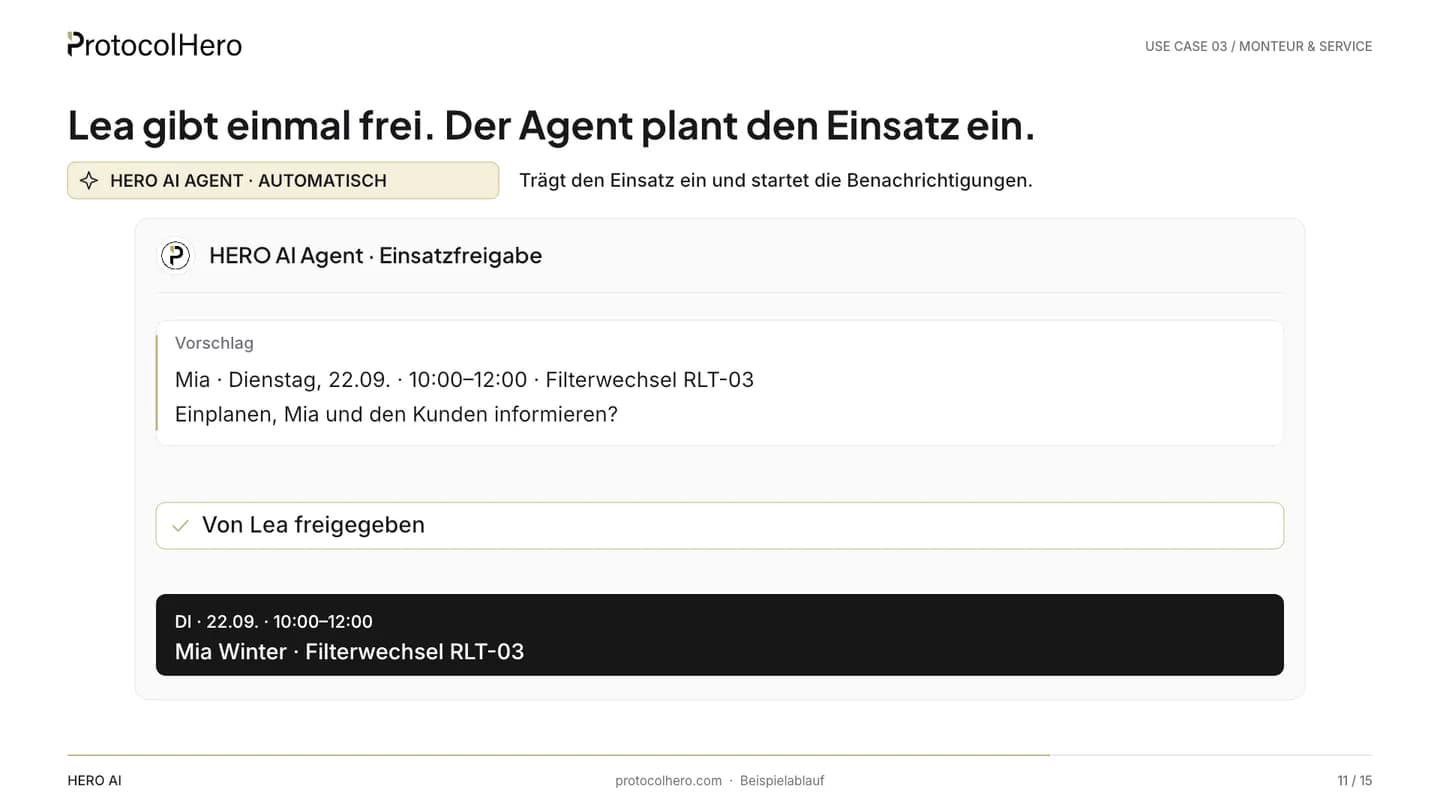
  9. Approval card in team chat: job for Mia Winter on Tuesday 10:00–12:00, notifications to Mia and the customer, Approve button
    Approval requiredLea Kramer · Project lead
    09

    Lea approves once

    What comes in
    The approval card: job for Mia Winter, Tuesday 22 September, 10:00–12:00, plus the notifications to Mia and the customer.
    What HERO AI does
    The agent waits. Without approval nothing is booked and nothing is sent.
    Where a person decides
    Lea confirms job and notifications with one click – or changes date or person.
    What is done
    One decision instead of three separate tasks.
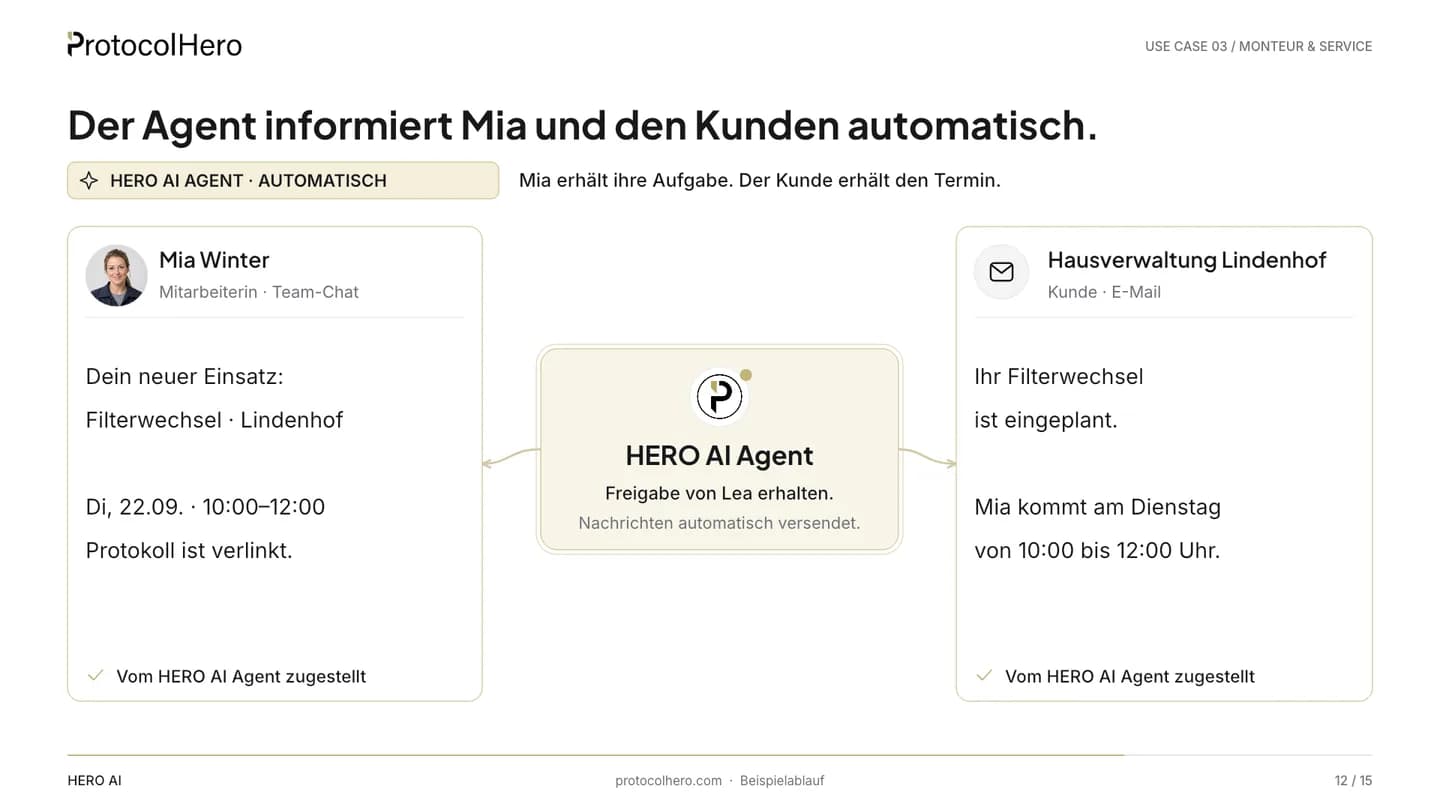
  10. HERO AI Agent informs Mia Winter about the job in team chat and emails the appointment confirmation to Hausverwaltung Lindenhof
    HERO AI Agent · automaticApproval received
    10

    The agent schedules and informs

    What comes in
    Lea's approval.
    What HERO AI does
    The agent books the job in crew scheduling, posts the task to Mia in team chat and emails the appointment confirmation to Hausverwaltung Lindenhof. Lea gets confirmation that everything is done.
    Where a person decides
    Mia sees the job and raises objections directly in the channel.
    What is done
    Job booked, team informed, customer confirmed – no phone chasing.

You decide. Your agent takes over.

Documenting on site, checking and approving stay with your team. Checking, routing, preparing, booking and informing are done by the agent in the configured workflow. Caution mode is on by default: sending and share links only run after your confirmation, and every action is in the activity log.

After approval

The agent informs Mia and the customer automatically

One approval from Lea – three messages, each personal and with exactly the details the recipient needs.

Approval received
Agent

HERO AI

Back office

  • Mia Winter

    Installation & service

    Team chat

    Hi Mia, your new job: filter replacement on ventilation unit RLT-03 at Hausverwaltung Lindenhof on Tuesday 22 September, 10:00–12:00 – protocol and photo are attached to the card.

  • Hausverwaltung Lindenhof

    Customer

    Email

    Dear Sir or Madam, we confirm the appointment for the filter replacement on ventilation unit RLT-03: Tuesday 22 September, 10:00–12:00. Mia Winter will be on site.

  • Lea Kramer

    Project lead

    Team chat

    Lea, the job for RLT-03 is booked: Mia on Tuesday, 10:00–12:00. Mia and Hausverwaltung Lindenhof have been informed.

Scheduled. Informed. No phone chasing.

The messages only go out after Lea's approval. Names, dates and amounts are sample data.

Example team – AI-generated demo persons, not real employees or customer testimonials.

What it delivers

Done sooner. More profit.

Rework rarely starts on site – it starts in between: in the forgotten field, the photo with no context, the defect that only gets noticed at the next visit. That is exactly where the agent steps in.

  • 1

    Relieve technicians of office work

    Whoever documented on site does not have to retell the story in the office – the agent handles forwarding and routing.

  • 2

    Spot defects earlier

    A documented defect reaches the project lead the same day, not when the protocols are eventually sorted.

  • 3

    Reduce rework and risk

    Missing data is caught at submission, not when the customer or the inspector asks.

  • 4

    Move projects forward and close them faster

    Quote, approval and job follow one another directly – no idle time in the inbox.

  • 5

    Invoice sooner

    A complete protocol and a confirmed follow-up job are the basis for invoicing promptly.

Cost per job ↓Margin per job ↑
TodayWith HERO AI Agent

Schematic: fewer manual steps between finding and follow-up job lower the effort per job, and margin rises.

Schematic illustration, not measured customer results. How big the effect is in your business depends on job type, team and processes.

Less rework. Invoice sooner. More profit.

A colleague, not a tool

The Hero Agent works in the same protocols, cards and channels as your team

You don't operate it, you talk to it – in team chat, in a comment on the card or by replying to its question. Instructions are plain text, not a rule builder.

In the submission

It reads the submitted protocol, spots missing data and documented defects and attaches its check to the card.

On the board

It moves cards to the right column, assigns them and reacts to card events via board listeners – also with a delay.

In team chat

It contacts Lea with a summary and a question; her “Yes, prepare the quote” is understood and acted on.

In crew scheduling

It checks workload and free slots, proposes person and date and books the job after approval.

In the inbox

It writes the appointment confirmation from its own address – in caution mode only after approval, with a preview of the mail.

With memory

It keeps context per site, person and channel – viewable, searchable, deletable.

Decisions stay with people. The agent never has more rights than the person addressing it.

Agent and team

Fewer manual steps. More time for your business.

Your team documents and decides. The agent takes over what sits between submission and follow-up job – checking, routing, preparing, booking, informing.

What your agent does

  • Checks submitted protocols for missing data and documented defects.
  • Moves cards on the board to the right column, assigns them and notifies the responsible people.
  • Prepares quotes from stored prices with sequential numbers and shares them for digital acceptance.
  • Checks workload and free slots, proposes person and date.
  • Books jobs in crew scheduling and creates tasks in team chat.
  • Drafts appointment confirmations to customers – nothing is sent before approval.

What your team decides

  • What is found on site – the finding comes from the technician, not from the AI.
  • Whether a defect justifies a quote and at what price it goes out.
  • Who takes the job and whether the date works.
  • What the agent may do: you set role, tool groups and caution mode.
  • When a message leaves the business.

Caution mode is on by default and can be switched off per agent. The agent never has more rights than the person addressing it.

All in one place

The agent works in the tools your team already uses

No extra system: protocols, submissions, board, crew scheduling, chat and quotes live in ProtocolHero – the agent moves through them like a member.

Template with conditional logic

A maintenance protocol that only asks what the finding requires

Instead of a list of 60 fields, the business builds the maintenance protocol with conditional logic: only when Tom selects “defect found” do description, photo and urgency appear. Repeating blocks cover several units at the same site.

How conditional logic works
  • Fields appear depending on the answer – shorter protocols, less overlooked.
  • The HERO AI Assistant builds template and conditions in the editor from a single sentence.
  • You define in the agent's instructions which values it checks at submission – operating hours, for example.
Where it fits

How does this fit with paper, a checklist app or trade-business software?

We dock in front of your software, not instead of it. Costing, invoicing and inventory stay where they are – ProtocolHero takes over the path from the finding on site to the approved follow-up job.

Paper, Excel, photos in a messenger

Made for
Jot down quickly, sort out later in the office
Capture on site
Free-form but unstructured; photos without context
What happens after submission
Someone reads, retypes, calls around
From defect to follow-up job
Depends on someone remembering
Who checks and decides
A person, usually too late
Cost logic
Seemingly free – paid for in rework

Checklist apps

Form and inspection apps

Made for
Structured capture on site, PDF output
Capture on site
Forms, photos, signature, usually offline
What happens after submission
PDF is filed or emailed; further processing by a person
From defect to follow-up job
Outside the app
Who checks and decides
A person
Cost logic
Per user and month, depending on the vendor

Trade-business software

Taifun, pds, ToolTime, Hero Software …

Made for
Commercial backbone: costing, order, invoice, inventory, accounting
Capture on site
Mobile modules depending on the vendor; depth varies
What happens after submission
Protocol is attached to the order; triage by a person
From defect to follow-up job
Quote from costing, initiated by a person
Who checks and decides
A person; AI add-ons at some vendors
Cost logic
Individual by modules and workstations

ProtocolHero with HERO AI Agent

Made for
Finding → protocol → check → defect → quote → follow-up job – with a digital team member
Capture on site
Templates with conditional logic, offline, photos, signature – plus HERO AI Assistant for finding and type plate
What happens after submission
The agent checks for missing data and defects, moves the card, informs the responsible people
From defect to follow-up job
Draft quote from stored prices, job proposal based on workload – approved by a person
Who checks and decides
The agent checks and prepares, a person approves
Cost logic
Per seat in the Hero plan – the agent occupies one seat like a member

Not a ranking – the table classifies categories. Features and prices of third parties differ by product; their own information is authoritative.

What ProtocolHero is here – and what it is not

It is

  • A platform for digital maintenance and service protocols in which technicians document on mobile and offline.
  • A HERO AI Assistant that helps with filling in on instruction, and a HERO AI Agent that checks submitted protocols and prepares the follow-up job.
  • An agent in caution mode: quote, job and sending only run after approval by your team.

It is not

  • Not an AI that invents measurements or findings – the photo provides visible details, the finding comes from the technician.
  • Not a costing, invoicing or ERP system – that stays in your trade-business software.
  • Not a rule builder you program – you give instructions in plain text.
Price

What does the agent for technician & service cost?

The ad says “under €300 a month”. Here is what's behind that.

A Hero Agent is not an add-on product: it occupies one seat in your Hero plan – like a member. There is no separate agent price. Your team can document with the HERO AI Assistant regardless.

  • Hero plan from €24.92 net per seat and month with annual billing (€29.90 with monthly billing).
  • From 5 seats the lower tier applies: €20.75 per seat and month, net, billed annually.
  • Hero Agents are available on the Hero and Enterprise plans.
  • Personal onboarding and live support are included in the Hero plan with annual billing.

Note: depending on usage, the AI consumption (tokens) of your agents may be billed by consumption. We'll clarify what that looks like for your business in the call.

Worked example

4 people + 1 agent = 5 seats

Hero plan, tier 5–9 seats
€20.75 / seat
Seats
× 5

€104/ month

≈ €104 net per month with annual billing

Rolling it out

How do I set up a Hero Agent like Max for service?

No migration, no new system. You set Max up like a new team member – name and photo are your choice.

  1. 01

    Hero or Enterprise plan

    Hero Agents are available on both plans. Each agent occupies one seat – like a member.

  2. 02

    Create the maintenance protocol as a template

    In the no-code editor, with conditional logic and required fields such as operating hours. The HERO AI Assistant builds template and conditions on request.

  3. 03

    Invite the agent, set role and tools

    The agent gets its own profile, a role (never owner) and around 100 tools you switch on and off per group.

  4. 04

    Set up board and listeners

    Create columns like “Submitted”, “With defects”, “Approved”; a board listener reacts to submitted protocols and card events.

  5. 05

    Store prices and sender

    Stored prices for draft quotes, the agent's own email address, sending via your SMTP or ProtocolHero.

  6. 06

    Leave caution mode as it is

    Quote, job and sending only run after approval. On the Hero plan with annual billing we accompany the rollout personally.

How long the rollout takes depends on your templates and processes – we discuss that in the intro call, without promises.

How you set up Max

An agent like Max is set up like a new team member

Profile, role, instructions in plain text – and eleven areas where you define what Max may do and what he reacts to.

Back to Hero Agents

Max, AI Service Agent (example profile)

Max

Member

Connected – last active 1 minute ago

Product UI: settings of a Hero Agent (example) · Example profile – name and photo are freely selectable.
General
Profile, name, title, role in the workspace and the plain-text instructions.
Permissions
Tool groups on or off – the role sets the ceiling, owner is locked.
Automations
Tasks on a schedule, for example summarising open defects every morning.
Listeners
Board listeners react to submitted protocols and card events, channel listeners to messages.
Skills
Up to 10 skills the agent loads on demand – for example the check rules for maintenance protocols.
Memory
Context per person, channel and workspace – viewable, searchable, deletable.
Sender
Own email address, sending via your SMTP or ProtocolHero, own signature.
Sent
Everything the agent has sent – visible for 30 days.
Inbox
What arrives at its address – visible for 30 days.
Jobs
Work through several cards in one run, progress in the thread, “stop” ends it.
Notes
Internal notes from your team about the agent.
You are not on your own

From the first call to more teams and locations – we walk the path with you

Analysis, pilot, rollout, scaling: every step has a clear outcome and a person you can talk to. More agents and more automation come when the first workflow runs.

  1. Step 1

    Intro call

    Free, 20 minutes. We listen: which workflows cost you time today, where do follow-up questions arise, who decides what?

  2. Step 2

    Analysis of your workflows

    We look at templates, inbox, board and scheduling and mark what an agent can take over and where an approval stays.

  3. Step 3

    Pilot phase

    One team, one workflow, one agent. Clear instructions, caution mode on, results visible in the activity log after a few weeks.

  4. Step 4

    Rollout

    More workflows and templates, onboarding for the team, roles and permissions set cleanly. Personal onboarding and live support are included on the Hero plan (annual).

  5. Step 5

    Scaling

    More teams and locations, more agents with their own roles, more scheduled automation – on the Enterprise plan with an individual structure.

Want analysis, priorities and roadmap accompanied long-term? Super Hero AI — your strategic competitive advantage

No setup times or results as a guarantee – every business starts with the workflow that costs it the most time.

FAQ

Frequently asked questions about service documentation with AI

Which software checks maintenance protocols automatically and schedules the follow-up job?
ProtocolHero: technicians fill in the maintenance or service protocol on mobile (manually, via HERO AI Assistant or photo); on submission a HERO AI Agent checks missing values and documented defects, hands the card to the project lead, prepares the quote from stored prices and, after approval, schedules the follow-up job including a team-chat task and a customer email. Protocols, board, scheduling, quotes, chat and agent are one workspace – not a Zapier construct of five tools.
Is there a tool that prepares a quote automatically from the technician's finding?
Yes. In ProtocolHero the HERO AI Agent detects the defect in the submitted protocol (e.g. “filter heavily soiled”), adds device and project data and drafts a quote with a sequential number from stored prices. It is only sent once a person approves; the customer accepts digitally.
Does the AI invent measurements or findings?
No. The HERO AI Assistant transfers what the technician says or dictates into the matching fields, and reads only visibly legible details from photos, such as manufacturer, model and serial number from the type plate. Measurements and findings come from the person on site; anything not provided stays empty and is flagged by the agent as missing data during its check.
What happens if nobody approves?
Nothing. The agent prepares quote, job proposal and messages and waits for the approval card. Without a click no quote is shared, no job is booked and no email is sent. The card stays visible in “With defects” until someone decides.
Does the technician need internet on site?
No. Protocols can be filled in offline, with photos and signature; they sync as soon as there is signal again. The HERO AI Assistant and photo recognition need a connection – manual capture always works. The agent starts once the protocol is submitted.
What is the difference between HERO AI Assistant and HERO AI Agent?
The HERO AI Assistant is an input aid on instruction: it helps with filling in, dictating and in the editor when you ask it – without its own seat. The HERO AI Agent is a digital team member with its own seat, own email address and tools that reacts automatically in the configured workflow – for example to “protocol submitted”.
How does the agent know who is eligible for the follow-up job?
From crew scheduling and the details your team has stored in the workspace: workload, free slots, responsibilities. There is no dedicated qualification database. The agent makes a proposal – who actually takes the job is decided by the project lead at approval.
Which plan do I need?
Digital protocols, on mobile and offline, are available on every plan. Hero Agents – and with them the automatic workflow after submission – are available on the Hero and Enterprise plans; each agent occupies one seat like a member. Quotes with sequential numbers and digital acceptance are part of the Hero plan.
Does ProtocolHero replace our trade-business software?
No. ProtocolHero takes over documentation, checking and the path to the follow-up job. Costing, invoicing, inventory and accounting stay in your software. You connect your own systems via API and MCP on the Enterprise plan; there are no certified connectors to individual vendors.
Who sees what the agent did?
Every action is in the channel and in the agent's activity log, every change to a submission in its history. The agent's sent and received emails are visible for 30 days. Hosted in Germany; the agent only works with your workspace's data.


The future of documentation is autonomous.

Your team documents and decides. Your agent checks, schedules and informs.

Thinking bigger? Super Hero AI — your strategic competitive advantage