Your full-time digital colleague in the office.
Hero Agent

Office automation with AI: an agent that works through your inbox – and lets you decide.

More than 100 emails a day, and each one needs a next step: quote, appointment, follow-up, protocol. A Hero Agent takes over these steps directly in ProtocolHero – with its own email address, its own seat in the team and one rule: nothing is sent before you approve.

ProtocolHero is a workspace for documentation, calendar, tasks, chat and quotes in which Hero Agents take over office work as digital team members – email handling, the quoting process and order fulfilment – with approval by people.

Example workflow with fictional names and figures. The video shows how a Hero Agent takes a customer enquiry all the way to the finished installation protocol.

Example workflow · 60 seconds

A Hero Agent takes 128 emails to a signed order – explained in 60 seconds

The info@ inbox distributes incoming mail to Hero Agents for service, sales and HR. One enquiry becomes a quote, a scheduled job and an installation protocol – the agent works, your team decides. No sound.

How it works

Six steps from customer enquiry to installation protocol – the agent does the work, a person decides

The workflow from the video, step by step. Fictional job: replace 24 luminaires in hall 3.

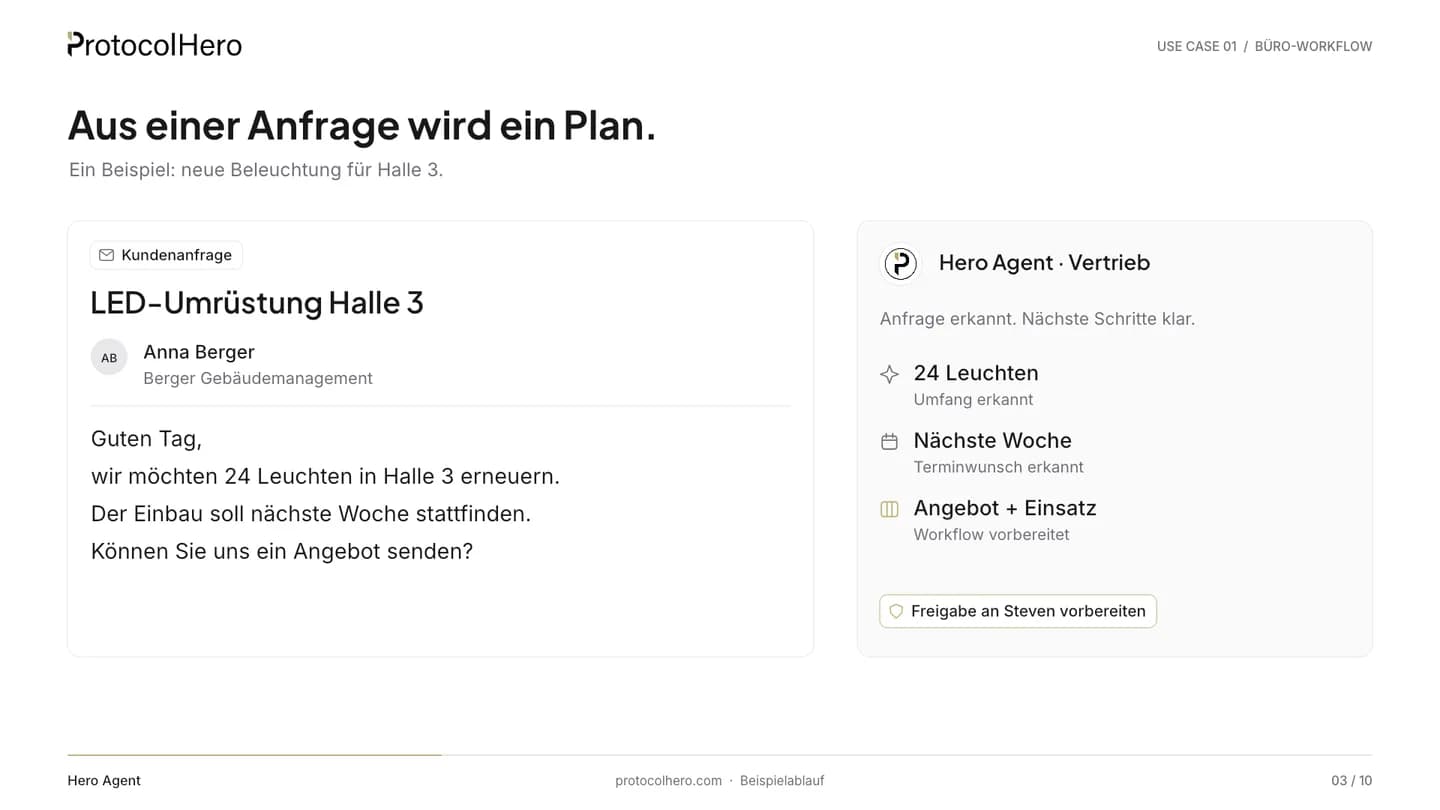
  1. Sales Hero Agent classifies a customer enquiry: 24 luminaires, preferred date next week, quote and job
    01

    An enquiry arrives – the agent reads along

    What comes in
    Email from Anna Berger, Berger Gebäudemanagement: replace 24 luminaires in hall 3, installation next week, quote requested.
    What the agent does
    The sales Hero Agent reads the mail in the channel and recognises scope (24 luminaires), preferred date (next week) and the matching workflow: quote plus job.
    Where a person decides
    Nobody yet. The agent only prepares.
    What is done
    The enquiry is classified and an approval for Steven is prepared.
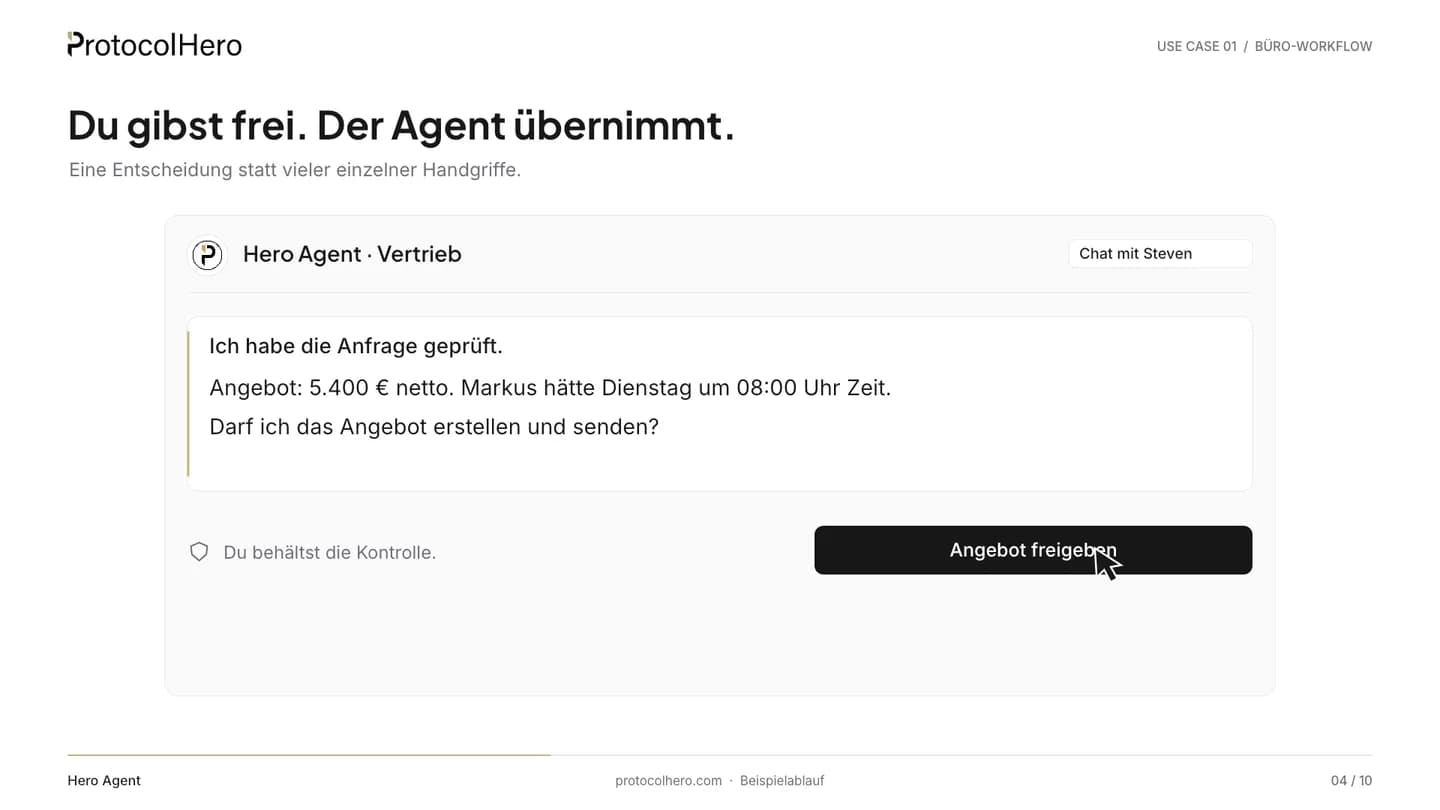
  2. Chat with approval card: Hero Agent asks whether it may create and send the €5,400 quote
    02

    You approve. The agent takes over.

    What comes in
    The prepared approval in chat: quote €5,400 net, Markus is free on Tuesday at 08:00.
    What the agent does
    The agent asks: “May I create and send the quote?” – and waits.
    Where a person decides
    Steven checks price and date and clicks “Approve quote”. Without that click, nothing happens.
    What is done
    Quote and job are approved.
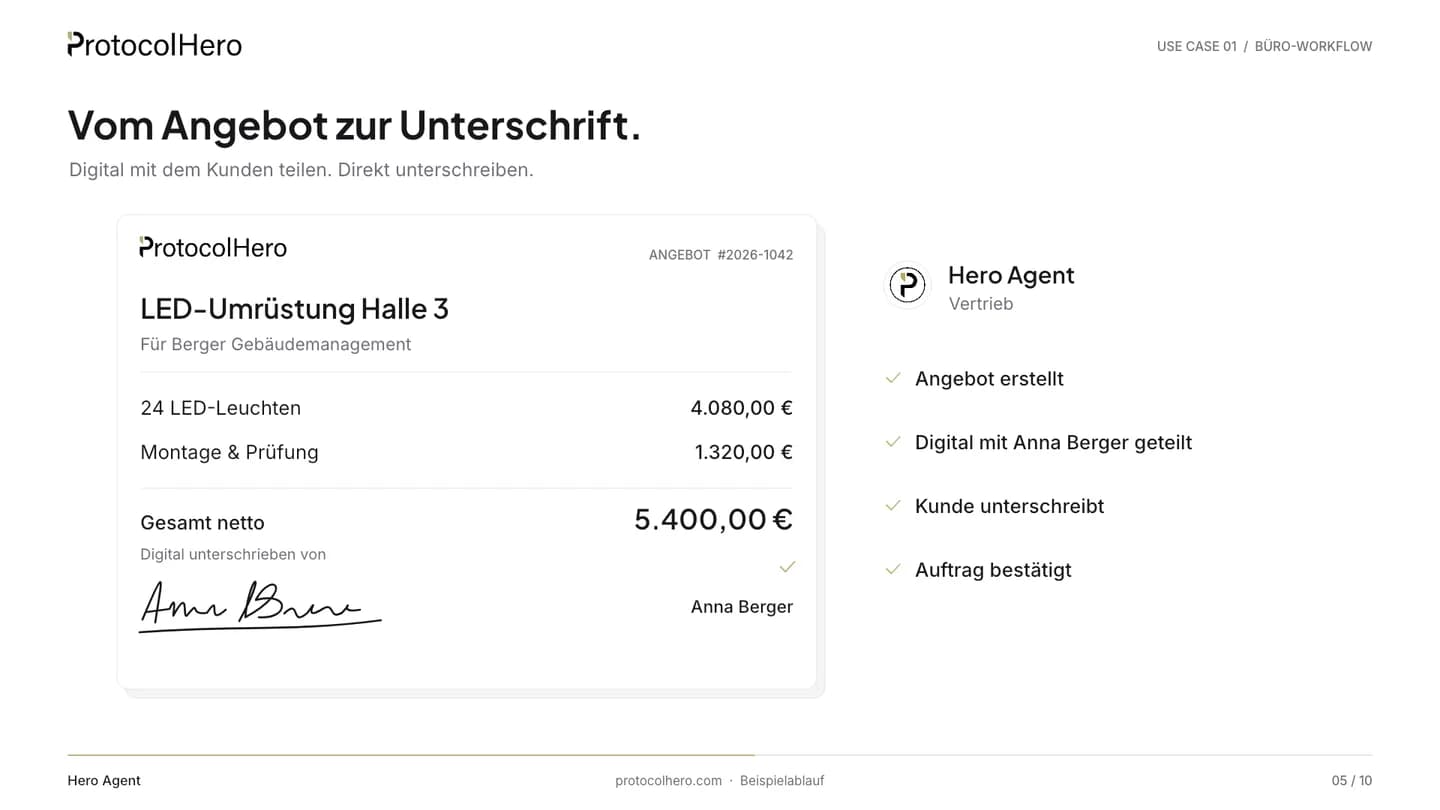
  3. Quote #2026-1042 LED retrofit hall 3 with line items, total €5,400 net and digital signature
    03

    From quote to signature

    What comes in
    Steven's approval.
    What the agent does
    The agent creates quote #2026-1042 “LED retrofit hall 3” – 24 LED luminaires €4,080, installation & testing €1,320, total €5,400 net – with a sequential number and shares it for digital signature.
    Where a person decides
    Anna Berger signs digitally.
    What is done
    The order is confirmed and the signed quote is stored in the workspace.
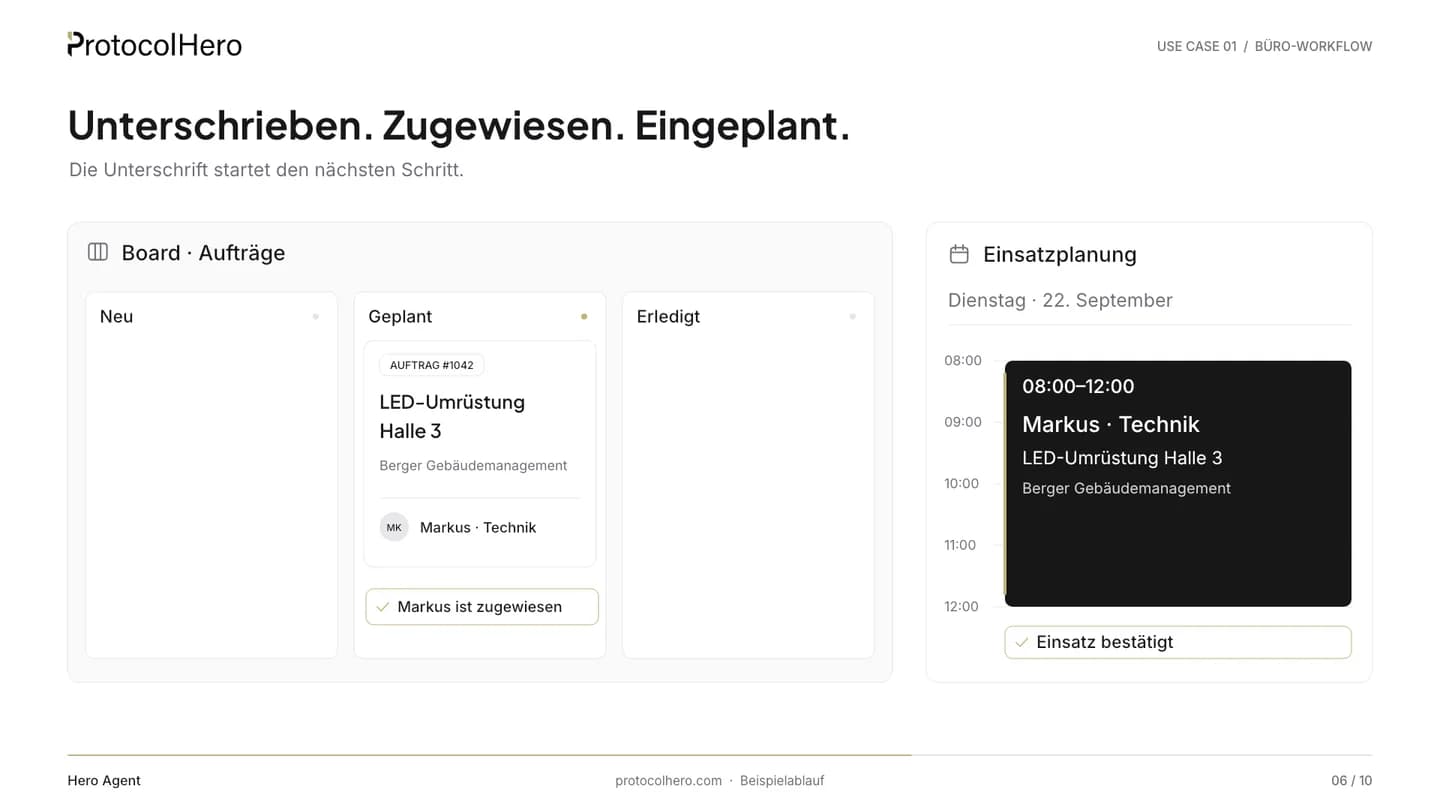
  4. Jobs board with card #1042 in the Scheduled column, assigned to Markus, and crew schedule for Tuesday 08:00–12:00
    04

    Signed. Assigned. Scheduled.

    What comes in
    The confirmed order.
    What the agent does
    The agent creates card #1042 on the “Jobs” board, moves it to “Scheduled”, assigns Markus (technical) and books the job in crew scheduling for Tuesday 22 September, 08:00–12:00.
    Where a person decides
    Markus sees the job in his calendar and raises objections directly in the channel.
    What is done
    Order, owner and date are in one place.
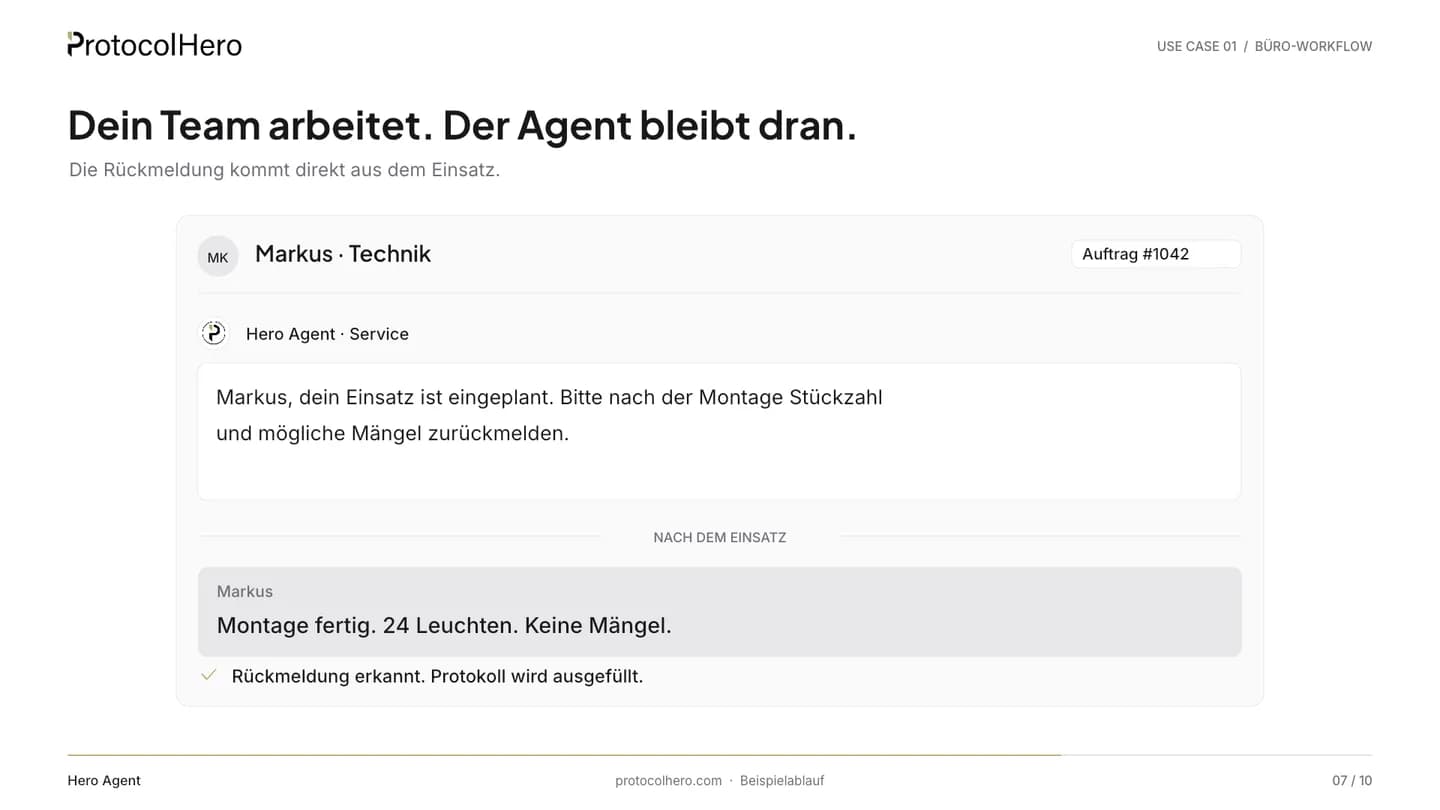
  5. Chat between service Hero Agent and technician Markus: installation done, 24 luminaires, no defects
    05

    Your team works. The agent stays on it.

    What comes in
    The day of the job.
    What the agent does
    The service Hero Agent asks Markus to report quantity and defects after installation. Markus replies in chat: “Installation done. 24 luminaires. No defects.”
    Where a person decides
    Markus does the work and reports back – in plain language, no form.
    What is done
    The report is recognised and the protocol is being filled in.
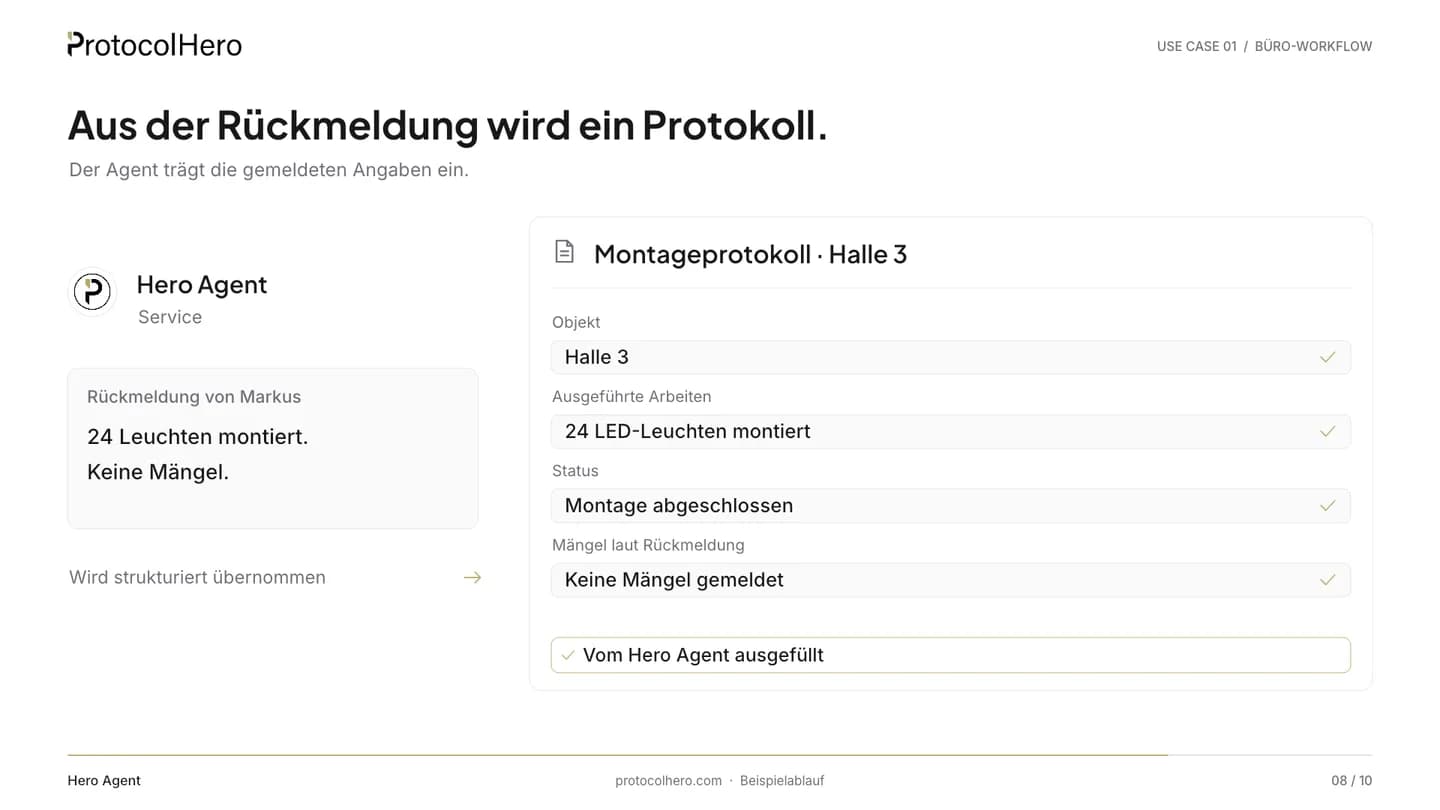
  6. Installation protocol hall 3, filled in by the Hero Agent: site, work, status, defects
    06

    The report becomes a protocol

    What comes in
    Markus's report.
    What the agent does
    The agent fills in the installation protocol for hall 3 – site, work, status, defects –, attaches it to the card, moves it to “Done” and prepares the reply to Anna Berger with the PDF.
    Where a person decides
    In caution mode the reply is only sent after approval.
    What is done
    Protocol complete, card done, customer informed.

What the video doesn't show

The agent works in caution mode: deleting, publishing, share links, final submission and sending email only run after your approval. What it did is visible in the channel and in the submission's activity log.

A colleague, not a tool

The Hero Agent works in the same channels, cards and calendars as your team

You don't operate it, you talk to it – in chat, in a comment or by email. It understands, asks back and acts within its permissions. Instructions are plain text, not a rule builder.

In team chat

Channel listeners react to every message without an @mention; direct messages it answers like a colleague. It reads forwarded mail in the channel.

In the card

It comments: “Quote for €5,400 prepared – may I send it?” A “Yes, Tuesday 08:00” is understood and acted on.

In the calendar

It recognises date wishes in enquiries, creates appointments and proposes free slots – matched with what is already in the calendar.

In the inbox

It reads plain language and replies from its own address with its own signature – via your SMTP or ProtocolHero, in caution mode only after approval.

With memory

It keeps context per person, channel and workspace – viewable, searchable, deletable.

With colleagues

It coordinates with people and other agents: sales hands over to service, service asks Markus.

Decisions stay with people. The agent never has more rights than the person addressing it.

Agent and team

The agent handles the small tasks, your team makes the decisions

One decision instead of many small tasks: the agent takes over what sits between enquiry and protocol. The decisions stay with you – as approvals in chat.

What your agent does

  • Reads email in the channel and classifies it with an AI summary – spam is ignored.
  • Derives a card with target column, assignee and date from an enquiry.
  • Prepares quotes with sequential numbers and shares them for digital signature.
  • Books jobs on the board and in crew scheduling.
  • Transfers chat reports into the protocol and attaches the PDF.
  • Drafts replies to customers – nothing is sent before approval.

What your team decides

  • Whether a quote goes out, and at what price.
  • Who takes the job and whether the date works.
  • Whether a protocol is technically correct – people check and sign.
  • What the agent may do: you set role, tool groups and caution mode.
  • When an email leaves the business.

Caution mode is on by default and can be switched off per agent. The agent never has more rights than the person addressing it.

All in one place

The agent works in the tools your business already uses

No extra system: inbox, board, calendar, protocols and quotes live in ProtocolHero – the agent moves through them like a member.

Enquiries from the website

An electrical contractor from Cologne takes quote requests directly on its website

Instead of a free-text contact email, the business embeds a detailed quote request as a form – inline on the service page and as a floating button on every page. Every request lands as a card on the board and the agent takes over.

How website forms work
  • The form asks for location, project scope, preferred date and photos.
  • No login for the customer; embedding from the Hero plan, public form link from Standard.
  • You can print the public link as a QR code with any QR generator – for example on the emergency-service notice.
Where it fits

How does this fit with Lexware, sevDesk or classic trade-business software?

We dock in front of your software, not instead of it. Invoicing, accounting, costing and inventory stay where they are – the Hero Agent takes over the path from enquiry to protocol.

Accounting

Lexware Office, sevDesk

Made for
Invoices, receipts, bookkeeping, tax
Strength
GoBD, accountant access, inexpensive
Enquiries from email and website
No native email or website intake, no intake AI
Quote and signature
Quotes can be accepted via customer link, no signature
Who reads and decides
A person
Invoicing and accounting
Core of the product
Cost logic
Lexware Office S–XL €7.90–32.90 net/month; sevDesk €11.90–34.90 net/month

Email + automation builder

Outlook rules, Zapier, Make

Made for
Sorting email, moving data between tools
Strength
Quick to set up, many connectors
Enquiries from email and website
Rules move mail; a person still reads the content
Quote and signature
No quote, no signature
Who reads and decides
A person reads, rules move
Invoicing and accounting
Not included
Cost logic
Per task or operation; building and maintenance are on you

Trade-business software

Taifun, pds, Streit, TopKontor · ToolTime, Hero Software

Made for
Commercial backbone: costing, measurement, purchasing/inventory, invoicing, accounting, DATEV, GAEB, wholesale
Strength
Depth in the commercial side, wholesale connections, many modules
Enquiries from email and website
Mail is archived and assigned to contacts; triage by a person
Quote and signature
Quote from costing; signature depends on the vendor
Who reads and decides
A person triages; AI add-ons at some vendors (phone assistant, text suggestions, receipt recognition, voice site documentation). Reading the inbox and asking for approval in team chat is not evident to us
Invoicing and accounting
Included, incl. accounting and DATEV
Cost logic
Individual by modules and workstations; cloud tools from around €79 net/month

ProtocolHero with Hero Agent

Made for
Enquiry → quote → order → job → protocol → customer informed – with a digital team member
Strength
An agent reads, classifies, prepares and asks for approval in team chat
Enquiries from email and website
The agent reads info@ and creates a card; the website form becomes a card
Quote and signature
Quote with sequential number, signed digitally – documented signature, not a QES
Who reads and decides
The agent reads and prepares, a person approves
Invoicing and accounting
Not yet – stays in your accounting tool or ERP
Cost logic
Per seat in the Hero plan – the agent occupies one seat like a member

Third-party details: as of September 2026 according to their public pricing pages, net, without guarantee. Not a ranking – the table classifies categories.

What ProtocolHero is here – and what it is not

It is

  • A workspace for documentation, calendar, tasks, chat and quotes in which a Hero Agent works as a digital team member.
  • The intake for enquiries from email and website – all the way to the signed quote and the finished protocol.
  • An agent in caution mode: sending, publishing and deleting only run after your approval.

It is not

  • Not an accounting or ERP system – invoicing, bookkeeping, payroll and inventory stay in your software.
  • Not a rule builder you program – you give instructions in plain text.
  • Not an AI that decides on its own – price, date and sending are approved by a person.
Price

What does the full-time digital colleague cost?

The ad says “under €300 a month”. Here is what's behind that.

A Hero Agent is not an add-on product: it occupies one seat in your Hero plan – like a member. There is no separate agent price.

  • Hero plan from €24.92 net per seat and month with annual billing (€29.90 with monthly billing).
  • From 5 seats the lower tier applies: €20.75 per seat and month, net, billed annually.
  • Hero Agents are available on the Hero and Enterprise plans.
  • Personal onboarding and live support are included in the Hero plan with annual billing.

Note: depending on usage, the AI consumption (tokens) of your agents may be billed by consumption. We'll clarify what that looks like for your business in the call.

Worked example

4 people + 1 agent = 5 seats

Hero plan, tier 5–9 seats
€20.75 / seat
Seats
× 5

€104/ month

≈ €104 net per month with annual billing

Rolling it out

How do I set up a Hero Agent like Max for the office?

No migration, no new system. You set Max up like a new team member – name and photo are your choice.

  1. 01

    Hero or Enterprise plan

    Hero Agents are available on both plans. Each agent occupies one seat – like a member.

  2. 02

    Invite the agent, set role and tools

    The agent gets its own profile, a role (never owner) and around 100 tools you switch on and off per group.

  3. 03

    Connect the inbox

    The agent has its own email address; channels and boards do too. Forward your inbox there – or give customers the address directly.

  4. 04

    Define sending

    Replies go out via your own SMTP or via ProtocolHero.

  5. 05

    Set up board and listeners

    Create columns for jobs; channel listeners react to every incoming mail, board listeners to card events. Both remain subject to approval.

  6. 06

    Leave caution mode as it is

    Sending, publishing and deleting only run after your approval. On the Hero plan with annual billing we accompany the rollout personally.

How long the rollout takes depends on your processes – we discuss that in the intro call, without promises.

How you set up Max

An agent like Max is set up like a new team member

Profile, role, instructions in plain text – and eleven areas where you define what Max may do and where he reads along.

Back to Hero Agents

Max, AI Office Agent (example profile)

Max

Member

Connected – last active 1 minute ago

Product UI: settings of a Hero Agent (example) · Example profile – name and photo are freely selectable.
General
Profile, name, title, role in the workspace and the plain-text instructions.
Permissions
Tool groups on or off – the role sets the ceiling, owner is locked.
Automations
Tasks on a schedule, also overnight.
Listeners
Channel listeners react to every message, board listeners to card events.
Skills
Up to 10 skills the agent loads on demand.
Memory
Context per person, channel and workspace – viewable, searchable, deletable.
Sender
Own email address, sending via your SMTP or ProtocolHero, own signature.
Sent
Everything the agent has sent – visible for 30 days.
Inbox
What arrives at its address – visible for 30 days.
Jobs
Work through several cards in one run, progress in the thread, “stop” ends it.
Notes
Internal notes from your team about the agent.
FAQ

Frequently asked questions about office automation with AI

Does the agent send emails without my approval?
Not in caution mode – and that is on by default. Deleting, publishing, share links, final submission and sending email only run once you confirm the approval card in chat. You can switch caution mode off per agent if you trust it with more.
Does the agent need its own inbox?
It comes with one: every Hero Agent has its own email address, as does every channel and every board – on every plan. Forward your existing inbox or use the addresses directly. Incoming mail appears in the channel as a card with an AI summary.
Can the agent create quotes with sequential numbers?
Yes. Sequential numbers for quotes, receipts and contracts as well as shared documents for digital signature are included in the Hero plan. The signature is documented – time, person, history; it is not a qualified electronic signature.
Can I run several agents with different tasks?
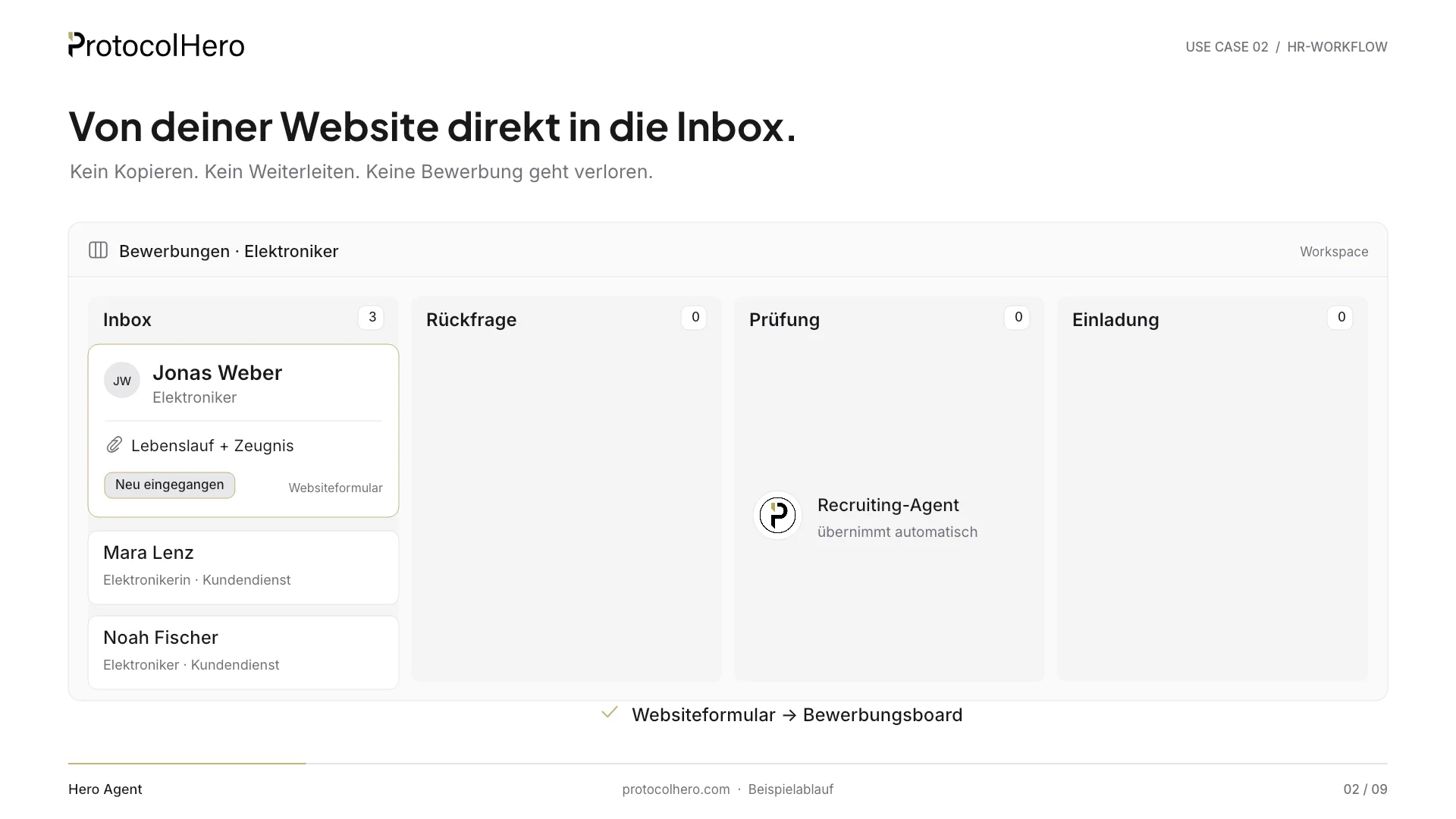
Yes. In the video one inbox distributes to three agents: service, sales, HR. Each has its own role, tool groups and email address and occupies one seat. Agents also react to messages from other agents – that is how they work together.
We already have software for quotes and accounting. Does that fit?
The agent works inside ProtocolHero: inbox, board, calendar, protocols, quotes. You connect your own systems via API and MCP – which ones exactly, we clarify in the intro call. You can also control the agent from Cursor, Claude or ChatGPT via MCP.
Where is the data stored, and who sees what the agent did?
Hosted in Germany. The agent only works with your workspace's data; its memory is viewable and deletable. Every action is in the channel, every change to a submission in the activity log. The agent's sent and received mail is visible for 30 days.
Does ProtocolHero replace Lexware, sevDesk or my trade-business software?
No. ProtocolHero sits before and after: enquiry, quote, job, protocol, customer update. Invoicing, costing, inventory, payroll and DATEV stay in your software. You connect your own systems via API and MCP on the Enterprise plan; there are no certified connectors to individual vendors.
Can I have quotes signed digitally?
Yes, on the Hero plan: the agent shares the quote as a document for signature and the customer signs in the browser. Time, person and history are documented – a simple electronic signature, not a qualified one (QES). Whether that is sufficient for your case is something to clarify with your legal advisor.
How do customer enquiries get from my website into the system?
You embed a protocol as a form – inline or as a floating button, no login for the customer. Every submission becomes a card or task and the agent takes over. You can print the public link as a QR code with any QR generator, for example for the emergency-service notice or the stairwell of a property manager.


The future of documentation is autonomous.

Your digital team. On site and in the office. You stay in control.