Immobilien & Verwaltung6 Min Lesezeit

Tenant Damage Report Template – Digital Form for Tenants & Property Managers

With our digital damage report template, tenants can easily record defects, damages, and complaints directly on their smartphones. Property managers and landlords receive structured, complete reports including photos, allowing them to initiate repairs or inspections immediately.

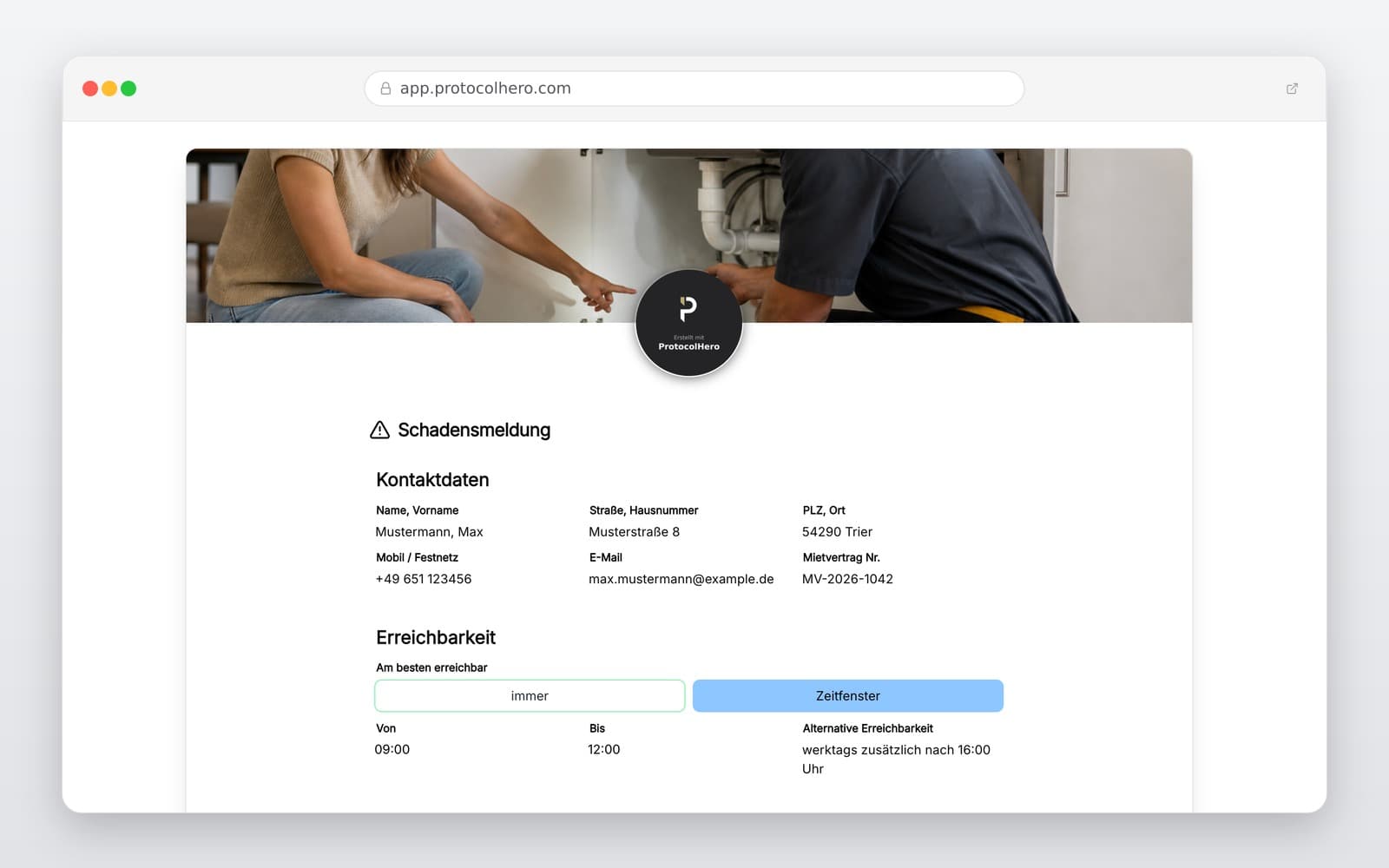
Preview of the “Tenant Damage Report Template – Digital Form for Tenants & Property Managers” template
Create free account
Inhalt der Vorlage

What is Included in the Damage Report Template?

Tenant details, property address, apartment unit, and contact info

Classification of the report (damage, defect, complaint)

Affected room or building area (e.g., basement, hallway, bathroom)

Detailed description of the damage or issue

Date and time when the issue was first noticed

Photo documentation directly via smartphone camera

Urgency level and additional remarks

Direct digital submission to the responsible property manager

Live form

Fill out this template directly in the browser

No install needed — complete the form below, attach photos, and submit. Create a free account anytime to save and reuse your own templates.

Create Digital Damage Reports & Provide QR Codes

Collect tenant reports centrally and structurally with ProtocolHero. Try it now for free!

Content of the Damage Report: Precise Information Speeds Up Repairs

A damage report should describe as concretely as possible what happened, where the defect is located, and since when the problem has existed. Instead of a vague statement like “heating broken”, a precise description like “radiator in the bedroom has been cold since this morning, while other rooms are warm” helps the property management immensely. The more accurate the report, the faster the right contractor can be dispatched.

In Germany, § 536c BGB requires tenants to report defects immediately to the landlord. Our digital template helps tenants collect all relevant data structurally. However, it does not represent a legal assessment of the defect or an automatic right to rent reduction.

  • Tenant's name, apartment number, and contact details
  • Exact location of the issue (e.g., bathroom, ceiling above the shower)
  • Detailed description of the defect & when it was noticed
  • Photo documentation of the damage for initial assessment

The ProtocolHero Advantage: Report Damages and Complaints via QR Code

With ProtocolHero, property managers can create an individual QR code for each building. This can be placed in the hallway, on the bulletin board, in the elevator, or in the tenant handbook. The process for tenants is extremely simple: scan the QR code with a smartphone, the form opens in the browser, fill in the details, take a photo, and submit. No app installation is required.

Whether it's a broken light in the hallway, a damaged front door lock, or a damp spot in the basement – tenants can report the issue directly on-site. The property management receives the damage report immediately, structured and linked to the correct property, without having to manually analyze incomplete emails or WhatsApp messages.

  • No app installation required for tenants
  • Report issues directly where they occur
  • Clear assignment to the respective property via building-specific QR codes
  • Unified, digital communication channel for all tenants

Avoid Typical Problems of Analog Damage Reporting

In many property management offices, reports arrive via various channels: emails without photos, phone calls without precise locations, or handwritten notes left for the caretaker. Often, crucial contact details are missing, or images cannot be matched to the correct issue later. A report like “water is running somewhere in the basement” leads to time-consuming follow-ups.

ProtocolHero's digital damage report solves these problems by guiding tenants step-by-step through the required fields. This ensures that all mandatory information, including contact details, photos, and urgency level, is provided from the start. This saves administrative time and accelerates the entire repair process.

Safety First: Handle Acute Emergencies Separately

The digital damage report is excellent for systematically recording everyday defects, damages, and general complaints. However, in acute emergencies or situations of immediate danger, tenants should not rely solely on a digital form.

In the event of fire, gas leaks, major water flooding, or complete building power outages, tenants must always use the established emergency numbers (such as the fire department) or the emergency hotlines provided separately by the property management. Clearly display these emergency instructions next to the QR code.

Häufige Fragen

Fragen zur Vorlage „Tenant Damage Report Template"

Mehr als eine Vorlage

Was ProtocolHero zusätzlich für dich übernimmt

Eine Vorlage allein ist erst der Anfang – ProtocolHero macht aus jedem Protokoll einen durchgängigen digitalen Workflow mit KI-Unterstützung, Workflow-Freigaben und revisionssicherem Archiv.

HERO Assistant – KI-Chat für Dokumentenerstellung

Der HERO Assistant ist der eingebaute KI-Chat von ProtocolHero. Du kannst per Spracheingabe ein komplettes Dokument anlegen lassen oder ein bestehendes PDF, Foto oder Word-Dokument hochladen – die KI liest die Struktur aus und baut eine wiederverwendbare Vorlage daraus.

Auto-Fill aus Sprache, Foto und Datei

Beim Ausfüllen kannst du das Dokument per Sprachsteuerung diktieren – die KI ordnet die Inhalte automatisch den richtigen Feldern zu. Oder du lädst Fotos, Scans, Verträge, Datenblätter oder Ausweise hoch: Der HERO Assistant extrahiert die Daten und befüllt das Formular vor – du prüfst und unterschreibst.

Foto- und Video-Upload direkt im Dokument

Zu jedem Bauteil, Messpunkt oder Schadensbild kannst du Fotos und Videos direkt aus der App anhängen. Videos sind besonders nützlich, wenn ein Schadensbild dynamisch ist – ein einzelnes Standbild würde den Befund nicht ausreichend dokumentieren.

Kommentare als Aufgaben – intern und mit dem Kunden

Jede Position im Dokument kann kommentiert und als Aufgabe an einen Kollegen, an dich selbst oder direkt an den Kunden zugewiesen werden. Kommentare können wahlweise rein intern bleiben oder im freigegebenen Kundenlink mitgeteilt werden.

Workflow: Bearbeiter zuweisen, Prüfer freigeben

Dokumente lassen sich an Kollegen weiterleiten und können einen festen Prüfer haben, der die letzte fachliche Freigabe erteilt, bevor das Dokument unterschrieben oder an den Kunden geht.

Activity-Log für lückenlose Nachvollziehbarkeit

Jedes Dokument hat einen vollständigen Aktivitäts-Verlauf: Wer hat wann was geändert, kommentiert, hochgeladen, freigegeben, unterschrieben. Das Log ist auf Wunsch auch im Kunden-Freigabelink sichtbar – ideal für Auditoren, Versicherer und Kunden.

Eindeutige Protocol-ID je Dokument

Jedes Dokument bekommt automatisch eine eindeutige Protocol-ID, mit der es sich zweifelsfrei referenzieren, verlinken und im Audit-Trail wiederfinden lässt.

Automatische Berichts-Nummerierung

Neu

Fortlaufende, lückenlose Berichts-Nummern (z. B. Protokoll-2026-001, 002, 003 …) je Dokumenttyp und Kunde – ohne manuelles Vergeben, ohne Dubletten.

Web-Formular & Inbox

Neu

Vorlagen lassen sich als öffentliches Web-Formular auf der eigenen Website einbinden – ein ausgefülltes Dokument landet automatisch in deiner ProtocolHero-Inbox zur Weiterbearbeitung.

QR-Code-Etiketten für Anlagen und Bauteile

Neu

QR-Code-Etiketten pro Anlage, Bauteil oder Abschottung, die beim Scannen direkt das hinterlegte Protokoll, die Historie und alle Wartungs- bzw. Prüfdokumente öffnen.

476 × genutzt

Diese Vorlage in 2 Minuten selbst nutzen

Vorlage übernehmen, an deinen Betrieb anpassen und direkt vor Ort ausfüllen – kostenlos testen, keine Kreditkarte nötig.