Brandschutz7

Hot Work Permit Template – Digital Fire Safety Permit

Welding, grinding, soldering, or thermal cutting outside designated workshops carry significant fire risks. With our digital Hot Work Permit template, you can seamlessly document all necessary safety precautions, fire watches, and post-work inspections to ensure compliance and safety.

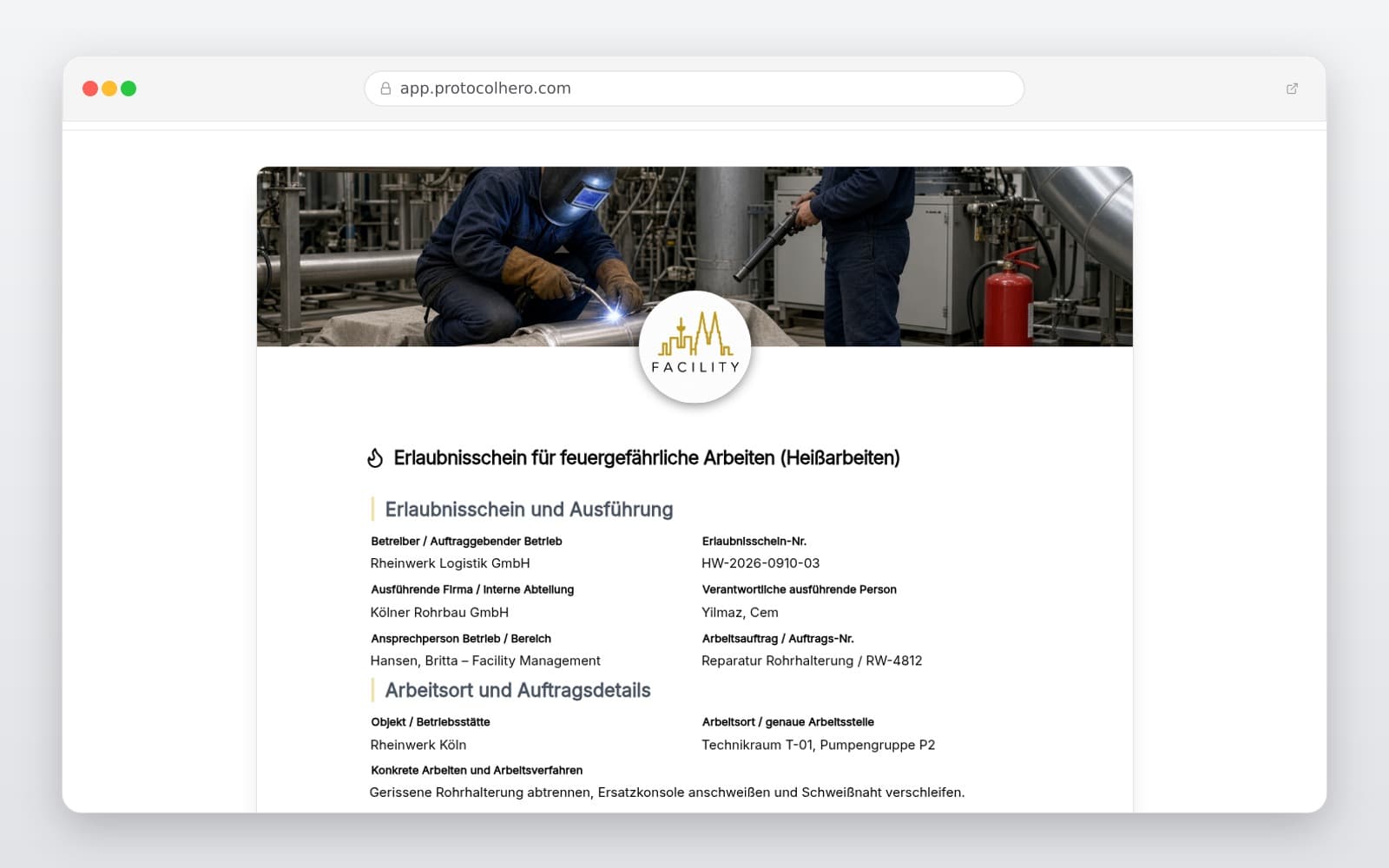
Preview of the “Hot Work Permit Template – Digital Fire Safety Permit” template
Create free account

Short answer

What is the “Hot Work Permit Template – Digital Fire Safety Permit” template for?

Create digital Hot Work Permits easily. Complete template for risk assessment, fire watch, safety measures, and post-work checks according to industry standards.

Use case
Brandschutz
Captured data
Details of the work order, operating company, and contractor, Precise location of work and the specific hot work method used, On-site risk assessment and definition of the safety perimeter
Result
A structured form that can be completed directly in the browser and reused in ProtocolHero.

Check the template against the technical, contractual and legal requirements of the specific case. ProtocolHero does not replace professional assessment.

Inhalt der Vorlage

What is included in the Hot Work Permit template?

Details of the work order, operating company, and contractor

Precise location of work and the specific hot work method used

On-site risk assessment and definition of the safety perimeter

Safety measures (removal/covering of flammable materials, sealing openings)

Formal authorization process with signatures of responsible persons

Assignment of fire watch during work and post-work monitoring

Staggered post-work inspections with timestamps and photos

Final sign-off and completion of the fire watch period

Live form

Fill out this template directly in the browser

No install needed — complete the form below, attach photos, and submit. Create a free account anytime to save and reuse your own templates.

Authorize and Document Hot Work Safely

Use our digital template to flexibly define safety measures, radiuses, fire watch duties, and inspection intervals based on your specific risk assessment.

Work Order and Risk Assessment

Every hot work permit begins with the precise recording of the work order, the exact location of the activity, and the personnel involved. Before any work starts, a risk assessment must be conducted directly on-site. This involves analyzing the specific hazards of the surrounding environment to establish appropriate protective measures.

This individual assessment is legally and contractually required by insurers and safety regulations whenever hot work is performed outside of permanently established, safe welding workshops.

  • Details of the client, contracting company, and executing technicians
  • Specification of the hot work method (e.g., welding, cutting, grinding, soldering)
  • Documentation of the permit's limited validity period
Protective Measures and Adjacent Areas

Hot work generates flying sparks, welding dross, or extreme heat that can spread unnoticed. Therefore, flammable materials within the hazard area must be removed or shielded using certified, fire-resistant blankets.

A critical focus must be placed on adjacent rooms, cavities, ventilation ducts, and wall openings. Heat conducts through pipes or steel beams, and sparks can migrate through tiny crevices into other fire zones. These areas must be inspected and sealed before work begins.

  • Removal or dust-tight covering of combustible materials
  • Inspection and sealing of wall, ceiling, and floor openings
  • Checking pipes and cavities in adjacent rooms for heat conduction
  • Provision of suitable and inspected fire extinguishers on-site

Fire Watch, Alarms, and Authorization

Work authorization is only granted once all safety measures have been implemented and verified. The permit clearly distinguishes between the initial release by the operations manager, the fire watch during the work, and the post-work fire watch.

Individuals assigned to the fire watch must be trained in using the firefighting equipment and be fully aware of the emergency alarm procedures (e.g., location of the nearest manual call point, emergency phone numbers).

  • Written authorization by the designated fire safety officer
  • Naming of the fire watch personnel for the duration of the work
  • Definition of the emergency alarm path
  • Temporary disabling and subsequent reactivation of fire alarm systems (if required)

Work Completion and Post-Work Inspections

The greatest danger in hot work is smoldering fires, which often break out hours after the work is completed. Once the actual hot work ends, the post-work fire watch phase begins. This requires meticulous, time-stamped documentation of all follow-up inspections.

The duration and intervals of these checks depend on the specific risk assessment and insurance requirements. Each intermediate check and the final walkthrough are recorded digitally with timestamps and signatures in the protocol.

  • Documentation of the official end of hot work
  • Execution of staggered post-work checks (e.g., hourly intervals)
  • Final walkthrough and formal sign-off of the fire watch
  • Reactivation of all fire protection and detection systems
Häufige Fragen

Fragen zur Vorlage „Hot Work Permit Template"

Mehr als eine Vorlage

Was ProtocolHero zusätzlich für dich übernimmt

Eine Vorlage allein ist erst der Anfang – ProtocolHero macht aus jedem Protokoll einen durchgängigen digitalen Workflow mit KI-Unterstützung, Workflow-Freigaben und revisionssicherem Archiv.

HERO Assistant – KI-Chat für Dokumentenerstellung

Der HERO Assistant ist der eingebaute KI-Chat von ProtocolHero. Du kannst per Spracheingabe ein komplettes Dokument anlegen lassen oder ein bestehendes PDF, Foto oder Word-Dokument hochladen – die KI liest die Struktur aus und baut eine wiederverwendbare Vorlage daraus.

Auto-Fill aus Sprache, Foto und Datei

Beim Ausfüllen kannst du das Dokument per Sprachsteuerung diktieren – die KI ordnet die Inhalte automatisch den richtigen Feldern zu. Oder du lädst Fotos, Scans, Verträge, Datenblätter oder Ausweise hoch: Der HERO Assistant extrahiert die Daten und befüllt das Formular vor – du prüfst und unterschreibst.

Foto- und Video-Upload direkt im Dokument

Zu jedem Bauteil, Messpunkt oder Schadensbild kannst du Fotos und Videos direkt aus der App anhängen. Videos sind besonders nützlich, wenn ein Schadensbild dynamisch ist – ein einzelnes Standbild würde den Befund nicht ausreichend dokumentieren.

Kommentare als Aufgaben – intern und mit dem Kunden

Jede Position im Dokument kann kommentiert und als Aufgabe an einen Kollegen, an dich selbst oder direkt an den Kunden zugewiesen werden. Kommentare können wahlweise rein intern bleiben oder im freigegebenen Kundenlink mitgeteilt werden.

Workflow: Bearbeiter zuweisen, Prüfer freigeben

Dokumente lassen sich an Kollegen weiterleiten und können einen festen Prüfer haben, der die letzte fachliche Freigabe erteilt, bevor das Dokument unterschrieben oder an den Kunden geht.

Activity-Log für lückenlose Nachvollziehbarkeit

Jedes Dokument hat einen vollständigen Aktivitäts-Verlauf: Wer hat wann was geändert, kommentiert, hochgeladen, freigegeben, unterschrieben. Das Log ist auf Wunsch auch im Kunden-Freigabelink sichtbar – ideal für Auditoren, Versicherer und Kunden.

Eindeutige Protocol-ID je Dokument

Jedes Dokument bekommt automatisch eine eindeutige Protocol-ID, mit der es sich zweifelsfrei referenzieren, verlinken und im Audit-Trail wiederfinden lässt.

Automatische Berichts-Nummerierung

Neu

Fortlaufende, lückenlose Berichts-Nummern (z. B. Protokoll-2026-001, 002, 003 …) je Dokumenttyp und Kunde – ohne manuelles Vergeben, ohne Dubletten.

Web-Formular & Inbox

Neu

Vorlagen lassen sich als öffentliches Web-Formular auf der eigenen Website einbinden – ein ausgefülltes Dokument landet automatisch in deiner ProtocolHero-Inbox zur Weiterbearbeitung.

QR-Code-Etiketten für Anlagen und Bauteile

Neu

QR-Code-Etiketten pro Anlage, Bauteil oder Abschottung, die beim Scannen direkt das hinterlegte Protokoll, die Historie und alle Wartungs- bzw. Prüfdokumente öffnen.

1.156 × genutzt

Diese Vorlage in 2 Minuten selbst nutzen

Vorlage übernehmen, an deinen Betrieb anpassen und direkt vor Ort ausfüllen – kostenlos testen, keine Kreditkarte nötig.