Brandschutz6 Min Lesezeit

Firefighter Elevator Acceptance Protocol – Template according to EN 81-72

Commissioning and accepting a firefighter lift requires maximum precision and seamless documentation. With ProtocolHero's digital template, you can record all structural, technical, and functional requirements directly on-site. This ensures that all building services interfaces and emergency operation modes are structured and documented for safety compliance.

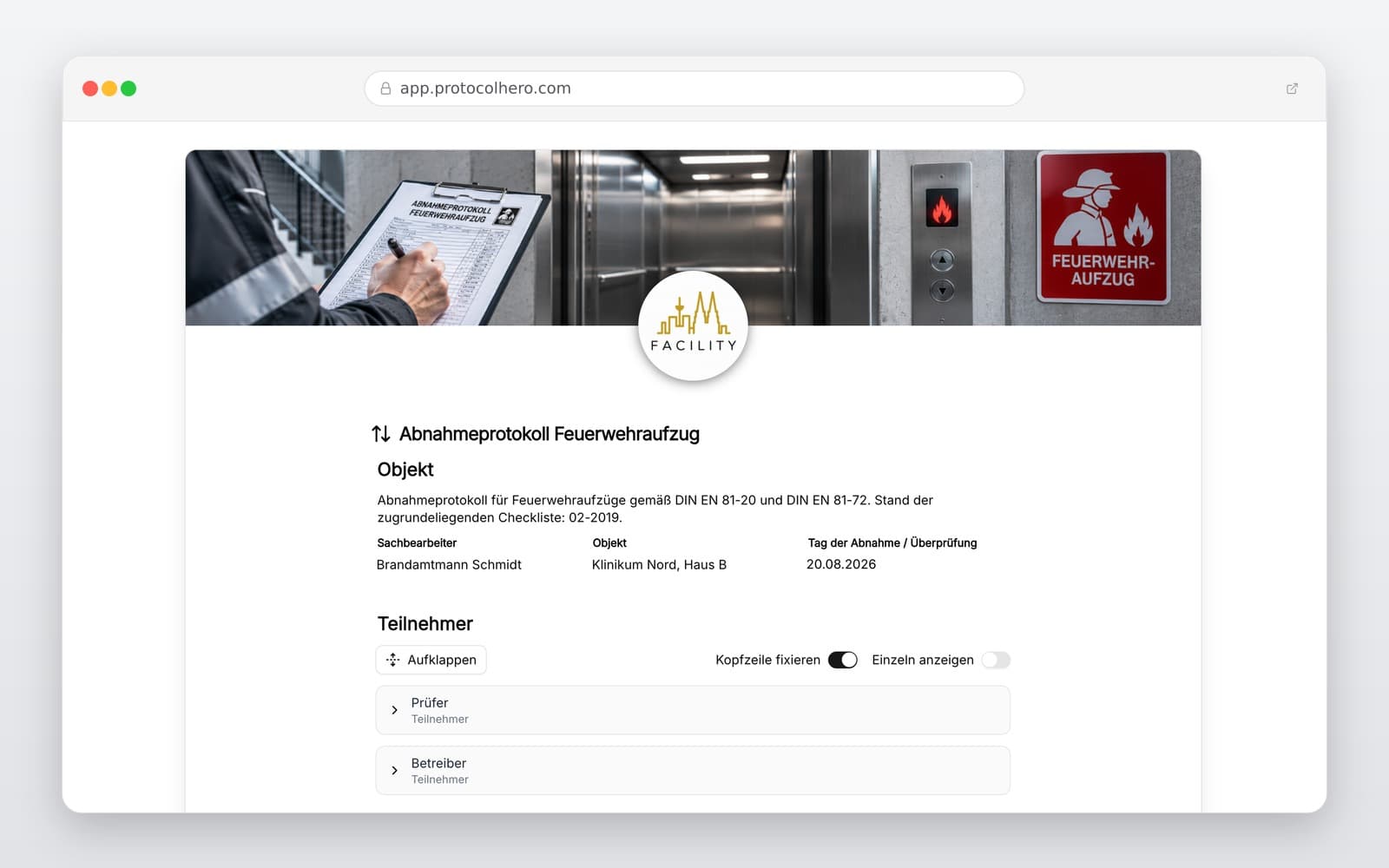
Preview of the “Firefighter Elevator Acceptance Protocol – Template according to EN 81-72” template
Create free account
Inhalt der Vorlage

What is included in the template?

Object, operator, and installation data, including manufacturer, elevator number, and construction year

Inspection of structural requirements and relevant areas of the firefighter lift

Testing of the firefighter switch, firefighter service, and associated control functions

Inspection of markings, displays, and control elements

Testing of power supply, emergency power supply, and relevant interfaces

Control of communication systems, emergency calls, and safety-relevant functions

Documentation of deviations, remaining defects, and required corrective actions

Completion of the acceptance with test results, participants, and digital signatures

Live form

Fill out this template directly in the browser

No install needed — complete the form below, attach photos, and submit. Create a free account anytime to save and reuse your own templates.

Document Firefighter Lift Acceptance Digitally

Use ProtocolHero to systematically work through checklists, capture deviations with photos, and track defects on-site. Start your free trial today!

What is tested during the acceptance of a firefighter elevator?

A firefighter elevator must function reliably under extreme conditions during an emergency, as it is used under the direct control of the fire department. The currently applicable EN 81-72 contains additional and differing requirements compared to standard passenger lifts. During functional checks and acceptance, these firefighter-specific features must be inspected in detail.

This involves not only the internal control components of the elevator but also its interaction with the building. Since local requirements and fire department guidelines can vary, a flexible and adaptable checklist is essential.

  • Firefighter switch and proper activation of the firefighter service
  • Car control and priority override directly from the lift car
  • Special displays, optical signals, and compliant markings
  • Two-way communication systems connected to the fire command center
  • Emergency power supply and automatic switchover during power failure
  • Protection of technical equipment against water and heat damage
  • Structural requirements such as smoke-free lobbies and safe access routes
What distinguishes a firefighter lift from a standard passenger lift?

While a standard passenger lift is designed for regular transit and typically evacuates to a designated floor and shuts down during a fire, a firefighter lift remains active. It is specifically designed to assist firefighters in firefighting and rescue operations.

This requires robust controls, a secured emergency power supply, and integration with building safety systems. External safety features, such as overpressure ventilation systems (to keep the shaft smoke-free), must work in perfect synchronization with the elevator controls, as outlined in technical safety regulations.

Important distinction: Internal acceptance vs. official inspection

For installers, planners, and operators, a clear legal distinction is crucial: This digital acceptance protocol is designed as a tool for structured pre-inspections, defect tracking, and trade handover. It does not replace the legally required inspection prior to commissioning conducted by an authorized inspection body (such as a notified body or ZÜS in Germany).

Use this template to prepare the installation perfectly for the official inspection and to document all preliminary defects digitally with photos. This minimizes the risk of delays during the final official commissioning.

Practical Example: Efficient digital documentation on-site

During the acceptance of a firefighter lift in a newly built high-rise, the technician first records the system data. While checking the firefighter service, they notice that a mandatory sign is missing at the 3rd-floor landing. Additionally, there is a minor delay in the intercom activation.

Using the ProtocolHero app, the technician captures these deviations instantly. They take a photo of the missing sign, add a note about the intercom delay, and assign the corrective action to the responsible subcontractor. Once the walkthrough is complete, all parties sign directly on the tablet, and the PDF is automatically emailed to facility management.

Häufige Fragen

Fragen zur Vorlage „Firefighter Elevator Acceptance Protocol"

Mehr als eine Vorlage

Was ProtocolHero zusätzlich für dich übernimmt

Eine Vorlage allein ist erst der Anfang – ProtocolHero macht aus jedem Protokoll einen durchgängigen digitalen Workflow mit KI-Unterstützung, Workflow-Freigaben und revisionssicherem Archiv.

HERO Assistant – KI-Chat für Dokumentenerstellung

Der HERO Assistant ist der eingebaute KI-Chat von ProtocolHero. Du kannst per Spracheingabe ein komplettes Dokument anlegen lassen oder ein bestehendes PDF, Foto oder Word-Dokument hochladen – die KI liest die Struktur aus und baut eine wiederverwendbare Vorlage daraus.

Auto-Fill aus Sprache, Foto und Datei

Beim Ausfüllen kannst du das Dokument per Sprachsteuerung diktieren – die KI ordnet die Inhalte automatisch den richtigen Feldern zu. Oder du lädst Fotos, Scans, Verträge, Datenblätter oder Ausweise hoch: Der HERO Assistant extrahiert die Daten und befüllt das Formular vor – du prüfst und unterschreibst.

Foto- und Video-Upload direkt im Dokument

Zu jedem Bauteil, Messpunkt oder Schadensbild kannst du Fotos und Videos direkt aus der App anhängen. Videos sind besonders nützlich, wenn ein Schadensbild dynamisch ist – ein einzelnes Standbild würde den Befund nicht ausreichend dokumentieren.

Kommentare als Aufgaben – intern und mit dem Kunden

Jede Position im Dokument kann kommentiert und als Aufgabe an einen Kollegen, an dich selbst oder direkt an den Kunden zugewiesen werden. Kommentare können wahlweise rein intern bleiben oder im freigegebenen Kundenlink mitgeteilt werden.

Workflow: Bearbeiter zuweisen, Prüfer freigeben

Dokumente lassen sich an Kollegen weiterleiten und können einen festen Prüfer haben, der die letzte fachliche Freigabe erteilt, bevor das Dokument unterschrieben oder an den Kunden geht.

Activity-Log für lückenlose Nachvollziehbarkeit

Jedes Dokument hat einen vollständigen Aktivitäts-Verlauf: Wer hat wann was geändert, kommentiert, hochgeladen, freigegeben, unterschrieben. Das Log ist auf Wunsch auch im Kunden-Freigabelink sichtbar – ideal für Auditoren, Versicherer und Kunden.

Eindeutige Protocol-ID je Dokument

Jedes Dokument bekommt automatisch eine eindeutige Protocol-ID, mit der es sich zweifelsfrei referenzieren, verlinken und im Audit-Trail wiederfinden lässt.

Automatische Berichts-Nummerierung

Neu

Fortlaufende, lückenlose Berichts-Nummern (z. B. Protokoll-2026-001, 002, 003 …) je Dokumenttyp und Kunde – ohne manuelles Vergeben, ohne Dubletten.

Web-Formular & Inbox

Neu

Vorlagen lassen sich als öffentliches Web-Formular auf der eigenen Website einbinden – ein ausgefülltes Dokument landet automatisch in deiner ProtocolHero-Inbox zur Weiterbearbeitung.

QR-Code-Etiketten für Anlagen und Bauteile

Neu

QR-Code-Etiketten pro Anlage, Bauteil oder Abschottung, die beim Scannen direkt das hinterlegte Protokoll, die Historie und alle Wartungs- bzw. Prüfdokumente öffnen.

0 × genutzt

Diese Vorlage in 2 Minuten selbst nutzen

Vorlage übernehmen, an deinen Betrieb anpassen und direkt vor Ort ausfüllen – kostenlos testen, keine Kreditkarte nötig.