Immobilien & Verwaltung6 Min Lesezeit

Utility Bill Template – Digital & Compliant Operating Cost Statement

Preparing the annual utility bill is often a tedious and time-consuming task for landlords and property managers. With our professional utility bill template, you can generate clear, accurate, and compliant operating cost statements. Save yourself from complex Excel files and handle the entire process digitally.

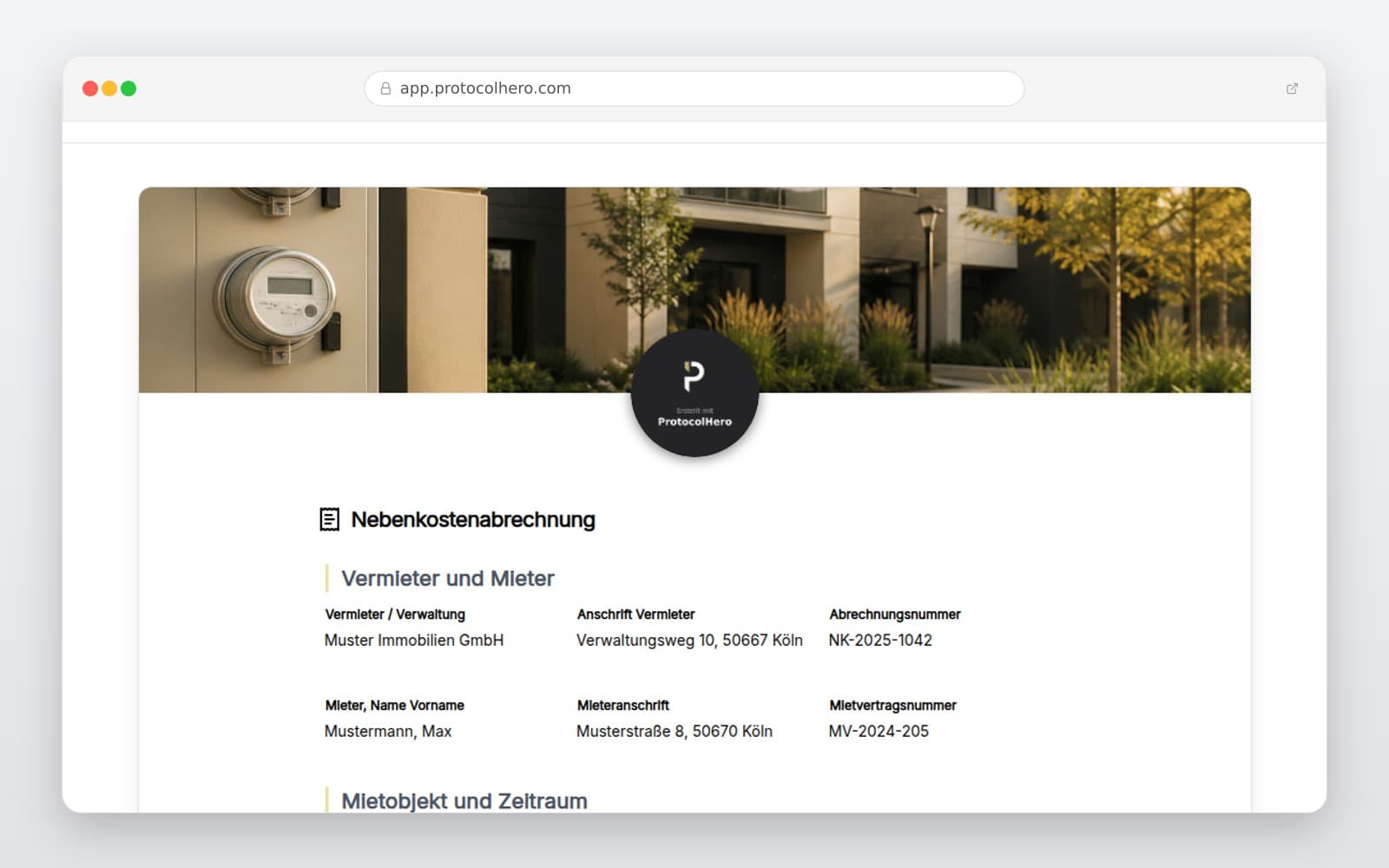
Preview of the “Utility Bill Template – Digital & Compliant Operating Cost Statement” template
Create free account

Short answer

What is the “Utility Bill Template – Digital & Compliant Operating Cost Statement” template for?

Looking for a utility bill template? Create precise, legally compliant operating cost statements for your tenants fully digitally. Start your free trial today!

Use case
Immobilien & Verwaltung
Captured data
Parties & Property: Clear identification of landlord, tenant, and the specific rental unit., Billing Period: Precise definition of the statutory annual billing timeframe., Area & Allocation Keys: Transparent presentation of allocation methods (e.g., square meters, number of occupants, units).
Result
A structured form that can be completed directly in the browser and reused in ProtocolHero.

Check the template against the technical, contractual and legal requirements of the specific case. ProtocolHero does not replace professional assessment.

Inhalt der Vorlage

What is included in this template?

Parties & Property: Clear identification of landlord, tenant, and the specific rental unit.

Billing Period: Precise definition of the statutory annual billing timeframe.

Area & Allocation Keys: Transparent presentation of allocation methods (e.g., square meters, number of occupants, units).

Heating & Water Costs: Recording consumption-based costs in compliance with local heating regulations.

Other Operating Costs: Structured breakdown of apportionable expenses such as property tax, waste disposal, and insurance.

Prepayments: Direct comparison against the monthly advance payments made by the tenant.

Balance Calculation: Automated calculation of the final balance (additional payment or credit refund).

Sign-off & Approval: Option for digital signature and direct PDF export for your records.

Live form

Fill out this template directly in the browser

No install needed — complete the form below, attach photos, and submit. Create a free account anytime to save and reuse your own templates.

Create Your Utility Bill Digitally Now

Use our interactive template to generate compliant utility statements for your tenants directly online – fast, secure, and paperless.

How to Avoid Common Mistakes in Operating Cost Statements

Utility bills are prone to formal and mathematical errors. Even minor mistakes can render the entire statement legally invalid, allowing tenants to successfully dispute the claims. One of the most critical aspects is the strict billing deadline: in many jurisdictions (such as Germany), the statement must reach the tenant within twelve months after the billing period ends. Missing this deadline usually forfeits any claims for additional payments.

Another common issue is including non-apportionable expenses. Only operating costs that have been explicitly agreed upon in the lease agreement can be charged to the tenant. Administrative fees, bank charges, and any maintenance or repair costs must be strictly excluded, as they are the sole responsibility of the landlord.

  • Missing the Deadline: Delivering the statement later than the legally allowed period.
  • Non-Apportionable Costs: Incorrectly billing administrative or repair expenses to the tenant.
  • Unagreed Cost Categories: Charging for services not specified in the lease agreement.
  • Inaccurate Allocation Keys: Applying incorrect calculation baselines for shared spaces.
Digital vs. Excel & Paper: Why You Should Make the Switch

Many property owners still rely on rigid spreadsheet templates or paper forms to calculate utility bills. However, this approach carries high risks of calculation errors that are hard to spot. Furthermore, physical files lack secure archiving and cannot be accessed easily on the go.

By switching to ProtocolHero's digital solution, you minimize human error. Our templates are dynamic, calculate sums automatically, and integrate seamlessly into your digital property management workflow. Browse our templates overview (https://www.protocolhero.com/vorlagen) to find more helpful documents for landlords.

  • Error reduction through automated math and logical validation.
  • Time savings by cloning property and tenant data for the next billing year.
  • Secure cloud storage and instant access to historical statements.
  • Professional presentation with clean, structured PDF exports for your tenants.

Legal Framework and Compliance

The allocation of operating costs is strictly regulated by local tenancy laws. Only specific, ongoing operational costs may be passed on to tenants, provided they are clearly defined in the rental agreement.

Please note: This template and the information provided serve as a structured documentation tool for your convenience. They do not constitute formal legal advice. For complex legal matters or disputes, always consult a qualified legal professional or landlord association.

Häufige Fragen

Fragen zur Vorlage „Utility Bill Template"

Mehr als eine Vorlage

Was ProtocolHero zusätzlich für dich übernimmt

Eine Vorlage allein ist erst der Anfang – ProtocolHero macht aus jedem Protokoll einen durchgängigen digitalen Workflow mit KI-Unterstützung, Workflow-Freigaben und revisionssicherem Archiv.

HERO Assistant – KI-Chat für Dokumentenerstellung

Der HERO Assistant ist der eingebaute KI-Chat von ProtocolHero. Du kannst per Spracheingabe ein komplettes Dokument anlegen lassen oder ein bestehendes PDF, Foto oder Word-Dokument hochladen – die KI liest die Struktur aus und baut eine wiederverwendbare Vorlage daraus.

Auto-Fill aus Sprache, Foto und Datei

Beim Ausfüllen kannst du das Dokument per Sprachsteuerung diktieren – die KI ordnet die Inhalte automatisch den richtigen Feldern zu. Oder du lädst Fotos, Scans, Verträge, Datenblätter oder Ausweise hoch: Der HERO Assistant extrahiert die Daten und befüllt das Formular vor – du prüfst und unterschreibst.

Foto- und Video-Upload direkt im Dokument

Zu jedem Bauteil, Messpunkt oder Schadensbild kannst du Fotos und Videos direkt aus der App anhängen. Videos sind besonders nützlich, wenn ein Schadensbild dynamisch ist – ein einzelnes Standbild würde den Befund nicht ausreichend dokumentieren.

Kommentare als Aufgaben – intern und mit dem Kunden

Jede Position im Dokument kann kommentiert und als Aufgabe an einen Kollegen, an dich selbst oder direkt an den Kunden zugewiesen werden. Kommentare können wahlweise rein intern bleiben oder im freigegebenen Kundenlink mitgeteilt werden.

Workflow: Bearbeiter zuweisen, Prüfer freigeben

Dokumente lassen sich an Kollegen weiterleiten und können einen festen Prüfer haben, der die letzte fachliche Freigabe erteilt, bevor das Dokument unterschrieben oder an den Kunden geht.

Activity-Log für lückenlose Nachvollziehbarkeit

Jedes Dokument hat einen vollständigen Aktivitäts-Verlauf: Wer hat wann was geändert, kommentiert, hochgeladen, freigegeben, unterschrieben. Das Log ist auf Wunsch auch im Kunden-Freigabelink sichtbar – ideal für Auditoren, Versicherer und Kunden.

Eindeutige Protocol-ID je Dokument

Jedes Dokument bekommt automatisch eine eindeutige Protocol-ID, mit der es sich zweifelsfrei referenzieren, verlinken und im Audit-Trail wiederfinden lässt.

Automatische Berichts-Nummerierung

Neu

Fortlaufende, lückenlose Berichts-Nummern (z. B. Protokoll-2026-001, 002, 003 …) je Dokumenttyp und Kunde – ohne manuelles Vergeben, ohne Dubletten.

Web-Formular & Inbox

Neu

Vorlagen lassen sich als öffentliches Web-Formular auf der eigenen Website einbinden – ein ausgefülltes Dokument landet automatisch in deiner ProtocolHero-Inbox zur Weiterbearbeitung.

QR-Code-Etiketten für Anlagen und Bauteile

Neu

QR-Code-Etiketten pro Anlage, Bauteil oder Abschottung, die beim Scannen direkt das hinterlegte Protokoll, die Historie und alle Wartungs- bzw. Prüfdokumente öffnen.

1.013 × genutzt

Diese Vorlage in 2 Minuten selbst nutzen

Vorlage übernehmen, an deinen Betrieb anpassen und direkt vor Ort ausfüllen – kostenlos testen, keine Kreditkarte nötig.