Brandschutz10

SHEV Inspection Protocol Template: Natural Smoke and Heat Exhaust Ventilation (NSHEV)

A reliable natural smoke and heat exhaust ventilation (NSHEV / NRA) system saves lives and protects property during a fire. With our professional SHEV inspection protocol template, you can seamlessly document annual maintenance, functional tests, and system statuses. Record measurements, defects, and proper system resets digitally on-site.

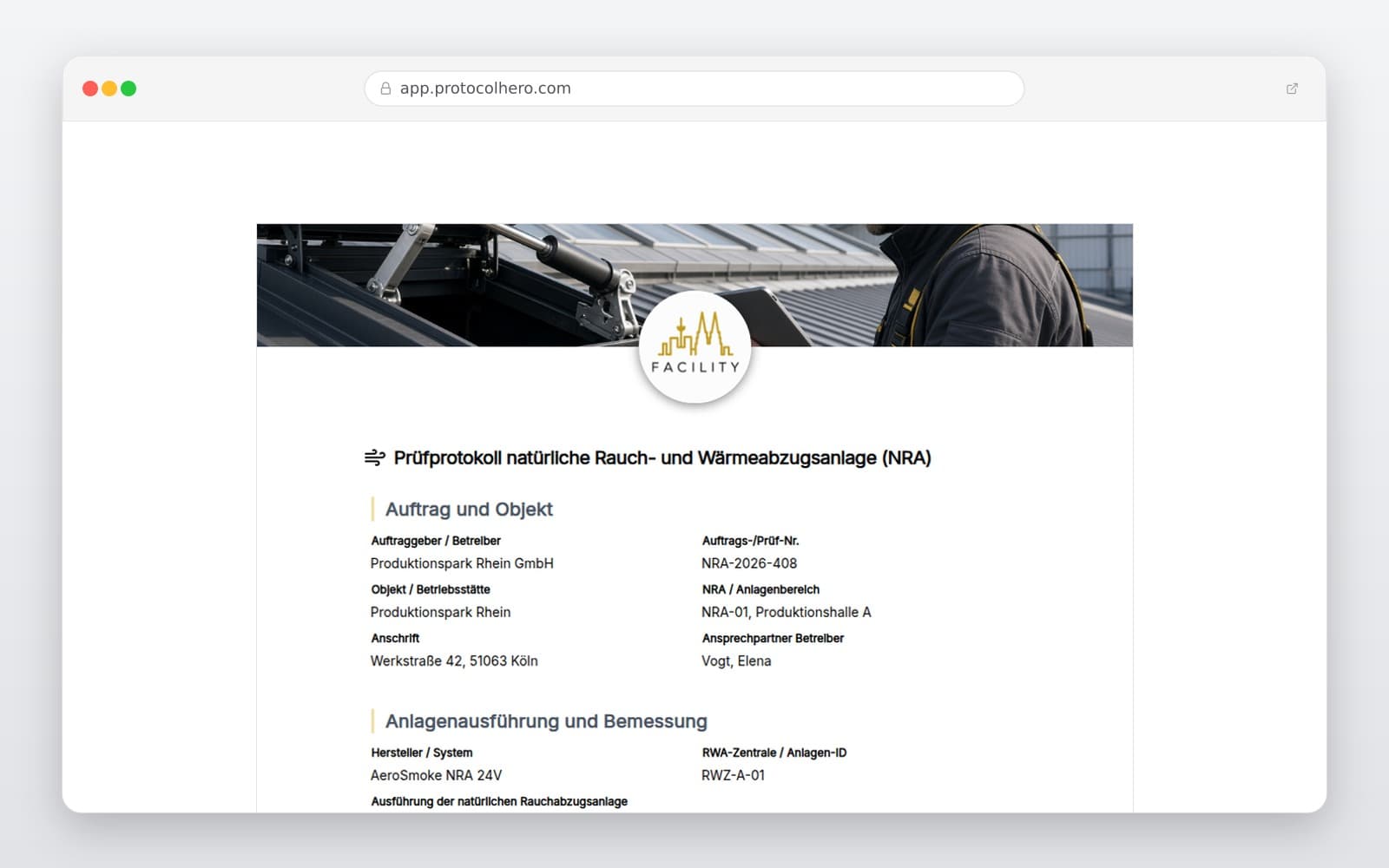
Preview of the “SHEV Inspection Protocol Template: Natural Smoke and Heat Exhaust Ventilation (NSHEV)” template
Create free account

Short answer

What is the “SHEV Inspection Protocol Template: Natural Smoke and Heat Exhaust Ventilation (NSHEV)” template for?

Digital SHEV inspection protocol for natural smoke and heat exhaust systems (NSHEV). Document maintenance according to EN 12101 & local standards. Try for free!

Use case
Brandschutz
Captured data
Master Data: Operator, building object, system design, and logbook status, Triggering Interfaces: Manual call points, smoke detectors, and fire alarm system (FAS), Control & Power: SHEV control panel, cable routing, and emergency battery backup
Result
A structured form that can be completed directly in the browser and reused in ProtocolHero.

Check the template against the technical, contractual and legal requirements of the specific case. ProtocolHero does not replace professional assessment.

Inhalt der Vorlage

What is Included in the SHEV Protocol?

Master Data: Operator, building object, system design, and logbook status

Triggering Interfaces: Manual call points, smoke detectors, and fire alarm system (FAS)

Control & Power: SHEV control panel, cable routing, and emergency battery backup

NSHEV Units: Roof and facade openings, including actuators and brackets

Functional Testing: Group-wise opening times, opening angles, and limit feedbacks

Inlet Air Management: Alignment with supply air openings and mechanical interfaces

Defect Log: Detailed reporting of faults, repair deadlines, and re-inspections

Report Completion: Photo documentation and digital client signature

Live form

Fill out this template directly in the browser

No install needed — complete the form below, attach photos, and submit. Create a free account anytime to save and reuse your own templates.

Digitalize & Adapt Your SHEV Inspection Protocol

Easily customize this template to match the specific fire protection concept, manufacturer specifications, environmental conditions, and system certifications of your NSHEV installation.

Why Natural Smoke and Heat Exhaust Ventilation (NSHEV) Systems Require Regular Testing

Natural smoke and heat exhaust ventilation systems (NSHEV) are critical components of passive fire protection. In the event of a fire, they thermally vent hot combustion gases, smoke, and heat upwards. This keeps escape routes clear of smoke and prevents structural damage from extreme heat. To guarantee this life-saving function, regular and professional testing is legally mandated.

Maintenance and inspections must align with recognized technical standards (such as the EN 12101 series, local standards like DIN 18232-2, or VdS guidelines) and manufacturer specifications. A complete SHEV inspection protocol serves as vital proof for building operators, insurers, and local authorities that all safety obligations have been met.
Focus on Control Panel, Triggering, and Power Supply

The heart of any SHEV system is its control unit. It coordinates the complex interaction between trigger devices, emergency power supplies, and the actual exhaust ventilators (NSHEVs). During the inspection, the control panel must be checked for error logs, line faults, and the integrity of the backup power supply.

The triggering mechanism must function flawlessly across all paths and be fully documented in the protocol:

  • Manual Triggering: Checking manual call points (break-glass buttons) for physical damage, glass integrity, and correct signal transmission.
  • Automatic Triggering: Testing smoke detectors and the interface for remote triggering via the main fire alarm system (FAS).
  • Power Redundancy: Verifying emergency batteries or pneumatic CO2 cartridges in accordance with system-specific maintenance schedules and manufacturer guidelines.

NSHEV Units, Supply Air, and Group-Wise Functional Testing

Natural smoke and heat exhaust ventilators (NSHEV) in roofs and facades must open quickly and reliably to clear the designed geometric or aerodynamic cross-section. Therefore, a group-wise functional test of all trigger groups is performed. This test evaluates the actuators, opening movements, and mechanical locks.

A critical factor is the coordination with supply air inlets in the lower parts of the building. Efficient smoke extraction only works if sufficient fresh air can flow in to create thermal convection. The inspection protocol therefore precisely logs the status of supply air interfaces and the actual limit feedback signals of the window and hatch actuators.

Defect Documentation, Logbook Entries, and System Reset

After triggering and testing all groups, the smoke ventilation systems must be safely closed and reset to their standby operating state. This reset process—including replacing single-use items like CO2 cartridges or fusible links—must be documented in the protocol.

Any defects found, such as worn seals, stiff hinges, or degraded batteries, must be recorded with clear priorities. The template provides structured fields to set repair deadlines and schedule necessary follow-up inspections. All entries should be recorded in the system's physical logbook.

Häufige Fragen

Fragen zur Vorlage „SHEV Inspection Protocol Template: Natural Smoke and Heat Exhaust Ventilation (NSHEV)"

Mehr als eine Vorlage

Was ProtocolHero zusätzlich für dich übernimmt

Eine Vorlage allein ist erst der Anfang – ProtocolHero macht aus jedem Protokoll einen durchgängigen digitalen Workflow mit KI-Unterstützung, Workflow-Freigaben und revisionssicherem Archiv.

HERO Assistant – KI-Chat für Dokumentenerstellung

Der HERO Assistant ist der eingebaute KI-Chat von ProtocolHero. Du kannst per Spracheingabe ein komplettes Dokument anlegen lassen oder ein bestehendes PDF, Foto oder Word-Dokument hochladen – die KI liest die Struktur aus und baut eine wiederverwendbare Vorlage daraus.

Auto-Fill aus Sprache, Foto und Datei

Beim Ausfüllen kannst du das Dokument per Sprachsteuerung diktieren – die KI ordnet die Inhalte automatisch den richtigen Feldern zu. Oder du lädst Fotos, Scans, Verträge, Datenblätter oder Ausweise hoch: Der HERO Assistant extrahiert die Daten und befüllt das Formular vor – du prüfst und unterschreibst.

Foto- und Video-Upload direkt im Dokument

Zu jedem Bauteil, Messpunkt oder Schadensbild kannst du Fotos und Videos direkt aus der App anhängen. Videos sind besonders nützlich, wenn ein Schadensbild dynamisch ist – ein einzelnes Standbild würde den Befund nicht ausreichend dokumentieren.

Kommentare als Aufgaben – intern und mit dem Kunden

Jede Position im Dokument kann kommentiert und als Aufgabe an einen Kollegen, an dich selbst oder direkt an den Kunden zugewiesen werden. Kommentare können wahlweise rein intern bleiben oder im freigegebenen Kundenlink mitgeteilt werden.

Workflow: Bearbeiter zuweisen, Prüfer freigeben

Dokumente lassen sich an Kollegen weiterleiten und können einen festen Prüfer haben, der die letzte fachliche Freigabe erteilt, bevor das Dokument unterschrieben oder an den Kunden geht.

Activity-Log für lückenlose Nachvollziehbarkeit

Jedes Dokument hat einen vollständigen Aktivitäts-Verlauf: Wer hat wann was geändert, kommentiert, hochgeladen, freigegeben, unterschrieben. Das Log ist auf Wunsch auch im Kunden-Freigabelink sichtbar – ideal für Auditoren, Versicherer und Kunden.

Eindeutige Protocol-ID je Dokument

Jedes Dokument bekommt automatisch eine eindeutige Protocol-ID, mit der es sich zweifelsfrei referenzieren, verlinken und im Audit-Trail wiederfinden lässt.

Automatische Berichts-Nummerierung

Neu

Fortlaufende, lückenlose Berichts-Nummern (z. B. Protokoll-2026-001, 002, 003 …) je Dokumenttyp und Kunde – ohne manuelles Vergeben, ohne Dubletten.

Web-Formular & Inbox

Neu

Vorlagen lassen sich als öffentliches Web-Formular auf der eigenen Website einbinden – ein ausgefülltes Dokument landet automatisch in deiner ProtocolHero-Inbox zur Weiterbearbeitung.

QR-Code-Etiketten für Anlagen und Bauteile

Neu

QR-Code-Etiketten pro Anlage, Bauteil oder Abschottung, die beim Scannen direkt das hinterlegte Protokoll, die Historie und alle Wartungs- bzw. Prüfdokumente öffnen.

1.086 × genutzt

Diese Vorlage in 2 Minuten selbst nutzen

Vorlage übernehmen, an deinen Betrieb anpassen und direkt vor Ort ausfüllen – kostenlos testen, keine Kreditkarte nötig.