Brandschutz9

Fire Alarm System (FAS) Maintenance Log – Template according to DIN 14675 & VDE 0833

Regular inspection and maintenance of fire alarm systems (FAS) safeguard lives and assets. With this digital template, certified fire protection specialists can document every testing step in compliance with DIN 14675 and DIN VDE 0833 – from temporary revision deactivation to safe reactivation.

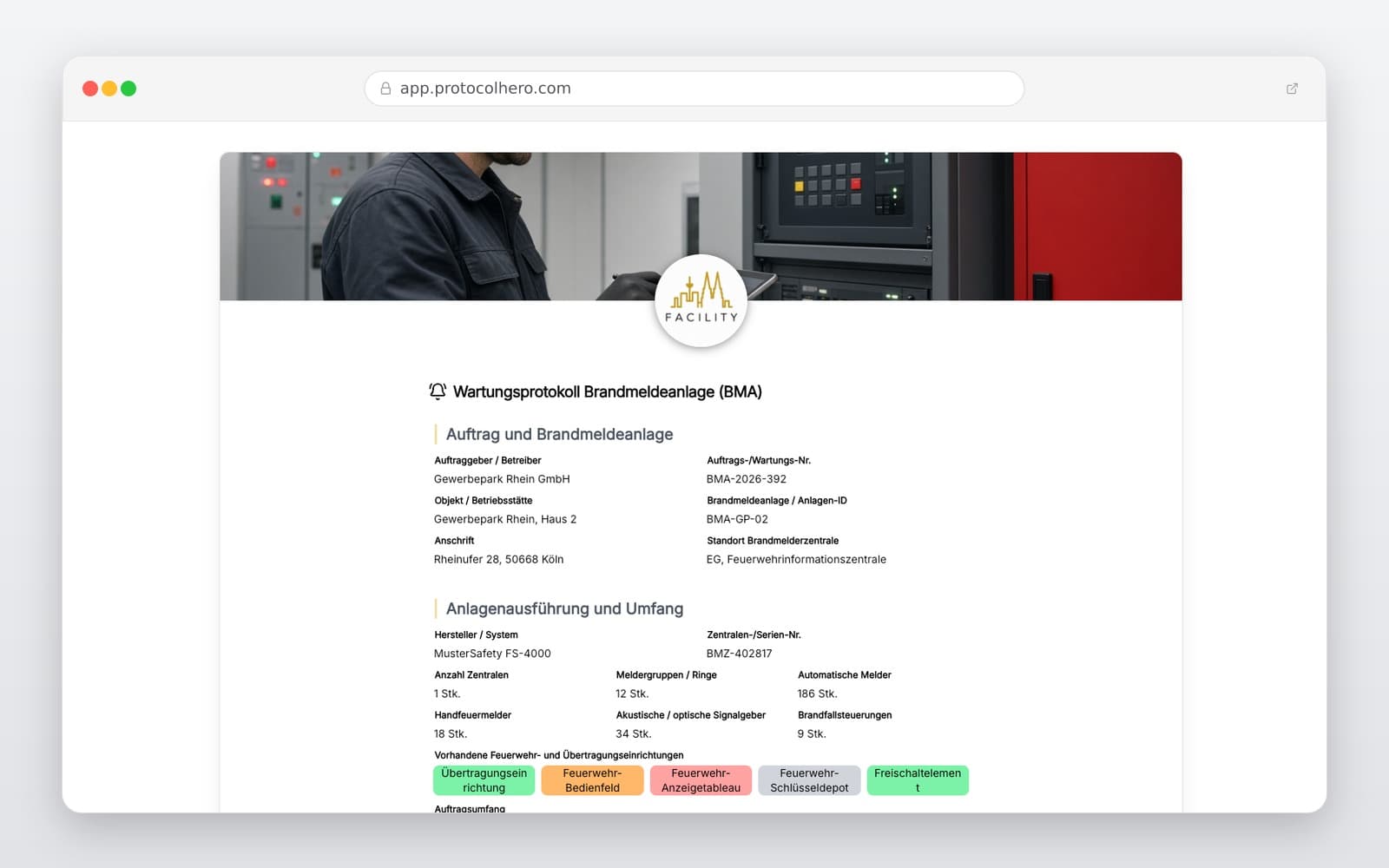
Preview of the “Fire Alarm System (FAS) Maintenance Log – Template according to DIN 14675 & VDE 0833” template
Create free account

Short answer

What is the “Fire Alarm System (FAS) Maintenance Log – Template according to DIN 14675 & VDE 0833” template for?

Fire alarm system maintenance log template. Digital FAS inspection protocol according to DIN 14675 & DIN VDE 0833. Document maintenance steps professionally.

Use case
Brandschutz
Captured data
Operator, object, installation, and system data, Revision start, log-off, and temporary safety measures, Testing of Fire Alarm Control Panel (FACP) and backup power supply
Result
A structured form that can be completed directly in the browser and reused in ProtocolHero.

Check the template against the technical, contractual and legal requirements of the specific case. ProtocolHero does not replace professional assessment.

Inhalt der Vorlage

What is included in the template?

Operator, object, installation, and system data

Revision start, log-off, and temporary safety measures

Testing of Fire Alarm Control Panel (FACP) and backup power supply

Logbook check, event memory review, and fire routing cards

Detector groups and test points as repeatable units

Alarm transmission, fault routing, and connection paths

Fire brigade peripherals (key depots, indicator panels) and fire controls

Defect log, repair deadlines, photos, and digital signature

Live form

Fill out this template directly in the browser

No install needed — complete the form below, attach photos, and submit. Create a free account anytime to save and reuse your own templates.

Customize Your Digital FAS Maintenance Log

Adapt this template flexibly to your maintenance contract, manufacturer specifications, connection conditions, system inventory, and current fire control matrix.

Why Structured FAS Maintenance Documentation is Crucial

Fire alarm systems are subject to strict legal and normative requirements. A seamless maintenance log serves as proof for insurers, building authorities, and operators while ensuring continuous operational readiness.

Structured digital logs help certified specialist contractors and electrical experts minimize liability risks, track recurring maintenance intervals, and present all testing steps transparently to the client.

  • Compliance with standards like DIN 14675 and DIN VDE 0833
  • Vital documentation for property insurers and fire safety authorities
  • Systematic tracking of all detectors, groups, and control units
Revision, Control Panel, and Power Supply

Before starting any test, the system must be set to revision mode and the alarm transmission to the fire department must be temporarily deactivated to prevent costly false alarms.

The initial testing steps focus on the Fire Alarm Control Panel (FACP) as well as the primary and secondary power supplies (batteries and backup systems). Charging voltages and battery capacities must be measured and recorded.

  • Logging of system deactivation and temporary replacement measures
  • Testing battery capacity and charging voltage
  • Reviewing the event memory and physical logbook

Detectors, Alarm Paths, and Fire Brigade Periphery

Each fire detector must be clearly assigned to its detector group and test point to ensure rapid localization in the event of an alarm. The template allows for serial logging of all detectors.

In addition to automatic detectors, manual call points, alarm transmission paths, fire department peripherals (e.g., key depots, indicator panels), and fire control systems (such as elevator recall or ventilation shutdown) must be verified.

  • Testing detectors using test gas or heat triggers
  • Functional testing of fire brigade key depots (FSD) and indicator panels (FAT)
  • Cause-and-effect testing of the fire control matrix and transmission paths

Defects, Reactivation, and Logbook

Identified defects must be prioritized, documented with photos, and assigned clear remediation deadlines. Critical defects require immediate coordination of organizational replacement measures (e.g., fire watch) with the operator.

After completing all work, the fire alarm system must be safely reactivated, the alarm transmission re-enabled, and the service recorded in the physical logbook.

  • Clear defect classification and photographic proof on-site
  • Setting binding remediation deadlines for the operator
  • Logging the successful and safe reactivation of the system
Häufige Fragen

Fragen zur Vorlage „Fire Alarm System (FAS) Maintenance Log"

Mehr als eine Vorlage

Was ProtocolHero zusätzlich für dich übernimmt

Eine Vorlage allein ist erst der Anfang – ProtocolHero macht aus jedem Protokoll einen durchgängigen digitalen Workflow mit KI-Unterstützung, Workflow-Freigaben und revisionssicherem Archiv.

HERO Assistant – KI-Chat für Dokumentenerstellung

Der HERO Assistant ist der eingebaute KI-Chat von ProtocolHero. Du kannst per Spracheingabe ein komplettes Dokument anlegen lassen oder ein bestehendes PDF, Foto oder Word-Dokument hochladen – die KI liest die Struktur aus und baut eine wiederverwendbare Vorlage daraus.

Auto-Fill aus Sprache, Foto und Datei

Beim Ausfüllen kannst du das Dokument per Sprachsteuerung diktieren – die KI ordnet die Inhalte automatisch den richtigen Feldern zu. Oder du lädst Fotos, Scans, Verträge, Datenblätter oder Ausweise hoch: Der HERO Assistant extrahiert die Daten und befüllt das Formular vor – du prüfst und unterschreibst.

Foto- und Video-Upload direkt im Dokument

Zu jedem Bauteil, Messpunkt oder Schadensbild kannst du Fotos und Videos direkt aus der App anhängen. Videos sind besonders nützlich, wenn ein Schadensbild dynamisch ist – ein einzelnes Standbild würde den Befund nicht ausreichend dokumentieren.

Kommentare als Aufgaben – intern und mit dem Kunden

Jede Position im Dokument kann kommentiert und als Aufgabe an einen Kollegen, an dich selbst oder direkt an den Kunden zugewiesen werden. Kommentare können wahlweise rein intern bleiben oder im freigegebenen Kundenlink mitgeteilt werden.

Workflow: Bearbeiter zuweisen, Prüfer freigeben

Dokumente lassen sich an Kollegen weiterleiten und können einen festen Prüfer haben, der die letzte fachliche Freigabe erteilt, bevor das Dokument unterschrieben oder an den Kunden geht.

Activity-Log für lückenlose Nachvollziehbarkeit

Jedes Dokument hat einen vollständigen Aktivitäts-Verlauf: Wer hat wann was geändert, kommentiert, hochgeladen, freigegeben, unterschrieben. Das Log ist auf Wunsch auch im Kunden-Freigabelink sichtbar – ideal für Auditoren, Versicherer und Kunden.

Eindeutige Protocol-ID je Dokument

Jedes Dokument bekommt automatisch eine eindeutige Protocol-ID, mit der es sich zweifelsfrei referenzieren, verlinken und im Audit-Trail wiederfinden lässt.

Automatische Berichts-Nummerierung

Neu

Fortlaufende, lückenlose Berichts-Nummern (z. B. Protokoll-2026-001, 002, 003 …) je Dokumenttyp und Kunde – ohne manuelles Vergeben, ohne Dubletten.

Web-Formular & Inbox

Neu

Vorlagen lassen sich als öffentliches Web-Formular auf der eigenen Website einbinden – ein ausgefülltes Dokument landet automatisch in deiner ProtocolHero-Inbox zur Weiterbearbeitung.

QR-Code-Etiketten für Anlagen und Bauteile

Neu

QR-Code-Etiketten pro Anlage, Bauteil oder Abschottung, die beim Scannen direkt das hinterlegte Protokoll, die Historie und alle Wartungs- bzw. Prüfdokumente öffnen.

1.264 × genutzt

Diese Vorlage in 2 Minuten selbst nutzen

Vorlage übernehmen, an deinen Betrieb anpassen und direkt vor Ort ausfüllen – kostenlos testen, keine Kreditkarte nötig.