Brandschutz8

Fire Safety Regulations Review & Update – Template according to DIN 14096

Keeping fire safety regulations up to date is essential for businesses to protect lives and minimize liability risks in emergencies. With this digital template, fire safety officers and qualified professionals can seamlessly and legally document both regular and event-driven reviews of Parts A, B, and C.

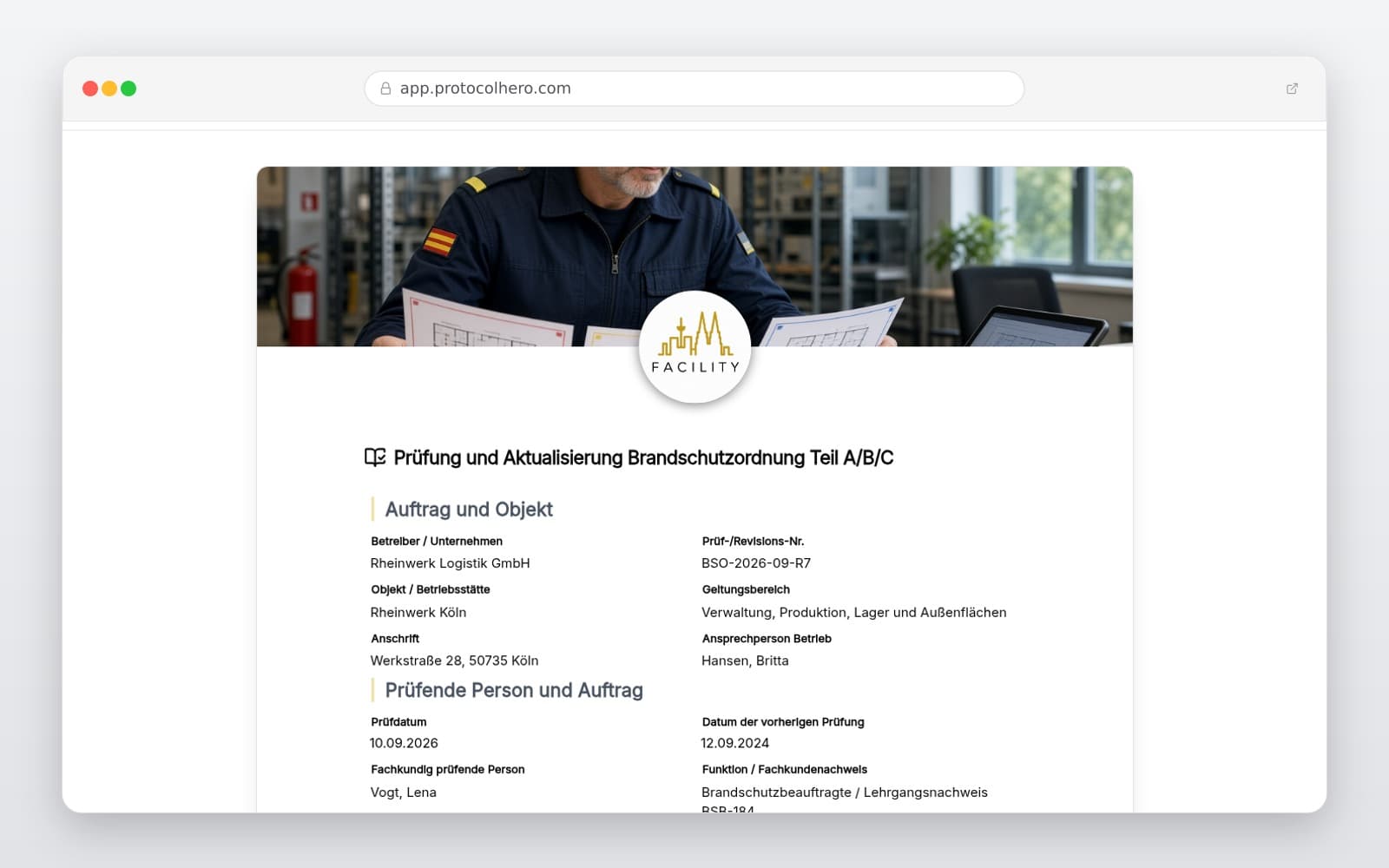
Preview of the “Fire Safety Regulations Review & Update – Template according to DIN 14096” template
Create free account

Short answer

What is the “Fire Safety Regulations Review & Update – Template according to DIN 14096” template for?

Template for reviewing and updating fire safety regulations (Parts A, B, C) according to DIN 14096. Document changes, approvals, and version control.

Use case
Brandschutz
Captured data
Master data of the facility, operator, and the certified inspector, Alignment with the fire safety concept, escape routes, and alarm organization, Review matrix for Parts A (posters), B (employees), and C (specialist staff)
Result
A structured form that can be completed directly in the browser and reused in ProtocolHero.

Check the template against the technical, contractual and legal requirements of the specific case. ProtocolHero does not replace professional assessment.

Inhalt der Vorlage

What is included in this template?

Master data of the facility, operator, and the certified inspector

Alignment with the fire safety concept, escape routes, and alarm organization

Review matrix for Parts A (posters), B (employees), and C (specialist staff)

Documentation of structural, technical, or organizational changes
Logging of posting locations, distribution channels, and language versions

Action item list with priorities, responsibilities, deadlines, and status

Formal approval by company management and effectiveness control

Live form

Fill out this template directly in the browser

No install needed — complete the form below, attach photos, and submit. Create a free account anytime to save and reuse your own templates.

Review and Update Fire Safety Regulations Digitally

Use our professional template to efficiently document the alignment with your building, usage, alarm systems, and current standards.

Inventory and Basis for Changes

Before conducting any content review, you must record the master data of the facility, the current version status of the existing fire safety regulations, and the legal framework. This includes operator information as well as proof of the inspector's expertise (e.g., as a certified fire safety officer according to DGUV Information 205-003).

A key step is comparing the documented regulations with the actual conditions on-site. Structural changes, changes in room utilization, or modifications to the alarm organization imperatively require adjusting the fire safety regulations to ensure correct procedures in an emergency.

  • Recording of facility, operator, scope, and existing version status
  • Verification of the inspector's expertise and qualifications
  • Alignment with the current fire safety concept and escape plans
  • Documentation of structural, technical, or organizational changes
Testing Parts A, B, and C

Standard DIN 14096 divides fire safety regulations into three specific parts, each addressing a different target group and carrying distinct structural and content requirements. During the review, each part must be checked individually for accuracy, completeness, and clarity.

Part A is aimed at all building occupants, Part B at employees, and Part C at personnel with designated fire safety roles. This targeted structure ensures that in an emergency, everyone – from visitors to specialist fire safety staff – can react appropriately and without delay.

  • Part A (Poster): Checking the highly visible display for all building occupants (behavior in case of fire)
  • Part B (Employees): Reviewing the written guidelines for personnel without specific fire safety duties (fire prevention, alarm procedures, evacuation plans)
  • Part C (Specialist Staff): Inspecting detailed instructions for personnel with designated fire safety roles (e.g., fire safety wardens, evacuation assistants)

Posting, Distribution, and Version Control

Fire safety regulations are only effective if they are accessible and understandable to their target groups. Therefore, you must verify that Part A posters are mounted in the correct locations (e.g., escape routes, elevators) and are available in the required languages.

Furthermore, the distribution of Part B to all employees must be verified and logged. To prevent liability risks, controlled version management is vital: outdated versions must be collected and discarded, while the new version is formally approved and archived.

  • Verifying posting locations and legibility of Part A
  • Documenting the training and distribution of Part B to all employees
  • Checking language versions for international workforces
  • Logging the controlled replacement of outdated document versions

Measures, Release, and Effectiveness Control

If deviations or update requirements are identified during the review, they must be recorded in a prioritized action list. Each action item requires a clear responsibility, a deadline, and status tracking.

Once all changes are incorporated, the technical review and formal approval of the updated fire safety regulations are signed off by the company management. To ensure the effectiveness of the regulations, subsequent training sessions, fire safety instruction, and regular evacuation drills must be documented.

  • Creating a prioritized deficiency list with responsibilities, deadlines, and status
  • Formal approval of the updated fire safety regulations by management
  • Planning and documenting effectiveness checks (e.g., evacuation drills)
  • Setting the deadline for the next regular review
Häufige Fragen

Fragen zur Vorlage „Fire Safety Regulations Review & Update"

Mehr als eine Vorlage

Was ProtocolHero zusätzlich für dich übernimmt

Eine Vorlage allein ist erst der Anfang – ProtocolHero macht aus jedem Protokoll einen durchgängigen digitalen Workflow mit KI-Unterstützung, Workflow-Freigaben und revisionssicherem Archiv.

HERO Assistant – KI-Chat für Dokumentenerstellung

Der HERO Assistant ist der eingebaute KI-Chat von ProtocolHero. Du kannst per Spracheingabe ein komplettes Dokument anlegen lassen oder ein bestehendes PDF, Foto oder Word-Dokument hochladen – die KI liest die Struktur aus und baut eine wiederverwendbare Vorlage daraus.

Auto-Fill aus Sprache, Foto und Datei

Beim Ausfüllen kannst du das Dokument per Sprachsteuerung diktieren – die KI ordnet die Inhalte automatisch den richtigen Feldern zu. Oder du lädst Fotos, Scans, Verträge, Datenblätter oder Ausweise hoch: Der HERO Assistant extrahiert die Daten und befüllt das Formular vor – du prüfst und unterschreibst.

Foto- und Video-Upload direkt im Dokument

Zu jedem Bauteil, Messpunkt oder Schadensbild kannst du Fotos und Videos direkt aus der App anhängen. Videos sind besonders nützlich, wenn ein Schadensbild dynamisch ist – ein einzelnes Standbild würde den Befund nicht ausreichend dokumentieren.

Kommentare als Aufgaben – intern und mit dem Kunden

Jede Position im Dokument kann kommentiert und als Aufgabe an einen Kollegen, an dich selbst oder direkt an den Kunden zugewiesen werden. Kommentare können wahlweise rein intern bleiben oder im freigegebenen Kundenlink mitgeteilt werden.

Workflow: Bearbeiter zuweisen, Prüfer freigeben

Dokumente lassen sich an Kollegen weiterleiten und können einen festen Prüfer haben, der die letzte fachliche Freigabe erteilt, bevor das Dokument unterschrieben oder an den Kunden geht.

Activity-Log für lückenlose Nachvollziehbarkeit

Jedes Dokument hat einen vollständigen Aktivitäts-Verlauf: Wer hat wann was geändert, kommentiert, hochgeladen, freigegeben, unterschrieben. Das Log ist auf Wunsch auch im Kunden-Freigabelink sichtbar – ideal für Auditoren, Versicherer und Kunden.

Eindeutige Protocol-ID je Dokument

Jedes Dokument bekommt automatisch eine eindeutige Protocol-ID, mit der es sich zweifelsfrei referenzieren, verlinken und im Audit-Trail wiederfinden lässt.

Automatische Berichts-Nummerierung

Neu

Fortlaufende, lückenlose Berichts-Nummern (z. B. Protokoll-2026-001, 002, 003 …) je Dokumenttyp und Kunde – ohne manuelles Vergeben, ohne Dubletten.

Web-Formular & Inbox

Neu

Vorlagen lassen sich als öffentliches Web-Formular auf der eigenen Website einbinden – ein ausgefülltes Dokument landet automatisch in deiner ProtocolHero-Inbox zur Weiterbearbeitung.

QR-Code-Etiketten für Anlagen und Bauteile

Neu

QR-Code-Etiketten pro Anlage, Bauteil oder Abschottung, die beim Scannen direkt das hinterlegte Protokoll, die Historie und alle Wartungs- bzw. Prüfdokumente öffnen.

509 × genutzt

Diese Vorlage in 2 Minuten selbst nutzen

Vorlage übernehmen, an deinen Betrieb anpassen und direkt vor Ort ausfüllen – kostenlos testen, keine Kreditkarte nötig.