Brandschutz8

Fire Extinguisher Visual Inspection Checklist – Operator Template

Regular visual inspections of fire extinguishing equipment protect lives and secure your business in an emergency. With this digital template, operators, fire safety officers, and facility managers can easily document monthly checks of fire extinguishers, wall hydrants, and accessories using a smartphone or tablet. Ensure full compliance with operational safety guidelines.

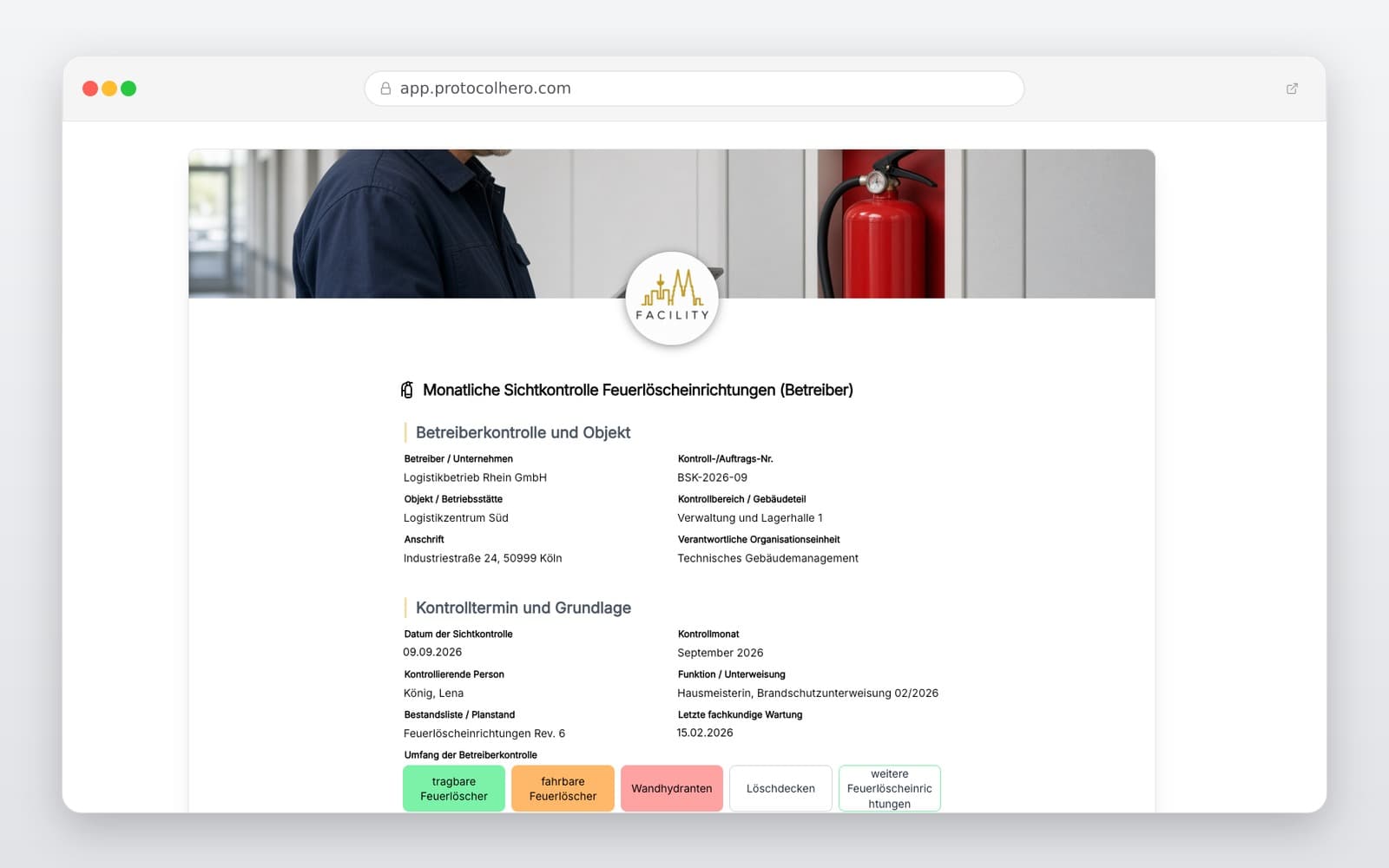
Preview of the “Fire Extinguisher Visual Inspection Checklist – Operator Template” template
Create free account

Short answer

What is the “Fire Extinguisher Visual Inspection Checklist – Operator Template” template for?

Fire extinguisher visual inspection checklist: Digital template for monthly operator inspections of fire extinguishing equipment according to ASR A2.2.

Use case
Brandschutz
Captured data
Master Data: Operator, property, inspection area, and calendar month, Inventory List & Assignment: Location, inventory number, and equipment type, Visual Inspection: Visibility, signage, and unobstructed accessibility
Result
A structured form that can be completed directly in the browser and reused in ProtocolHero.

Check the template against the technical, contractual and legal requirements of the specific case. ProtocolHero does not replace professional assessment.

Inhalt der Vorlage

What is included in the template?

Master Data: Operator, property, inspection area, and calendar month

Inventory List & Assignment: Location, inventory number, and equipment type

Visual Inspection: Visibility, signage, and unobstructed accessibility

Condition Check: External condition, safety seal, hose, and pressure gauge

Defects Log: Identified defects, immediate corrective actions, and deadlines

Documentation: Photo uploads and legally compliant digital signatures

Live form

Fill out this template directly in the browser

No install needed — complete the form below, attach photos, and submit. Create a free account anytime to save and reuse your own templates.

Digitalize Your Fire Safety Inspections

Use our interactive template and adapt it to your inventory list, risk assessment, manufacturer specifications, and operational inspection intervals.

Why Operators Must Inspect Fire Extinguishing Equipment Regularly

Fire safety equipment must be fully operational in an emergency. Regular, usually monthly, operator inspections (visual checks) ensure that fire extinguishers and wall hydrants are not blocked, damaged, or missing. This process bridges the gap between the official, biennial professional maintenance services.

Performing these visual checks is a core duty for employers and building operators under workplace safety guidelines (such as ASR A2.2 in Germany) and accident prevention regulations. Keeping seamless, digital records protects you from liability risks with insurance providers and authorities in the event of a fire.

  • Ensures constant operational readiness of firefighting equipment
  • Fulfills employer and building operator safety obligations
  • Early detection of vandalism, theft, or pressure loss
  • Complete proof of compliance for insurance and regulatory bodies
Inventory Tracking and Unique Equipment Assignment

For audit-proof documentation, it is essential to uniquely assign every piece of fire extinguishing equipment in the building. A structured inventory list within the checklist helps you keep track of all locations and devices.

Each fire extinguisher is logged with a unique inventory number, precise location description (e.g., '1st Floor Hallway West'), and equipment type (e.g., powder, CO2, or foam). The dates of the last and next professional inspections should also be recorded.

Focus on Accessibility, Signage, and Physical Condition

The actual visual inspection focuses on easily recognizable external features. A fire extinguisher is of little use if it is blocked by pallets during an emergency or if the signage is missing.

Systematically verify that the extinguisher is unobstructed, the fire safety sign is clearly visible, and the device shows no signs of physical damage. Particular attention must be paid to the safety seal: if it is broken or missing, the extinguisher must be replaced or professionally inspected immediately. For extinguishers with pressure gauges, the needle must point to the green zone.

Defects, Corrective Actions, and Professional Maintenance Limits

If defects such as broken seals, cracked hoses, blocked access, or pressure loss are detected during the visual inspection, immediate corrective actions must be initiated and documented. The template allows you to capture defects via photo and assign them to responsible team members for resolution.

Important: The operator inspection is strictly a visual and external functional check. It does not replace the mandatory professional maintenance (typically required every 2 years by certified technicians). It serves solely to maintain functionality between official service intervals.

Häufige Fragen

Fragen zur Vorlage „Fire Extinguisher Visual Inspection Checklist"

Mehr als eine Vorlage

Was ProtocolHero zusätzlich für dich übernimmt

Eine Vorlage allein ist erst der Anfang – ProtocolHero macht aus jedem Protokoll einen durchgängigen digitalen Workflow mit KI-Unterstützung, Workflow-Freigaben und revisionssicherem Archiv.

HERO Assistant – KI-Chat für Dokumentenerstellung

Der HERO Assistant ist der eingebaute KI-Chat von ProtocolHero. Du kannst per Spracheingabe ein komplettes Dokument anlegen lassen oder ein bestehendes PDF, Foto oder Word-Dokument hochladen – die KI liest die Struktur aus und baut eine wiederverwendbare Vorlage daraus.

Auto-Fill aus Sprache, Foto und Datei

Beim Ausfüllen kannst du das Dokument per Sprachsteuerung diktieren – die KI ordnet die Inhalte automatisch den richtigen Feldern zu. Oder du lädst Fotos, Scans, Verträge, Datenblätter oder Ausweise hoch: Der HERO Assistant extrahiert die Daten und befüllt das Formular vor – du prüfst und unterschreibst.

Foto- und Video-Upload direkt im Dokument

Zu jedem Bauteil, Messpunkt oder Schadensbild kannst du Fotos und Videos direkt aus der App anhängen. Videos sind besonders nützlich, wenn ein Schadensbild dynamisch ist – ein einzelnes Standbild würde den Befund nicht ausreichend dokumentieren.

Kommentare als Aufgaben – intern und mit dem Kunden

Jede Position im Dokument kann kommentiert und als Aufgabe an einen Kollegen, an dich selbst oder direkt an den Kunden zugewiesen werden. Kommentare können wahlweise rein intern bleiben oder im freigegebenen Kundenlink mitgeteilt werden.

Workflow: Bearbeiter zuweisen, Prüfer freigeben

Dokumente lassen sich an Kollegen weiterleiten und können einen festen Prüfer haben, der die letzte fachliche Freigabe erteilt, bevor das Dokument unterschrieben oder an den Kunden geht.

Activity-Log für lückenlose Nachvollziehbarkeit

Jedes Dokument hat einen vollständigen Aktivitäts-Verlauf: Wer hat wann was geändert, kommentiert, hochgeladen, freigegeben, unterschrieben. Das Log ist auf Wunsch auch im Kunden-Freigabelink sichtbar – ideal für Auditoren, Versicherer und Kunden.

Eindeutige Protocol-ID je Dokument

Jedes Dokument bekommt automatisch eine eindeutige Protocol-ID, mit der es sich zweifelsfrei referenzieren, verlinken und im Audit-Trail wiederfinden lässt.

Automatische Berichts-Nummerierung

Neu

Fortlaufende, lückenlose Berichts-Nummern (z. B. Protokoll-2026-001, 002, 003 …) je Dokumenttyp und Kunde – ohne manuelles Vergeben, ohne Dubletten.

Web-Formular & Inbox

Neu

Vorlagen lassen sich als öffentliches Web-Formular auf der eigenen Website einbinden – ein ausgefülltes Dokument landet automatisch in deiner ProtocolHero-Inbox zur Weiterbearbeitung.

QR-Code-Etiketten für Anlagen und Bauteile

Neu

QR-Code-Etiketten pro Anlage, Bauteil oder Abschottung, die beim Scannen direkt das hinterlegte Protokoll, die Historie und alle Wartungs- bzw. Prüfdokumente öffnen.

683 × genutzt

Diese Vorlage in 2 Minuten selbst nutzen

Vorlage übernehmen, an deinen Betrieb anpassen und direkt vor Ort ausfüllen – kostenlos testen, keine Kreditkarte nötig.