Personal & HR6 Min Lesezeit

Leave Request Template – Digital Vacation Requests for Craft Businesses

Put an end to lost vacation slips in service vehicles or messy WhatsApp group chats. With our digital leave request template, craft businesses and SMEs can organize employee vacation planning easily, transparently, and on the go – directly from their smartphones. This keeps the office in control and speeds up approvals.

app.protocolhero.com/share/urlaubsantrag/019ffbb3-070a-70a3-bd8f-3faa69d93fd0
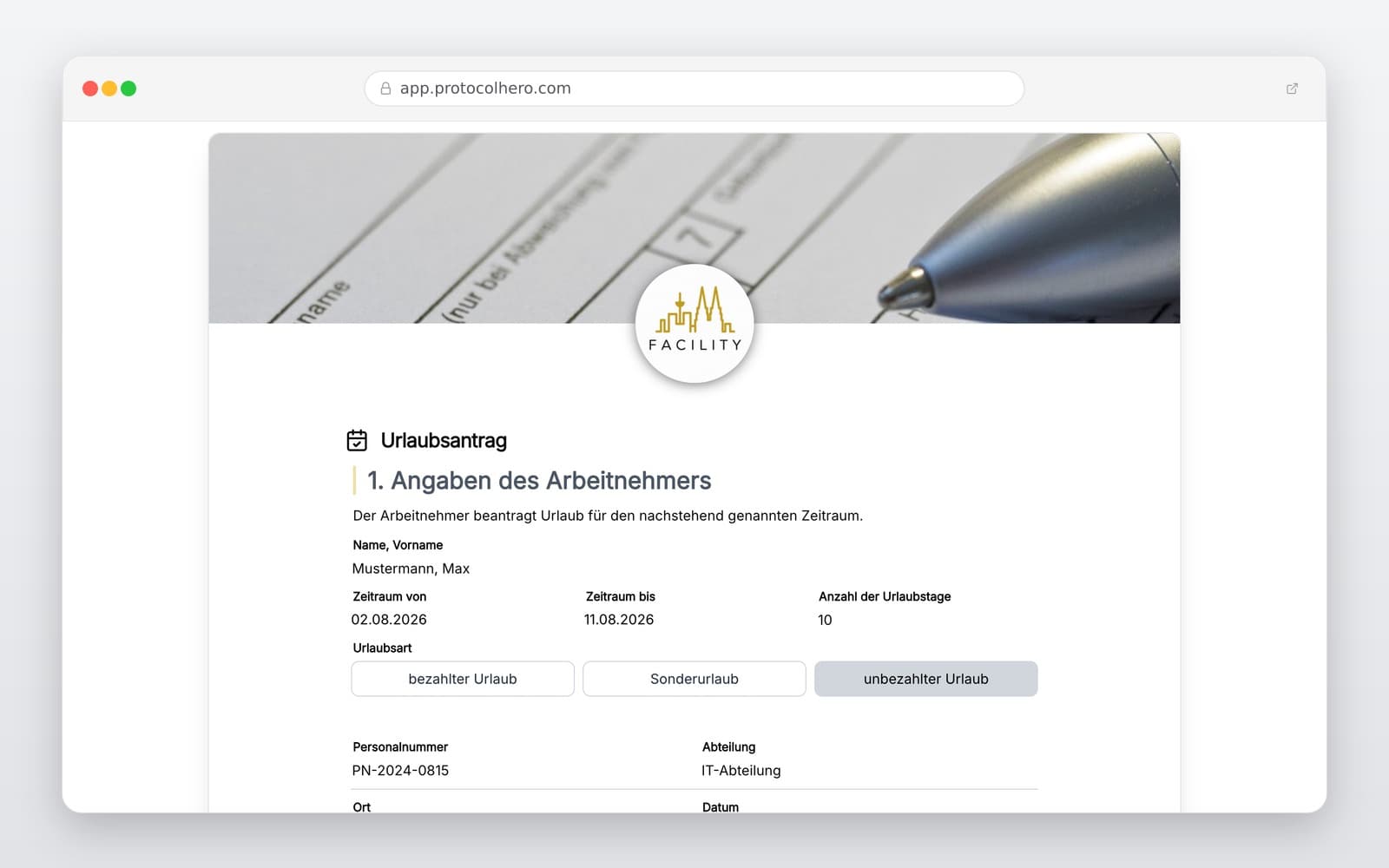
Vorschau der Vorlage „Leave Request Template – Digital Vacation Requests for Craft Businesses"
Create free account
Inhalt der Vorlage

What is included in the leave request?

Complete employee details (name, department/trade)

Requested leave period (start and end date)

Number of requested vacation days

Details on remaining leave entitlement

Field for comments, handover notes, or representatives

Interface for processing and approval by supervisors

Clear documentation of approval or rejection

Digital signature or confirmation from both parties

Live form

Fill out this template directly in the browser

No install needed — complete the form below, attach photos, and submit. Create a free account anytime to save and reuse your own templates.

Test Digital Leave Requests Now

Create, manage, and approve leave requests paperlessly with ProtocolHero.

What belongs in a leave request?

A structured leave request is the foundation of smooth vacation planning in any business. Most importantly, it must clearly identify which employee is requesting leave for which exact period. In addition to the start and end dates, specifying the actual number of vacation days is crucial to avoid misunderstandings regarding public holidays or weekends. Information on the remaining leave entitlement also helps both the employee and the office stay on track.

Legally, the Federal Leave Act (Bundesurlaubsgesetz - BUrlG) in Germany sets the framework for statutory minimum leave. According to § 7 BUrlG, employee vacation requests must generally be taken into account. Exceptions only apply if urgent operational reasons—such as an acute order peak in a craft business—or socially prioritized vacation wishes of other employees (e.g., parents during school holidays) stand in the way. Proper documentation protects both sides.
Typical mistakes in leave requests and vacation planning

In many craft businesses, vacation planning is still highly informal. A technician quickly mentions their vacation to the master on-site, another sends a WhatsApp message in the evening, and a third drops a handwritten note in the office. This inevitably leads to chaos: approvals are forgotten, periods overlap, and in the end, crucial staff are missing from the construction site.

Without a centralized, uniform process, management or the office quickly loses track. Missing details on exact dates or undocumented verbal agreements often lead to frustration and disputes later on. A standardized template ensures that every employee follows the same process.

The advantage of a digital leave request over paper

Digitizing leave requests saves valuable time in trade and craft businesses and reduces stress for everyone involved. With a mobile solution like ProtocolHero, the process is incredibly simple and can be completed directly on the construction site or during service calls:

  • Mobile entry: The employee opens the form on their smartphone and enters the desired period.
  • Instant transmission: The request is recorded in real time and sent directly to the office or the master.
  • Fast review: The manager sees immediately whether the period is suitable and documents the decision with one click.
  • No paper chaos: No lost slips in trucks or untraceable notes in the office—everything is securely archived in one place.

Distinguishing between leave request and leave approval

Crucial for daily practice: A submitted leave request initially only documents the employee's non-binding vacation wish. Simply submitting the request does not mean that the vacation is approved or that the employee can stay away from work. The employer must actively review and approve the request.

Contrary to popular myths, there is no general legal rule stating that a leave request is automatically approved after a certain number of days. To avoid misunderstandings, companies should define a clear internal process for application, review, and approval. A digital system helps display the current processing status transparently and traceably for both sides at all times.

Häufige Fragen

Fragen zur Vorlage „Leave Request Template"

Mehr als eine Vorlage

Was ProtocolHero zusätzlich für dich übernimmt

Eine Vorlage allein ist erst der Anfang – ProtocolHero macht aus jedem Protokoll einen durchgängigen digitalen Workflow mit KI-Unterstützung, Workflow-Freigaben und revisionssicherem Archiv.

HERO Assistant – KI-Chat für Dokumentenerstellung

Der HERO Assistant ist der eingebaute KI-Chat von ProtocolHero. Du kannst per Spracheingabe ein komplettes Dokument anlegen lassen oder ein bestehendes PDF, Foto oder Word-Dokument hochladen – die KI liest die Struktur aus und baut eine wiederverwendbare Vorlage daraus.

Auto-Fill aus Sprache, Foto und Datei

Beim Ausfüllen kannst du das Dokument per Sprachsteuerung diktieren – die KI ordnet die Inhalte automatisch den richtigen Feldern zu. Oder du lädst Fotos, Scans, Verträge, Datenblätter oder Ausweise hoch: Der HERO Assistant extrahiert die Daten und befüllt das Formular vor – du prüfst und unterschreibst.

Foto- und Video-Upload direkt im Dokument

Zu jedem Bauteil, Messpunkt oder Schadensbild kannst du Fotos und Videos direkt aus der App anhängen. Videos sind besonders nützlich, wenn ein Schadensbild dynamisch ist – ein einzelnes Standbild würde den Befund nicht ausreichend dokumentieren.

Kommentare als Aufgaben – intern und mit dem Kunden

Jede Position im Dokument kann kommentiert und als Aufgabe an einen Kollegen, an dich selbst oder direkt an den Kunden zugewiesen werden. Kommentare können wahlweise rein intern bleiben oder im freigegebenen Kundenlink mitgeteilt werden.

Workflow: Bearbeiter zuweisen, Prüfer freigeben

Dokumente lassen sich an Kollegen weiterleiten und können einen festen Prüfer haben, der die letzte fachliche Freigabe erteilt, bevor das Dokument unterschrieben oder an den Kunden geht.

Activity-Log für lückenlose Nachvollziehbarkeit

Jedes Dokument hat einen vollständigen Aktivitäts-Verlauf: Wer hat wann was geändert, kommentiert, hochgeladen, freigegeben, unterschrieben. Das Log ist auf Wunsch auch im Kunden-Freigabelink sichtbar – ideal für Auditoren, Versicherer und Kunden.

Eindeutige Protocol-ID je Dokument

Jedes Dokument bekommt automatisch eine eindeutige Protocol-ID, mit der es sich zweifelsfrei referenzieren, verlinken und im Audit-Trail wiederfinden lässt.

Automatische Berichts-Nummerierung

Neu

Fortlaufende, lückenlose Berichts-Nummern (z. B. Protokoll-2026-001, 002, 003 …) je Dokumenttyp und Kunde – ohne manuelles Vergeben, ohne Dubletten.

Web-Formular & Inbox

Neu

Vorlagen lassen sich als öffentliches Web-Formular auf der eigenen Website einbinden – ein ausgefülltes Dokument landet automatisch in deiner ProtocolHero-Inbox zur Weiterbearbeitung.

QR-Code-Etiketten für Anlagen und Bauteile

Neu

QR-Code-Etiketten pro Anlage, Bauteil oder Abschottung, die beim Scannen direkt das hinterlegte Protokoll, die Historie und alle Wartungs- bzw. Prüfdokumente öffnen.

4.382 × genutzt

Diese Vorlage in 2 Minuten selbst nutzen

Vorlage übernehmen, an deinen Betrieb anpassen und direkt vor Ort ausfüllen – kostenlos testen, keine Kreditkarte nötig.