Brandschutz6 Min Lesezeit

Elevator Emergency Call Checklist – Template for Functional Testing & Documentation

Test elevator emergency call systems systematically and document their functionality directly on-site. With this digital template, service technicians, property managers, and building operators record all relevant inspection points mobile via smartphone or tablet. Meet documentation requirements seamlessly and manage defects without paperwork.

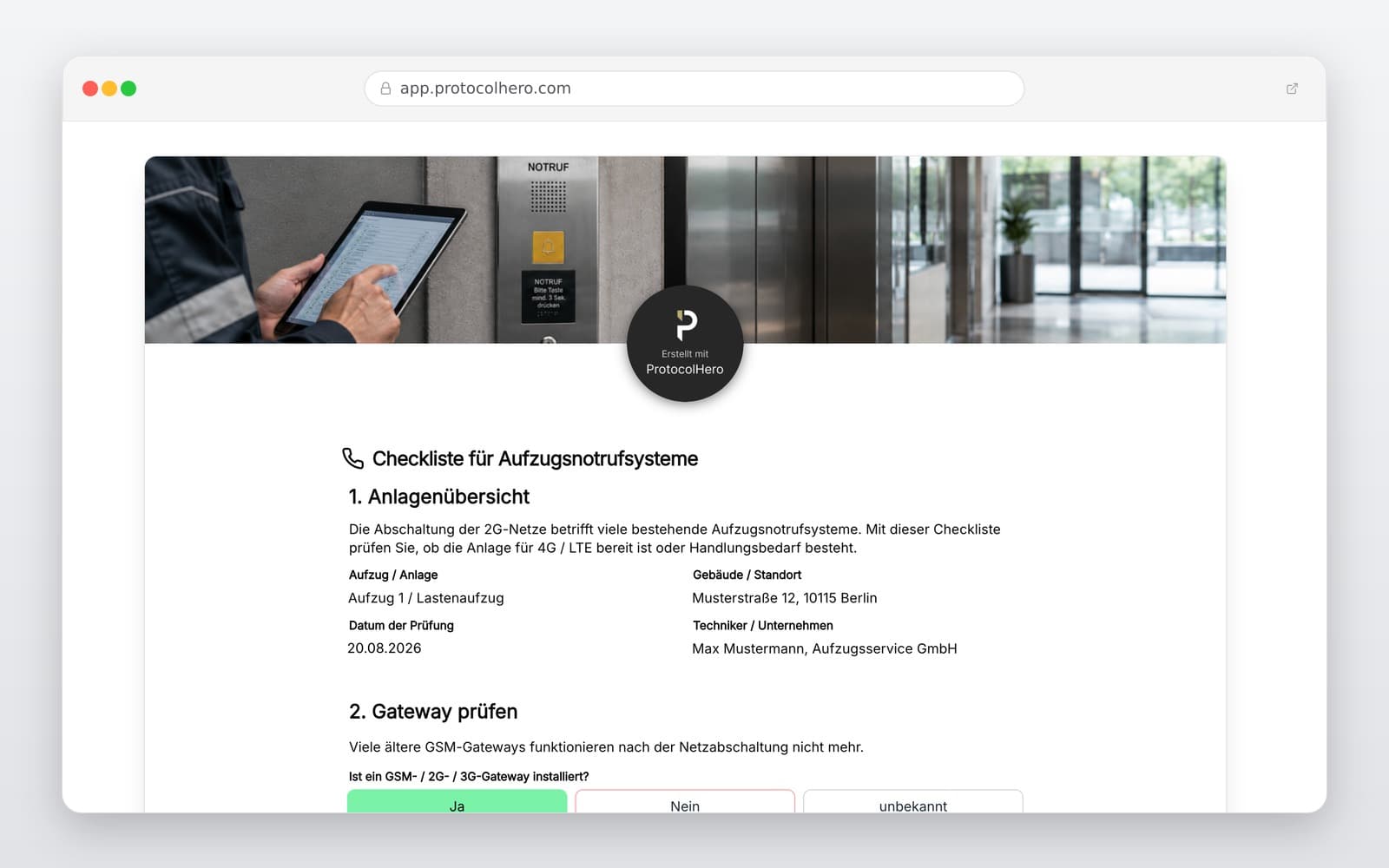
Preview of the “Elevator Emergency Call Checklist – Template for Functional Testing & Documentation” template
Create free account
Inhalt der Vorlage

What is included in the template?

Property, operator, and elevator master data

Identification of the elevator and the emergency call system type

Functional check of the emergency call button inside the cabin

Verification of the two-way voice communication with the rescue service

Checking accessibility and correct location mapping

Testing the backup power supply in the event of a mains failure

Documentation of detected issues (with photo upload) and actions

Final sign-off with digital signature, inspector name, and date

Live form

Fill out this template directly in the browser

No install needed — complete the form below, attach photos, and submit. Create a free account anytime to save and reuse your own templates.

Control Elevator Emergency Calls Digitally

Use our digital checklist to document inspections reliably and test ProtocolHero for free.

What is Inspected in an Elevator Emergency Call System?

A modern elevator emergency call system must do much more than simply trigger an acoustic signal in the shaft. For elevator installations covered by Annex 1 No. 4.1 of the German Industrial Safety Regulation (BetrSichV), an effective two-way communication system in the car is mandatory. This system must allow an emergency service to be reached at all times.

The Technical Rules for Operational Safety (TRBS 3121) specify these requirements: The system must enable voice communication in both directions. An entrapped person must not only be able to send an alert but also communicate actively with the emergency service. During an elevator emergency call functional test, the focus is therefore on the following aspects:

The currently applicable standard is DIN EN 81-28:2022-08, which covers remote alarms for passenger and goods passenger lifts. Although a draft for a revised version (DIN EN 81-28:2025-09) was published in 2025, the 2022 edition remains the authoritative standard until its final replacement.

  • Can the emergency call be triggered properly from inside the cabin?
  • Is the connection to the designated emergency service established without errors?
  • Is clear two-way voice communication possible in both directions?
  • Can the emergency service immediately identify which elevator the call is coming from?
  • Does the emergency call system work during a power outage of the elevator installation (backup power)?
  • Are existing faults or error messages detected automatically?
  • Are all labels, instructions, and pictograms in the cabin clearly legible and present?
Why a Mobile Phone in the Elevator is Not a Valid Emergency System

In practice, the question sometimes arises whether carrying a mobile phone is sufficient to call for help in an emergency. TRBS 3121 makes it unmistakably clear: The two-way communication system must be permanently connected to the elevator installation. A simple mobile phone does not meet these requirements.

This regulation is highly practical: In an emergency, it cannot be assumed that every trapped person has a functioning, charged smartphone. Furthermore, mobile reception is often extremely limited or non-existent inside closed elevator cars. The permanently installed elevator emergency call system must therefore function completely independently of private mobile devices.

Another critical point is reliability. The legislator requires that the two-way communication system remains fully effective even during a power failure of the elevator. While technical experts often refer precisely to a 'two-way communication system', users in everyday life usually search for 'emergency call system' – both terms refer to the same life-saving technology in this context.

Typical Mistakes in Elevator Emergency Call Inspections

During regular inspections, errors often creep in that can have serious consequences in an emergency. An incomplete check not only endangers passenger safety but can also lead to liability issues for operators.

A situation where a connection is technically established but the emergency service cannot identify which building or elevator the call is coming from is particularly critical. TRBS 3121 explicitly requires that the emergency service must be able to identify the exact location of the elevator and document incoming messages seamlessly.

  • The emergency call button is pressed, but the actual voice connection is not verified.
  • A connection is established, but the voice quality is too poor for clear communication.
  • The emergency service cannot uniquely identify the affected elevator due to outdated data.
  • The system was modified or the telephone number changed without adapting the emergency call system accordingly.
  • Testing the power supply or the backup battery function is neglected.
  • Detected defects are only reported verbally and are not recorded in writing or digitally.
  • The results of the functional check are not documented in a traceable manner.

Digital Inspection Workflow and Practical Example

With a digital elevator emergency call checklist, you optimize the entire inspection process. The service technician arrives at the property, opens the template on their smartphone or tablet, and records the elevator data. Step by step, they are guided through the inspection: trigger the emergency call, test the connection to the emergency desk, check two-way communication, inspect the backup power supply, and record the result. Any faults can be documented immediately with photos and a description of the required action. Once the inspection is complete, there is no need to manually transfer handwritten notes in the office.

A realistic practical example illustrates the benefit: A service technician inspects the emergency call of a passenger elevator in an apartment building. After pressing the emergency button, the connection is established. The receiver can speak with the technician and states the correct location of the system. In a second elevator in the same building, a connection is also established, but the audio from the cabin is extremely quiet and incomprehensible. The technician documents this fault digitally in the checklist, assigns it to the affected elevator, and initiates the repair. This makes it easy for the property management to see exactly which elevator required attention.

Emergency Call System and Emergency Plan Go Hand in Hand

A functioning elevator emergency call is a key element, but it does not represent the entire rescue concept. The Industrial Safety Regulation also requires operators to maintain an up-to-date emergency plan. While the emergency call system ensures that an entrapped person can call for help, the emergency plan regulates the exact process of passenger rescue.

The emergency plan contains important information on the location of the system, responsible persons, contact details for first aid, and detailed instructions for emergency release. TRBS 3121 requires that the rescue of trapped persons must be initiated at any time and as quickly as possible. A functioning interplay of the emergency call system, the 24/7 emergency service, and the locally available emergency plan is therefore essential.

How Often Should the Elevator Emergency Call Be Tested?

There is no generic statutory interval such as 'exactly every three months' for testing elevator emergency call systems. TRBS 3121 provides for regular operational checks of the elevator installation and explicitly names the functionality of the two-way communication system as a required control point.

The specific intervals for checks and maintenance work must be determined by the operator as part of a risk assessment. This must take into account the manufacturer's specifications of the emergency call system, the operating conditions, and the frequency of elevator use. The emergency call system is also always closely examined during officially prescribed inspections by approved inspection agencies (ZÜS).

Häufige Fragen

Fragen zur Vorlage „Elevator Emergency Call Checklist"

Mehr als eine Vorlage

Was ProtocolHero zusätzlich für dich übernimmt

Eine Vorlage allein ist erst der Anfang – ProtocolHero macht aus jedem Protokoll einen durchgängigen digitalen Workflow mit KI-Unterstützung, Workflow-Freigaben und revisionssicherem Archiv.

HERO Assistant – KI-Chat für Dokumentenerstellung

Der HERO Assistant ist der eingebaute KI-Chat von ProtocolHero. Du kannst per Spracheingabe ein komplettes Dokument anlegen lassen oder ein bestehendes PDF, Foto oder Word-Dokument hochladen – die KI liest die Struktur aus und baut eine wiederverwendbare Vorlage daraus.

Auto-Fill aus Sprache, Foto und Datei

Beim Ausfüllen kannst du das Dokument per Sprachsteuerung diktieren – die KI ordnet die Inhalte automatisch den richtigen Feldern zu. Oder du lädst Fotos, Scans, Verträge, Datenblätter oder Ausweise hoch: Der HERO Assistant extrahiert die Daten und befüllt das Formular vor – du prüfst und unterschreibst.

Foto- und Video-Upload direkt im Dokument

Zu jedem Bauteil, Messpunkt oder Schadensbild kannst du Fotos und Videos direkt aus der App anhängen. Videos sind besonders nützlich, wenn ein Schadensbild dynamisch ist – ein einzelnes Standbild würde den Befund nicht ausreichend dokumentieren.

Kommentare als Aufgaben – intern und mit dem Kunden

Jede Position im Dokument kann kommentiert und als Aufgabe an einen Kollegen, an dich selbst oder direkt an den Kunden zugewiesen werden. Kommentare können wahlweise rein intern bleiben oder im freigegebenen Kundenlink mitgeteilt werden.

Workflow: Bearbeiter zuweisen, Prüfer freigeben

Dokumente lassen sich an Kollegen weiterleiten und können einen festen Prüfer haben, der die letzte fachliche Freigabe erteilt, bevor das Dokument unterschrieben oder an den Kunden geht.

Activity-Log für lückenlose Nachvollziehbarkeit

Jedes Dokument hat einen vollständigen Aktivitäts-Verlauf: Wer hat wann was geändert, kommentiert, hochgeladen, freigegeben, unterschrieben. Das Log ist auf Wunsch auch im Kunden-Freigabelink sichtbar – ideal für Auditoren, Versicherer und Kunden.

Eindeutige Protocol-ID je Dokument

Jedes Dokument bekommt automatisch eine eindeutige Protocol-ID, mit der es sich zweifelsfrei referenzieren, verlinken und im Audit-Trail wiederfinden lässt.

Automatische Berichts-Nummerierung

Neu

Fortlaufende, lückenlose Berichts-Nummern (z. B. Protokoll-2026-001, 002, 003 …) je Dokumenttyp und Kunde – ohne manuelles Vergeben, ohne Dubletten.

Web-Formular & Inbox

Neu

Vorlagen lassen sich als öffentliches Web-Formular auf der eigenen Website einbinden – ein ausgefülltes Dokument landet automatisch in deiner ProtocolHero-Inbox zur Weiterbearbeitung.

QR-Code-Etiketten für Anlagen und Bauteile

Neu

QR-Code-Etiketten pro Anlage, Bauteil oder Abschottung, die beim Scannen direkt das hinterlegte Protokoll, die Historie und alle Wartungs- bzw. Prüfdokumente öffnen.

0 × genutzt

Diese Vorlage in 2 Minuten selbst nutzen

Vorlage übernehmen, an deinen Betrieb anpassen und direkt vor Ort ausfüllen – kostenlos testen, keine Kreditkarte nötig.